
Google Ads channel prioritization is a new optional setting. It lets you rank the networks where a campaign spends its budget: Google Search, Search partners or the Display Network. Google announced it on 14 October 2026 together with budget allocation, a daily spending limit for the networks you rank lower. According to Google’s help page, both start to appear in accounts from 15 October.
If your Search campaigns include the Display Network, they will move to the new controls in February 2027 even if you do nothing. Until then, the new settings are optional, and Google’s help says every network starts on High priority.
What are Google Ads channel prioritization and budget allocation?
Channel prioritization and budget allocation are two settings that decide how one campaign divides its daily budget between Google’s networks. A “channel” here means a network inside Google Ads, not a marketing channel such as email or social media. You mark each network as High or Low priority. Google’s announcement of 14 October says campaigns “will fully fund high-priority channels” before the rest of the budget goes to the lower ones.
Search partners are sites that work with Google to show its search ads, which Google’s glossary describes as “hundreds of non-Google websites, as well as YouTube”. The Display Network is Google’s collection of websites, videos and apps that show display ads.
Budget allocation is the second setting. It sets a maximum that a Low priority network may spend, as a percentage of the campaign’s average daily budget (the daily amount you set for the campaign). Google’s help page on the new controls gives an example: 5% of a $1,000 average daily budget is a limit of $50 a day. The same page calls the limit best-effort and warns that “daily spend on that channel may occasionally exceed your budget allocation.”
The settings cover four types of Google Ads campaigns:
| Campaign type | Networks you can rank | Percentage limit |
|---|---|---|
| Search | Google Search, Search partners, Display Network | Yes |
| Shopping | Google Search, Search partners | Yes |
| Performance Max | Google channels, Search partners, Display Network | Yes |
| Demand Gen | Google channels, Display Network | No, priority only |
In Performance Max and Demand Gen, Google groups its own surfaces, such as Search, YouTube, Maps, Gmail and Discover, together as “Google channels”.
How did Search campaigns split the budget until now?
Search campaigns with Display switched on used a feature called Display Expansion. Google’s help on Display Expansion says it showed ads on the Display Network “using unspent budget” and “with a 50% budget allocation applied in the backend”.
Search Engine Journal, which reported on a Google briefing, writes that Google currently puts Search ahead of Display when both are on, and “that same prioritization doesn’t apply to Search Partners.” Google’s help on the Search Network adds that partners are included by default when you create a Search campaign. The same page warns that “clicks from these sites may not always reflect highly targeted traffic.”
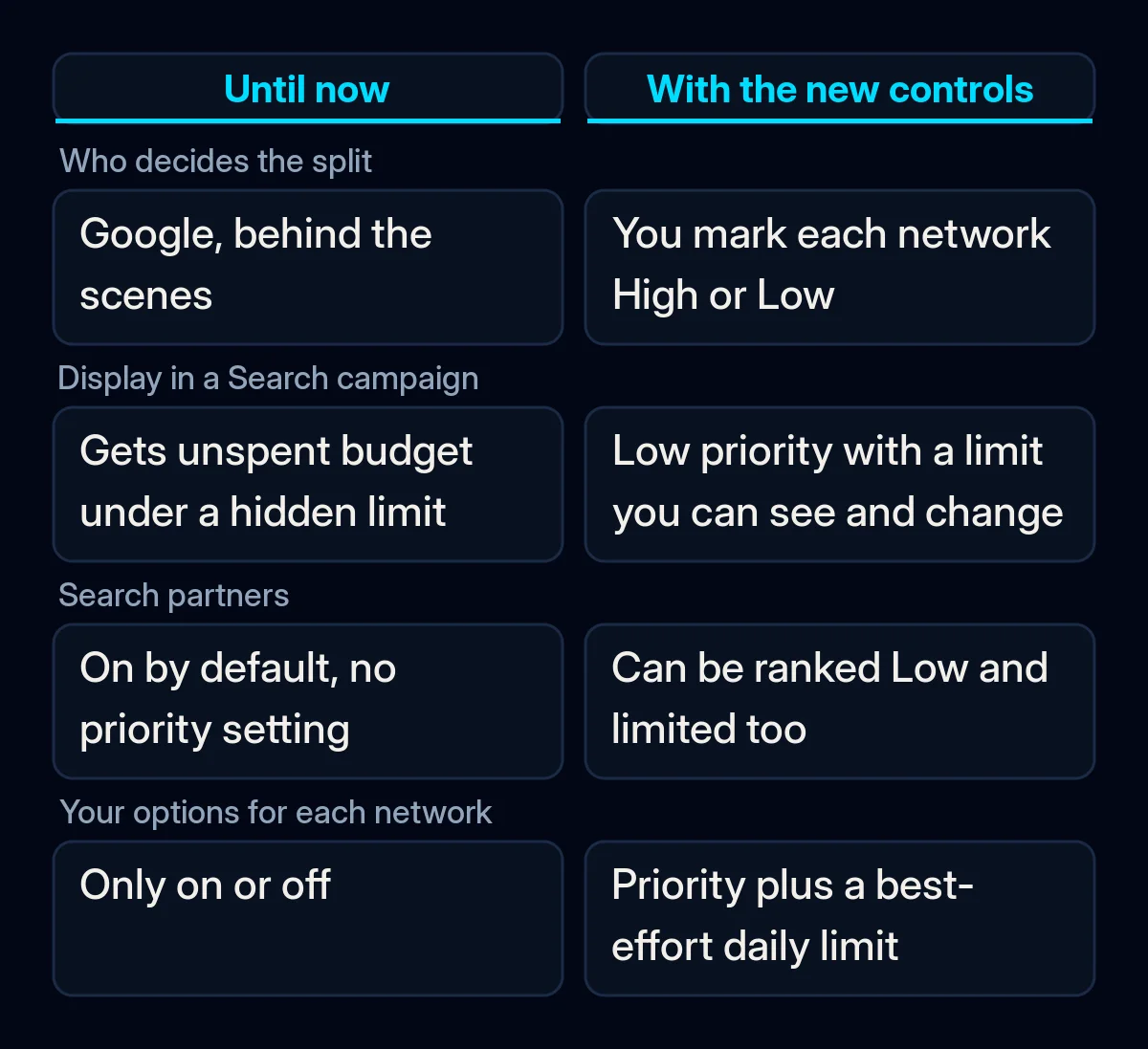
Google describes the new settings as giving “more control than all-or-nothing opt-outs” because previously each network could only be switched on or off.
What changes for Search campaigns in February 2027?
From February 2027, every Search campaign with Display Expansion switched on moves to the new controls automatically. Google’s help page says the current setup “will go away”, and that you may see a shift in spending between Google Search, Search partners and the Display Network. Google has not named a day in February.
Google suggests setting the Display Network to Low priority with a 50% daily budget allocation if you want to keep a campaign’s current setup. Search Engine Journal adds that, with every network on High priority by default, advertisers who change nothing “could see their spending shift between networks.”
The help page adds three more details:
- Target Impression Share campaigns lose Display. This is a bid strategy that aims to show your ad in a set share of searches, at the top of results or anywhere on the page. Google notes it can be useful for brand terms, meaning searches for your company’s name. With the February change, the Display Network will no longer serve on Search campaigns that use Target Impression Share.
- Setting priorities early applies them at once. If you set priorities on a Search campaign before February, they take effect right away and replace the old Display Expansion behaviour.
- Priority alone does little if budget is not the limit. Target CPA and Target ROAS are bid strategies. They aim for a cost per conversion (an action you count as a result, such as a sent form or a call) or for a return on ad spend. If such a campaign is not limited by budget, priority “has no effect”, in Google’s words, while a percentage limit still applies.
What Google has not said yet
Google has not said how far spending will move in the Search campaigns that migrate. PPC Land notes that “the documentation does not yet say how much the spend mix on affected Search campaigns will move.” Until Google publishes more, we would watch your own spend by network to see what the change does in your account.
The settings are rolling out in stages, so the “Channel Prioritization” card may not be in your Account settings yet. Search Engine Roundtable reports that it saw an early alpha release in August, before the rollout to everyone.
According to the help page, you manage the settings in Google Ads or Search Ads 360. A manager account cannot set them. That is the umbrella account agencies use to run several advertisers’ accounts.
Support in the Google Ads API and Google Ads Editor is “coming soon”. Search Engine Journal reports that Google expects to expand channel reporting for Search in the first quarter of 2027.
What it means for your business
In our view, the useful part of Google Ads channel prioritization is that you can now set priorities and limits for a budget split that Google used to decide on its own. Before February, we would review it using your own account data, in this order.
- Find the Search campaigns that use other networks. Open each Search campaign, go to Settings and look at Networks. Note whether “Include Google search partners” and the Display Network are ticked, and whether the campaign bids with Target Impression Share.
- Look at results by network before you change anything. Break the campaign report down by network. Compare spend, clicks and conversions on Google Search, Search partners and Display over a period that includes your usual busy and quiet days. Write the figures down.
- Check what those conversions became. A form sent from a partner site can look like any other enquiry in Google Ads. Compare the conversions with the enquiries and sales in your inbox or CRM. This is the check we make when we work on connecting your ad account to the CRM.
- Set the priority to match the campaign’s goal. If a Search campaign should bring enquiries from people searching for your service, keep Google Search on High. Set a network that brings weak enquiries to Low with a limit. If you want a network off entirely, untick it in the network settings, or set it to Low with 0%, which according to Google’s help means “Google won’t spend on that channel.”
- Change one thing at a time. The help page warns that if a campaign already spends more than your chosen percentage on a network set to Low priority, spend can shift once the setting is applied. Change the account default for one campaign type, watch spend by network, then move on to the next type. We follow this rule for Google Ads budget recommendations too.
- Decide before February. As when Google began upgrading Search campaigns to AI Max, we would choose the settings ourselves before the default applies. If your brand campaign uses Target Impression Share and you counted on Display there, plan another campaign for it. If someone manages the account for you, agree these settings with them first. In our Google Ads management, budget changes go ahead only with your approval.
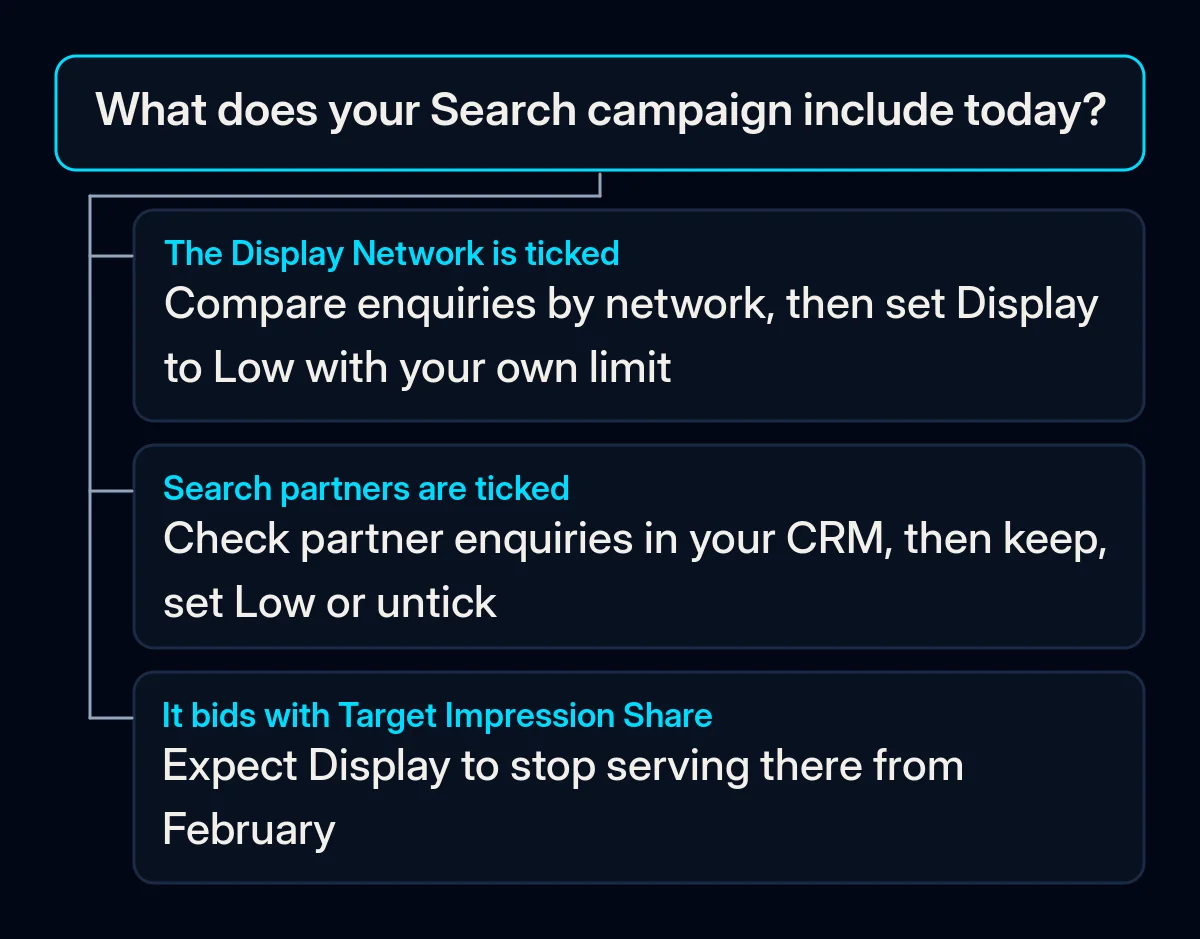
If your Search campaigns run on Google Search only, the February migration described in Google’s help does not apply to them. When the Channel Prioritization card appears in your Account settings, open it once and check that each network is set the way you intend.