
A card in your Google Ads account says “Raise your budgets”. Or the Investment Strategy tab, a planning screen on the Recommendations page, offers to move money from some campaigns to your “highest-performing” ones. Google Ads budget recommendations are worth accepting only when the campaign that gets the money already brings enquiries and sales at a cost you can afford, and your CRM, where enquiries and deals are recorded, confirms it.
Your optimization score, Google’s rating of how the account is set up, may fall. The usual reactions are to click Apply because of it, or to ignore everything because Google simply wants you to spend more. Both skip one check: whether the campaign Google calls the best is the one that sells.
What do Google Ads budget recommendations measure?
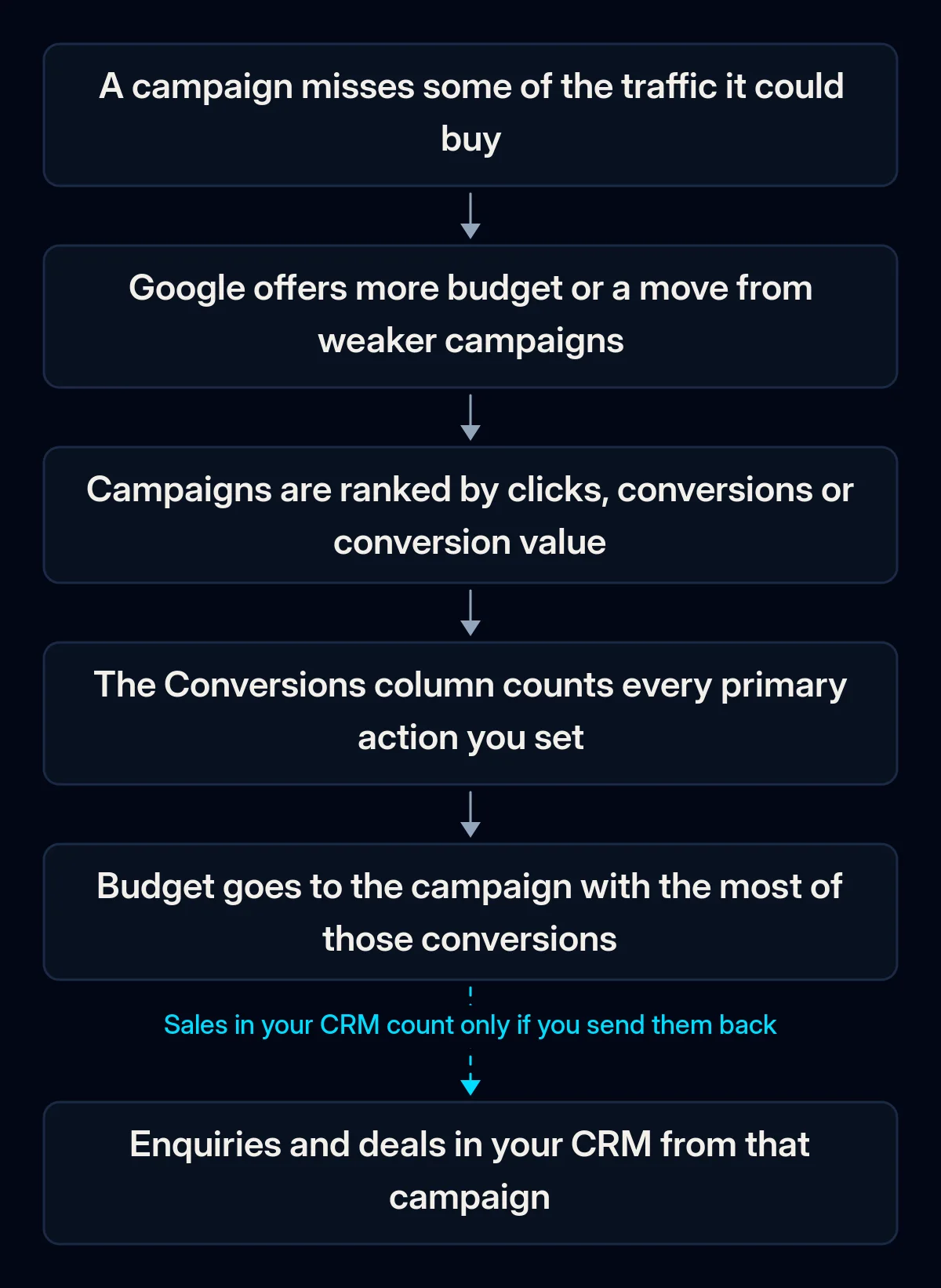
A budget recommendation is a forecast of how much more of a chosen metric your campaigns could buy, based on recent account history. Google sees your clicks, your conversion actions and your spend. It does not see which enquiries became customers unless you send that back.
It starts from missed traffic. “Raise your budgets” appears when a campaign “missed out on 5% or more of your potential traffic last week”, according to Google’s list of recommendation types. The page on limited budgets says the recommended budget “will help you increase clicks and impressions”. Neither page says the extra clicks will pay for themselves.
“Best” means the metric you picked. In Recommended Investment Strategy, you choose what to maximise: clicks, conversions or conversion value. Its Holistic mode, which Search Engine Roundtable reported on 24 September 2026, in Google’s words “reallocates existing budget” from campaigns that are underutilised or less efficient to the highest-performing ones by that metric. So a campaign can be called “top” while nobody has checked what happened after the form was sent.
Conversions are whatever you told Google to count. Primary conversion actions fill the Conversions column and steer bidding, according to Google’s page on primary and secondary actions; secondary ones are for observation only, unless they sit in a custom goal. If a click on your phone number, a page view or a newsletter form is set as primary, a campaign full of those looks like a winner.
Consent mode is the setting that adjusts Google’s tracking to each visitor’s cookie choice. If it is set up, Google also models conversions from visitors who decline cookies, and its consent mode page says these appear in the same column. One sign to check is that Google shows more conversions than your inbox shows enquiries.
The forecast is short. The strategy’s estimates are “typically based on a 7-day forecast”, and Google’s page on recommendations says it “doesn’t predict whether your ads will do well”. A week of data says little about a business where a deal takes a month to close.
The next lead costs more than the last one. For Maximize Conversions campaigns, Google describes the “Adjust your budgets” card as more conversions “with a smaller relative increase in overall cost per action”. So the cost per result goes up, only more slowly than the number of results. Google’s page on budgets sets the condition: more budget makes sense when it runs out quickly and the campaign is driving conversions “at a reasonable CPA”, the cost per acquisition.
In our checks, the hardest question is often the simplest one: nobody in the company can name a reasonable cost per enquiry.
How to tell if your best campaign really sells
A campaign really sells when its conversions match enquiries and deals in your CRM for the same period. Go in order and stop at the first check that fails; do not accept the recommendation yet. You need access to the Google Ads account and your CRM or the inbox where enquiries land. No paid tools are involved.
- Read the recommendation itself. Open Campaigns, then Recommendations, and the budget card or the Investment Strategy tab. Write down which metric it optimises, which campaigns gain budget and, in Holistic mode, which ones lose it.
- Check what counts as a conversion. In Goals, list the conversion actions marked as primary. If anything other than a real enquiry, booking or sale is primary, the ranking is built on it.
- Put the campaigns next to the CRM. For the same recent period, take conversions per campaign from Google Ads. From the CRM, take enquiries, qualified enquiries (the ones that fit what you sell) and deals per campaign. If your CRM cannot say which campaign an enquiry came from, you cannot complete this check yet.
- Look at brand campaigns separately. People who searched for your name would often have found you anyway, so a brand campaign tends to look like the best one. Do not let it pull money from the others without this check.
- Check why the campaign is limited. In the campaign columns, compare impressions lost to budget with impressions lost to rank; we explain both in our piece on why every lead costs more than last month. If rank is the bigger loss, more budget buys little.
- Open Change history. See who changed budgets or switched on auto-apply, and when. In our audits of accounts that passed through several hands, we often find changes nobody remembers making.
What should you do with the recommendation?
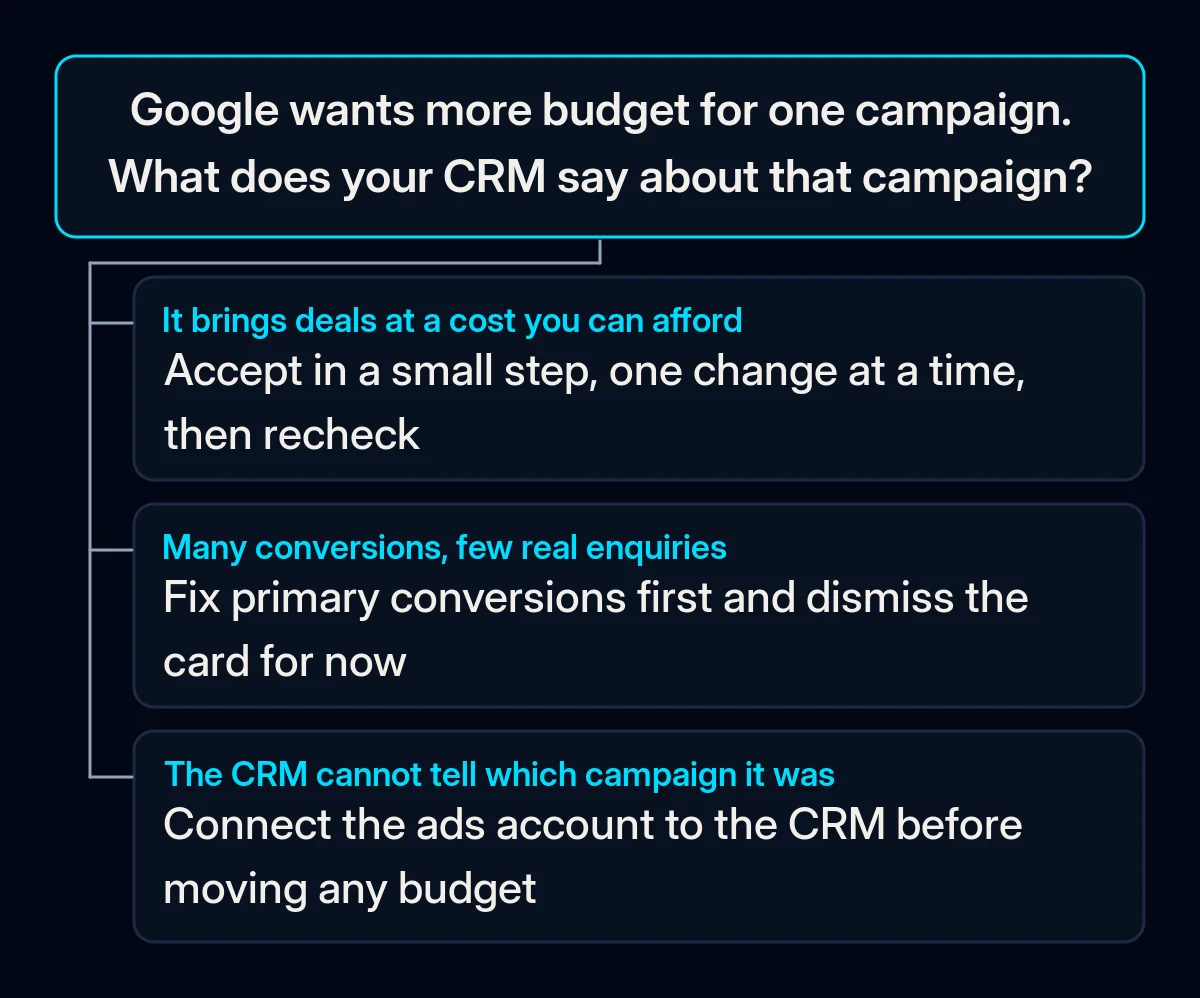
Say yes only after two things are true: your primary conversions are real enquiries or sales, and the campaign that would get the money also wins on deals in your CRM. Until then, switch off auto-applied bidding changes, dismiss the cards you will not act on and fix what Google counts. The steps below go from the cheapest to the most expensive.
-
Switch off auto-apply for bidding targets. Google’s help page on auto-apply says raising the budget is not part of auto-applied recommendations. Several other changes can be applied automatically, though. Among them are CPA and ROAS targets, the cost per enquiry or return on spend that Google’s bidding aims for. The list also covers broad match keywords that show ads for loosely related searches, search partners (sites outside Google Search) and Display expansion onto other websites. Each of them changes what your money is spent on.
To turn one off, open Recommendations, then Auto-apply settings, clear its checkbox, then select Save.
-
Dismiss what you will not do. The optimization score is Google’s estimate of how well your account is set up. Google’s page on it says an account reaches the full score by “applying or dismissing all recommendations”, so dismissing a card does not prevent the score from recovering.
-
Fix the conversion goals before moving money. Make real enquiries and sales primary, and move clicks and page views to secondary. If sales close later, by phone or in person, send them back to Google from the CRM, within the consent your privacy notice covers, so that Google ranks campaigns by sales. We covered how in our article on enquiries that never turn into customers. Recording the campaign on every enquiry is part of connecting your ad account to the CRM.
-
If you use the Investment Strategy, untick before you confirm. Google says eligible campaigns are selected by default and that Confirm updates them instantly. Untick brand campaigns and anything you have not checked against the CRM, then choose the mode on purpose:
| Option | What it does | When it fits |
|---|---|---|
| Holistic | Takes budget from campaigns it rates as weaker and gives it to its top ones, plus any extra weekly spend | The top campaigns also win on CRM deals, and the donors are weak on CRM deals too |
| Growth | Adds budget to limited campaigns and cuts nothing | One campaign sells well and is held back by its budget |
| Dismiss and adjust by hand | Nothing changes until you decide | Conversions and CRM disagree, or the history is too short to judge |
-
Raise in steps, one change at a time. Smart Bidding is Google’s automated bidding, which sets bids for each auction. Google warns that it needs a learning phase of 7 to 14 days and that frequent budget changes reset it. Make one change, note the date, and wait before judging.
-
Set the monthly ceiling first. Google allows a campaign to spend up to twice its average daily budget on a given day and no more than 30.4 times that budget over a month. Decide what you can spend in a month, then split it across campaigns. In our Google Ads management we agree every budget change with the owner first and measure results up to the deal.
What should you measure after changing the budget?
Judge any budget change by your CRM, and only after the learning phase has passed. Enquiries, qualified enquiries and deals in the CRM show whether the added money produced enquiries and deals. Write down the figures from the weeks before the change, so you have something to compare with.
- Cost per qualified enquiry, by campaign, from the CRM. Compare the weeks before and after the change; Google’s cost per conversion comes second.
- Deals and revenue from the campaign that got the money. If it got more budget and more conversions but no more deals, roll the change back.
- Actual monthly spend against your ceiling. Check it at the end of the first full month.
- Impressions lost to budget. This should fall in the campaign that got more money; if it does not, the budget was never the limit.
Where we come in
We start by checking four things in your account: what the recommendation optimises, what counts as a conversion, what the CRM says about each campaign and what an enquiry may cost you. Then we agree with the owner which budget moves make sense, and in what order, one at a time. If you would like someone to look at the account before you press Confirm, tell us about your account.