
Google Ads in multiple countries works when each country has its own campaign, its location targeting reaches people likely to be there or regularly in that country, and its ads and landing pages use that market’s language. Language matters more now. Google is removing the campaign language setting from Search campaigns, and Search ads will match based on the language your ads are written in. Choose the account currency and time zone before you build, because neither can be changed later in a standard account.
Say your home market works, so you copy the campaign, add three countries and translate the headlines. A month later one country has taken most of the budget and clicks arrive from places you never sell to. A German ad shows up for a French search, and sales your shop made in pounds appear in the report as if they were euros. Each of these traces back to a setting.
What changes now that Google is removing language targeting?
Google’s help page on language targeting says the campaign-level language setting will be removed from Search campaigns, starting in September 2026. Search ads will then match based on the language of the ads themselves, and Google’s developer announcement names late September. On 19 October 2026 the help page still describes the change as upcoming, so check whether the setting is still visible in your campaigns.
Performance Max, the campaign type that runs one campaign across Search, YouTube, Display and other Google channels, is affected only in part. The Search Network is Google’s group of search-related websites and apps where search ads can appear.
| Where the ad shows | Campaign language setting |
|---|---|
| Search campaigns | Removed; ads match on the language of the ad |
| Performance Max on the Search Network | No longer applies; works like Search |
| Performance Max on YouTube, Display, Discover and Gmail | Keeps working |
| Shopping ads inside Performance Max | Not affected by language settings |
When several ads are eligible, Google prioritises the ad that matches the language of the search term. According to Search Engine Roundtable, a search marketing trade publication, Google says language targeting has no language exclusions and will not gain them with this update. The same report says, citing Google, that single-language campaign structures will continue to function normally and no restructuring is required. The developer post asks advertisers to make sure ads and landing pages are clearly structured in the intended languages.
Why do Google Ads campaigns in several countries go wrong?
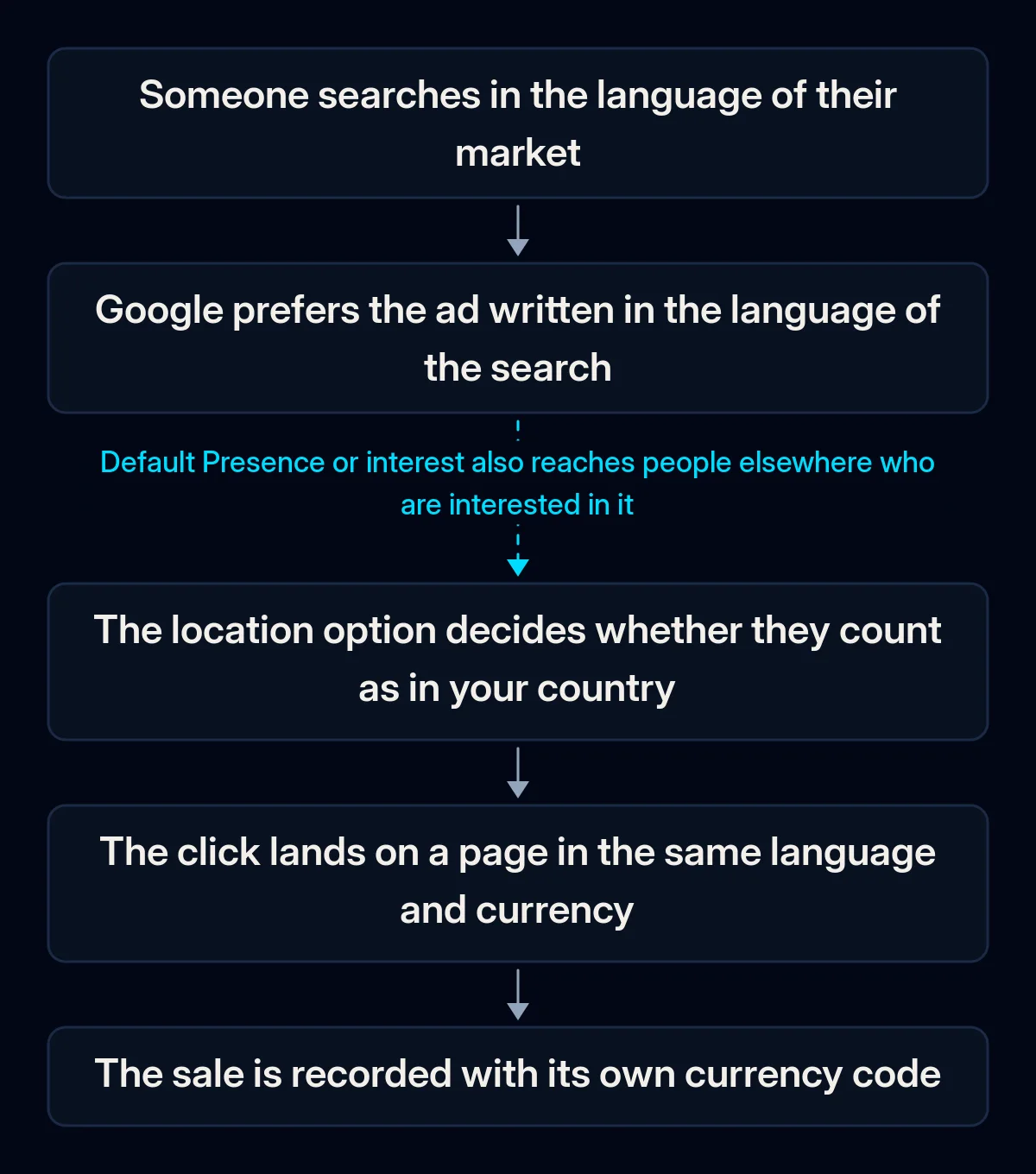
When markets are added, settings that were fine for one market may no longer fit. The location option reaches beyond borders, one campaign shares one budget, languages get mixed, the account currency differs from the sale, and the product data in Merchant Center points at another market.
Location targeting reaches people elsewhere. By default, targeting covers people who are physically in your chosen area and people who have shown interest in it; Google calls this default Presence or interest. Google’s help on geographic targeting adds that location of interest “isn’t restricted to a person’s country”. An ad aimed at a whole country may also show to people searching on that country’s Google domain, such as google.de for Germany, while their IP address is outside it.
One campaign carries several countries. A campaign has one average daily budget, so the countries inside it compete for the same money. Location bid adjustments, which raise or lower bids for a place, are set per campaign. Google’s help says they are not supported with Smart Bidding, its automated bidding for conversions or conversion value, so Google’s automated bids determine how spend is split between countries in such a campaign.
Languages are mixed. Once the campaign setting is gone, the language of the ad is the signal. An ad group, the set of ads and keywords inside a campaign, that mixes German and French ads gives Google an unclear signal. French ads leading to an English page give the visitor a page they may not read, and ads in an unsupported language are disapproved.
The account currency differs from the sale. Google sets the account currency permanently at creation, and a standard account’s time zone is fixed too. Conversion values, the money you record for a sale or lead, are reported in the account currency at an average daily exchange rate. If your conversion tag (the code that reports a sale to Google Ads) sends no ISO 4217 three-letter code such as EUR, GBP or CHF, Google ignores the tag’s currency and uses the one set with the conversion’s default value.
Merchant Center and the campaign point at different markets. Merchant Center is where the product data for Shopping ads lives. Shopping ads are product listings with a photo and price, organised through data sources, the product feeds you keep in Merchant Center. Merchant Center help says the location targeting in Google Ads must match the target countries in Merchant Center for products to show there. Product landing pages should be in the language of the product data, and a market in a new language needs its own data source with translated products.
How to check your account, country by country
You can check a running account yourself in Google Ads and Merchant Center, without paid tools. Start with the locations your ads matched, because that tells you which cause to look at first. Write down what you find for each country before changing anything, so you can compare after the rebuild.
- Where your ads matched. Open Insights and reports, then When and where your ads showed, and switch to Matched locations. It shows results by the places where your ads appeared, physical or of interest. Countries you do not serve, with real spend, point to the location option.
- Location option per campaign. In each campaign’s location settings, note whether it uses Presence or interest and which countries it targets.
- Language of ads and pages. For each ad group, note the language of the ads and of the page they lead to. Mark ad groups with mixed languages.
- Search terms by country. In the search terms report, the list of actual searches that triggered your ads, mark searches in a language you did not plan for.
- Budget and bidding. For campaigns with several countries, see how spend splits between them in Matched locations, and note which bid strategy each campaign uses.
- Currency of conversions. Place a test order or enquiry on each country’s page, in its currency and with cookies accepted, and check what value Google Ads records.
- Merchant Center countries. If you run Shopping, compare the countries and languages of each data source with the campaigns that use it.
How should you structure Google Ads in multiple countries?
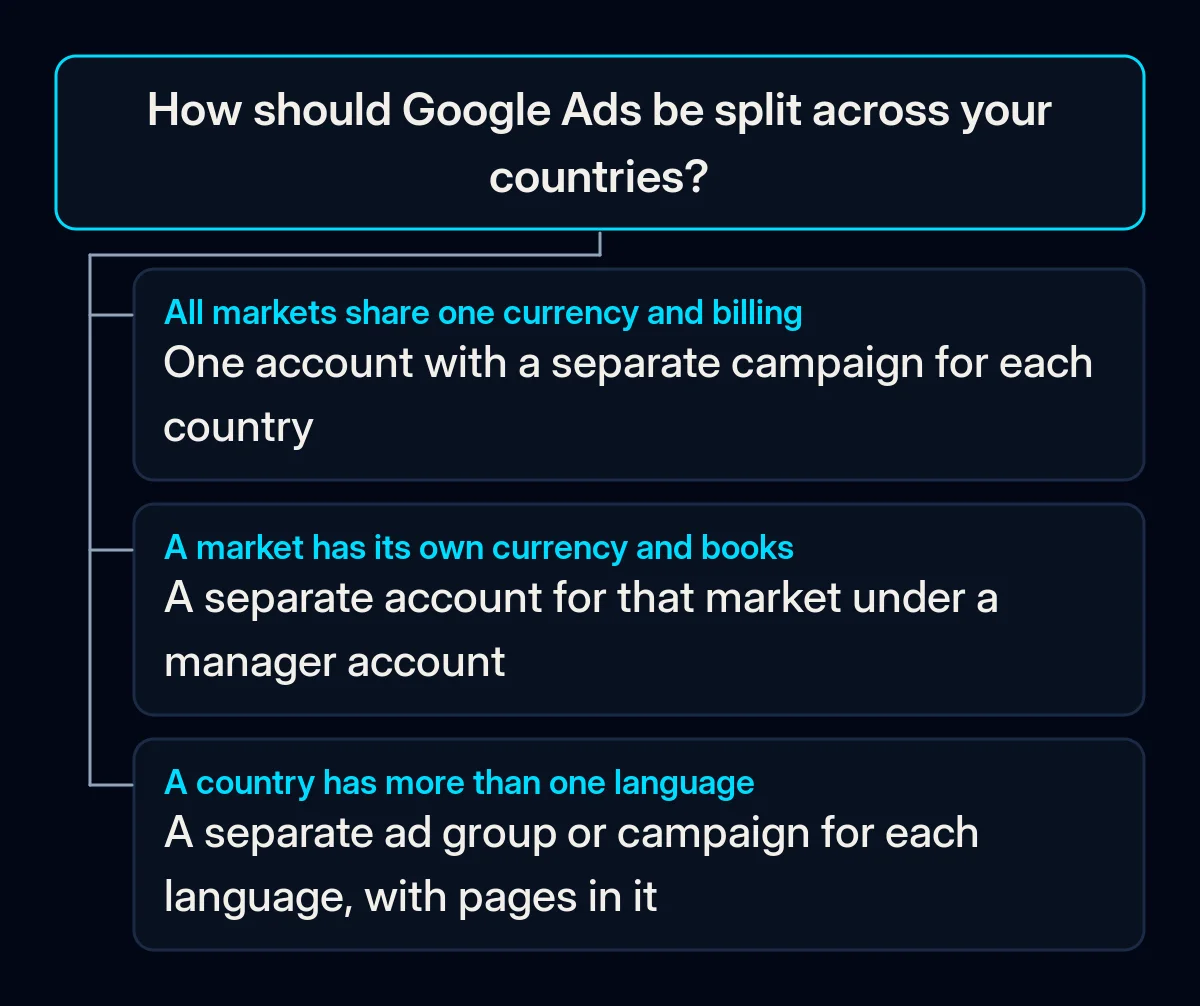
Decide the account layout first, because currency and time zone are fixed there. Then give each country its own campaign, set location targeting to the people who are there, and match ads and landing pages to the market’s language. Currency in tracking, Merchant Center and the budget for each market come last.
-
Choose one account or one per market. If all markets are billed and reported in one currency, one account with a campaign per country can be enough. A market with its own currency and its own books is easier in a separate account. A manager account lets you manage several accounts in one place and compare results across them. Campaigns copied into a new account do not bring their historical data, so make this choice before launch.
-
Give each country its own campaign. It gets its own budget and its own Smart Bidding target, such as the cost per sale or return you ask the system to aim for. It also gets an ad schedule matched to that country’s working hours. In a country with more than one language, such as Belgium or Switzerland, keep each language in its own ad group or its own campaign, with pages in that language. When we plan paid advertising campaigns across markets, the rule is campaigns per country, not “Europe” as one line, with budgets set by each market’s economics.
-
Set location targeting to Presence. In advanced location options, choose Presence: people likely to be in, or regularly in, your chosen countries, and exclude countries you cannot deliver to. For a stricter setup, Google’s help on clicks outside your targets suggests targeting a country’s regions instead of the whole country. Ads then skip people whose IP address Google can place only at country level. Our guide to setting up a small Google Ads test shows the same setting for one area.
-
Write ads in the market’s language and send them to a page in that language. Keep one language per ad group, and build keywords from how people in that market search, with a native speaker checking them. The landing page needs the same language, local currency and that country’s delivery terms. Our multilingual website projects give each language version its own localised URLs, currency and formats; for the rest of the site, see what a second-country site needs beyond translation.
-
Fence off other languages if you use AI Max. AI Max for Search is a set of automated features you can switch on in a Search campaign. With its final URL expansion, Google sends visitors to the page on your domain it predicts will perform best, and URL exclusions remove pages from that choice. The help page does not say how page language is treated, so as a precaution, exclude the other language sections of the site in each country’s campaign.
-
Send the currency with every conversion, and ask for consent in every language. Make the tag pass the ISO 4217 code of the currency the customer paid in, then repeat your test order. Google’s EU user consent policy requires legally valid consent from users in the European Economic Area, the UK and Switzerland, for cookies where the law requires it and for ad personalisation. Each language version of the site needs a working consent banner before ads start.
-
Line up Merchant Center with the campaigns. Use the same countries in both. Countries that share a language can use one data source, with prices converted automatically; a new language needs its own data source and pages in that language.
-
Set budgets by market. Give each country a budget based on what a sale or lead is worth there, and judge each campaign on its own results. A shared budget across campaigns exists, but it brings back the question of which country gets the money.
What to measure in each country
When you run Google Ads in multiple countries, measure each country on its own: spend, enquiries or sales, and their value in the money you actually receive. Look at the same figures on the same day each week. Compare a new country with your home market only once it has enough sales or enquiries of its own, because a combined total hides the market that is losing money.
- Spend outside your countries. In Matched locations, compare the cost from places you do not serve before and after the switch to Presence. If it does not fall, check the location options and exclusions again.
- Cost per sale or enquiry by country. Take this from your shop or CRM by market, so a cheap country does not hide an expensive one.
- Searches in an unplanned language. Count them in the search terms report before and after you split languages, and read any that remain.
- Conversion value against your shop. For each currency, compare the value in Google Ads with what the shop recorded, allowing for the daily exchange rate.
Where we come in
We start with three questions: which markets share a currency and books, which languages each country needs, and what a sale is worth in each. Then we set up tracking with the right currency, build landing pages in each language and launch campaigns per country, with each language kept apart. We read results by market in your CRM. If you are adding a country and want a second look at the plan, send us a short brief.