Google Ads on a small budget works best as one narrow test. Google’s help on budgets names no minimum amount, so the real limit is the price of a click in your market. Put the money into one Search campaign, the type that shows ads on Google’s search results, aimed at the area you serve and at searches close to a sale. Leave out the extra networks added by default and track enquiries before the first click. Spread across more searches and places, the same money can leave each part with too few clicks to judge.
You set a daily budget you can live with, and on the second day the campaign spends twice that. By the end of the week the clicks have come from searches you never meant to pay for, some of them from websites you have never heard of, and the phone has not rung. Before deciding that Google Ads only works for big budgets, look at where the default settings sent the money.
Why does a small Google Ads budget run out so fast?
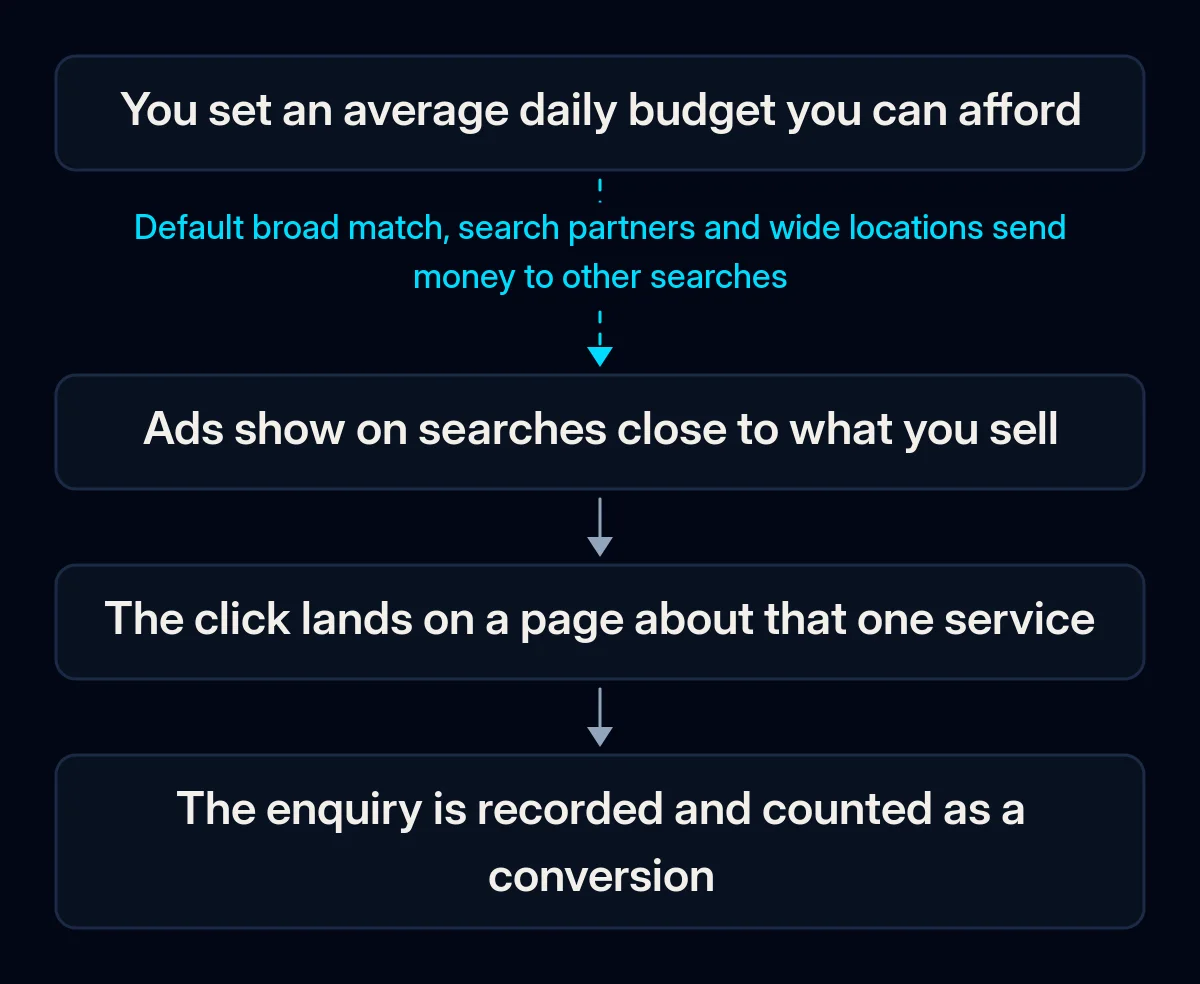
A small budget runs out fast for several reasons that stack up. The daily budget is a monthly average, a new campaign starts with settings that widen its reach, the budget is thin for the price of a click, nothing marks which clicks were worth paying for, and frequent edits keep restarting the learning phase. Each one leaves a trace you can find in your account.
The daily figure is an average. According to Google’s help on spending limits, for most campaigns spend on a single day can reach double the average daily budget, while the month stays within 30.4 times that figure, and Google covers anything served above those limits. A double-spend day is the system working as designed.
Since 1 June 2026, switching a campaign off on some weekdays no longer lowers the maximum monthly spend for campaigns other than Smart campaigns that are scheduled on 16 or more days: it stays at 30.4 times the daily budget. The sign: you divided a monthly sum by working days, and spend runs above plan.
A new campaign starts wide. Broad match, the loosest of the keyword match types that decide how closely a search has to match your keyword, is the default, and Google describes it as showing ads on searches that can lack the direct meaning of your keywords. Search partners, other search sites where your search ads can appear, are included by default, and location targeting by default covers people interested in your area as well as people in it.
Each default leaves more room for traffic you did not plan for, and on a small budget that room costs a bigger share of the money. The search terms report, the list of actual searches that triggered your ads, is where searches you would never pay for show up.
The budget is thin for the price of a click. Google’s troubleshooting page for low traffic suggests, as a guideline, a daily budget of at least ten times your expected cost per click (CPC), the price you pay when someone clicks your ad. With a low budget, the same page says, ads may not serve as often while Google keeps spend within your limit. When the budget is below what Google recommends for your settings, the campaign shows the status “Limited by budget”, and a handful of clicks a day can mean many days before you can judge anything.
Nothing marks which clicks were worth it. Conversion tracking records an action you care about, such as a sent form or a call, as a conversion. Without it, you cannot tell a useful click from a wasted one, and neither can the automated bidding system: Maximize conversions, the strategy that bids for as many conversions as possible, requires conversion tracking. The sign: the Conversions column is empty, or the only actions it counts are page views and button clicks.
Frequent edits restart the learning. After a change to a bid strategy, automated bidding has a learning period while it calibrates to the new goal. Google says this typically takes one to two conversion cycles, where a conversion cycle is the usual time between a click and an enquiry. For Smart Bidding, Google’s automated bidding for conversions or conversion value, the conversion measurement help names a standard 7 to 14 days and warns that frequent manual changes to budgets, targets or conversion goals during this time reset the learning window. Your change history will show whether edits have come every few days.
How do you check where a small budget is going?
You can check a running campaign, or a draft you are about to launch, in your own account and without paid tools. Work through the settings in this order because the early checks decide which searches your money reaches and cost nothing to fix. Write down what you find before you change anything, so you can tell later which change made the difference.
- Networks. Open the campaign settings and look at Networks. If Google search partners or the Display Network, a group of websites, videos and apps where your ads can appear, are ticked, part of the money can go outside Google’s own search results.
- Locations. Open the location options. If targeting includes people interested in your area, a local business can pay for clicks from people who are somewhere else. The locations report shows where clicks came from.
- Keywords and search terms. Check the match type next to each keyword. Then open the search terms report for the last few weeks and mark every search you would not pay for again.
- Conversions. In Goals, see which conversion action is primary, the one used for bidding, and whether it is a real enquiry. Send yourself a test enquiry from the page your ads lead to and check that it is recorded.
- Budget against click price. Compare your daily budget with the average cost per click the campaign has paid so far. If it buys fewer than the ten clicks a day the guideline points to, the budget is likely your main limit.
- Schedule and change history. Look for weekdays switched off in the ad schedule, and for edits in the change history over the last weeks.
How do you set up Google Ads on a small budget?
Keep the test focused. First decide what result counts, make tracking work, give the click one page to land on, then narrow the campaign and size the budget to the click price. Only after that does it make sense to choose how to bid and how long to wait.
-
Write the rules of the test before launch. Decide what an enquiry is worth to you, which result means continue, adjust or stop, and on which date you will judge it. When we run paid advertising campaigns, we start the same way: we calculate the test budget before launch and say plainly if it is not enough for the market.
-
Make conversion tracking work first. Set one primary conversion, a real enquiry such as a sent form or a call, and keep page views and button clicks as secondary actions for observation. Google calls getting primary and secondary actions right critical. For visitors in the EEA, the UK and Switzerland, Google’s EU user consent policy says you must obtain their legally valid consent to cookies where the law requires it and to the use of personal data for personalised ads, so send a test enquiry with consent given and confirm it is recorded before you spend.
-
Give the click one page with one offer. A small test should land on a page about the exact service in the ad, with a short form and a phone number that can be tapped on a phone. On a general home page the visitor often has to find the service and the form first. Our website projects include this format: one page, one offer and one action, for a campaign or a product test.
-
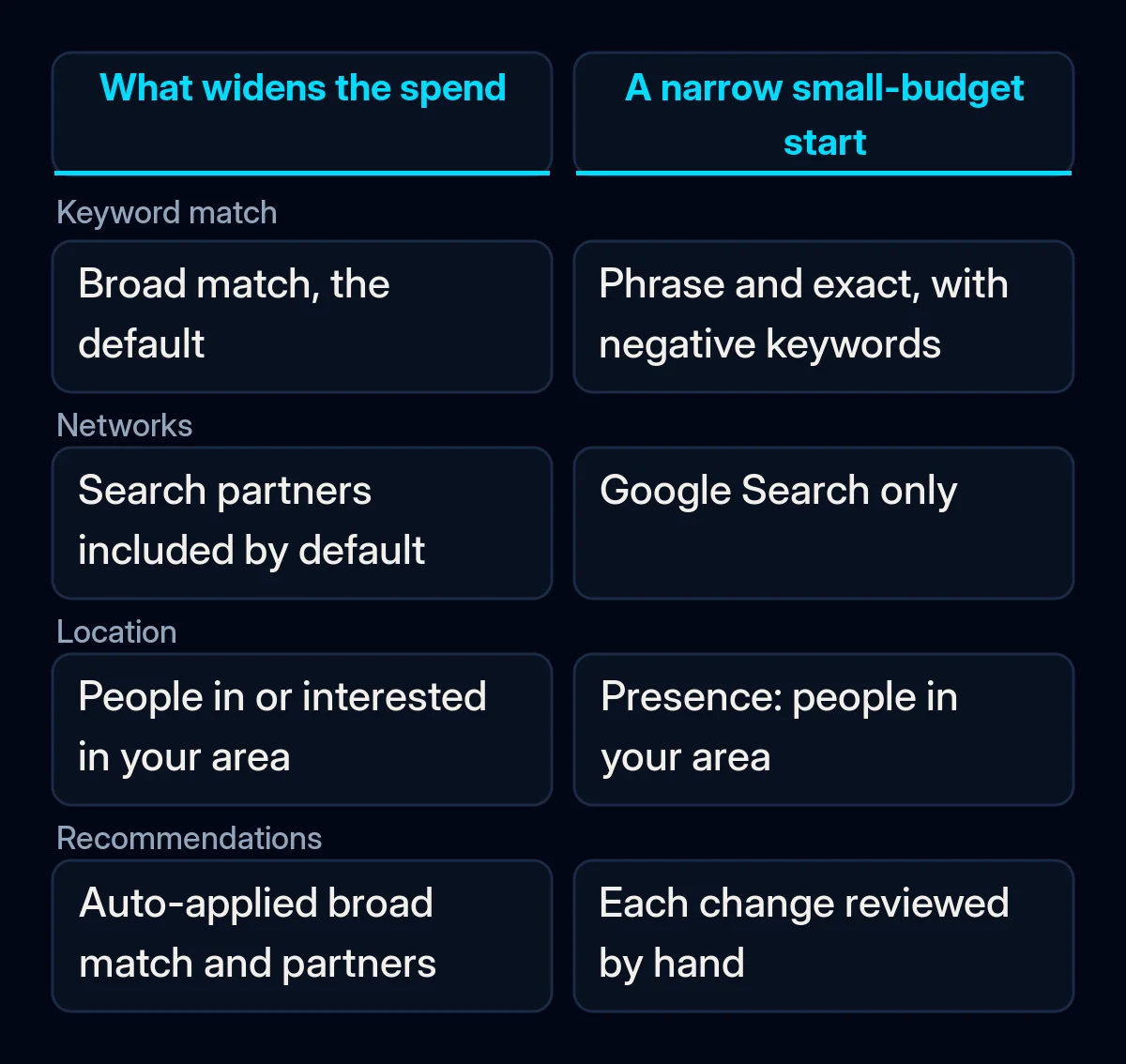
Run one Search campaign in the area you serve. In Networks, untick Google search partners and the Display Network. In location options, choose Presence: people who are likely to be in, or regularly in, your area.
If recommendations apply automatically, open that list too. Auto-applied recommendations will not increase your budget, yet the list includes adding broad match keywords and search partners. Keep Smart campaigns and Performance Max, Google’s more automated campaign types that choose placements for you, for later. Smart campaigns also show on Maps, YouTube, partner sites and the Display Network, and to opt out of the Display Network or search partners you may be able to request it from Google Ads support.
-
Start with phrase and exact match, and add negative keywords. Exact match gives the most control and reaches fewer searches; phrase match shows ads on searches that include the meaning of your keyword. Google’s help on match types says it is critical to use Smart Bidding with broad match, so until tracking has recorded real enquiries, tighter match types keep more of the money on searches close to the ones you chose. Negative keywords block searches for what you do not sell. Add plurals and synonyms separately, because negatives do not match close variants; casing and misspellings are covered automatically.
-
Size the daily budget from the click price. Take the monthly sum you are prepared to put into a test and divide it by 30.4, the figure behind the monthly limit. Compare the result with the guideline of at least ten times your expected cost per click. If it falls short, narrow the test: fewer keywords, a smaller area, the hours when someone answers the phone. For campaigns other than Smart campaigns, the June 2026 budget pacing change covers schedules that switch off whole days, so if you need to limit when ads run, limit the hours within a day.
-
Bid for clicks first, then for conversions. For new campaigns with little data, the troubleshooting page suggests starting with Maximize Clicks, which buys as many clicks as the budget allows, or Manual CPC, where you set the maximum price per click yourself, for five to seven days. After that it points to a conversion strategy such as Maximize Conversions or Target CPA, which aims at an average cost per conversion, once there is enough conversion data, giving 30 or more conversions in 30 days as an example. Google’s Target CPA help adds that this strategy can start with no conversion history. On a small budget, starting with clicks and setting a maximum cost per click keeps the price of each click in view.
-
Leave it alone, then review on a fixed day. Avoid editing budgets and targets during the learning period. Once a week, read the search terms report, add negatives and note which enquiries came in. If clicks arrive and enquiries do not, our guide to Google Ads not converting walks through the next checks.
-
Scale only what the test proved. When the test meets the rule you wrote in step one, raise spending in modest steps. Before you accept the increases the platform suggests, read what to check before agreeing to Google Ads budget recommendations.
What should you measure during a small test?
Judge a small test by enquiries and what each one cost; clicks and impressions, the times your ad appears, only explain where the money went. Look at the same few numbers on the same day each week, and make the decision to continue, adjust or stop only at the point you set before launch. Until then, use the weekly look to clean up searches.
- Searches you would pay for again. How much of the spend went to search terms that match what you sell.
- Cost per real enquiry. Spend divided by the enquiries your team confirmed in the inbox or CRM.
- Spend against the monthly limit. Daily spend will move up and down; over a full month it should stay within the monthly limit for your daily amount.
- The Limited by budget status, read calmly. A limited campaign “can still be successful”, in Google’s own words. If enquiries come at a cost you accept, the status is information, and adding money can wait. If the cost per enquiry is above what an enquiry is worth to you, go back to the search terms report before you add money.
Where we come in
We start paid campaigns with the numbers this article asks you to write down: what an enquiry is worth, how much testing the money can buy, and the point at which the test is judged. Tracking comes first, then the landing page, then the campaign itself, and decisions are made on enquiries in your CRM. If you would like a second look at your numbers first, send us a short brief.