
From 12 October 2026, Google will start creating Google Ads promotion assets (the offer line under an ad, such as a discount on a product) automatically from some advertisers’ websites. Google emailed advertisers that it will “automatically identify and extract high-quality promotions, such as coupons and deals, from your website and apply them directly to your campaigns”, as Search Engine Roundtable reported on 5 October. The setting is on unless you switch it off.
It applies to Search and Performance Max campaigns that use location assets, the address and map that can appear with your ad, and do not already run a promotion of your own. Performance Max is Google’s campaign type that shows your ads across Google’s channels, including Search, Maps, YouTube and Gmail, from a single campaign.
What Google announced for 12 October
Google has not published the email. Search Engine Roundtable quoted it on 5 October and noted that Google sent it to “some advertisers”. According to the email, the change “only applies to Search and Performance Max campaigns with linked location assets that don’t already have promotion assets attached”, and it is opt-out: Google “will automatically opt you in for this starting October 12th”.
Search Engine Roundtable first covered automated promotions on 7 September 2026, after Google published a help page for them. According to the email, the default changes on 12 October: unless the advertisers who got it switch the setting off, it turns on.
How automated Google Ads promotion assets work
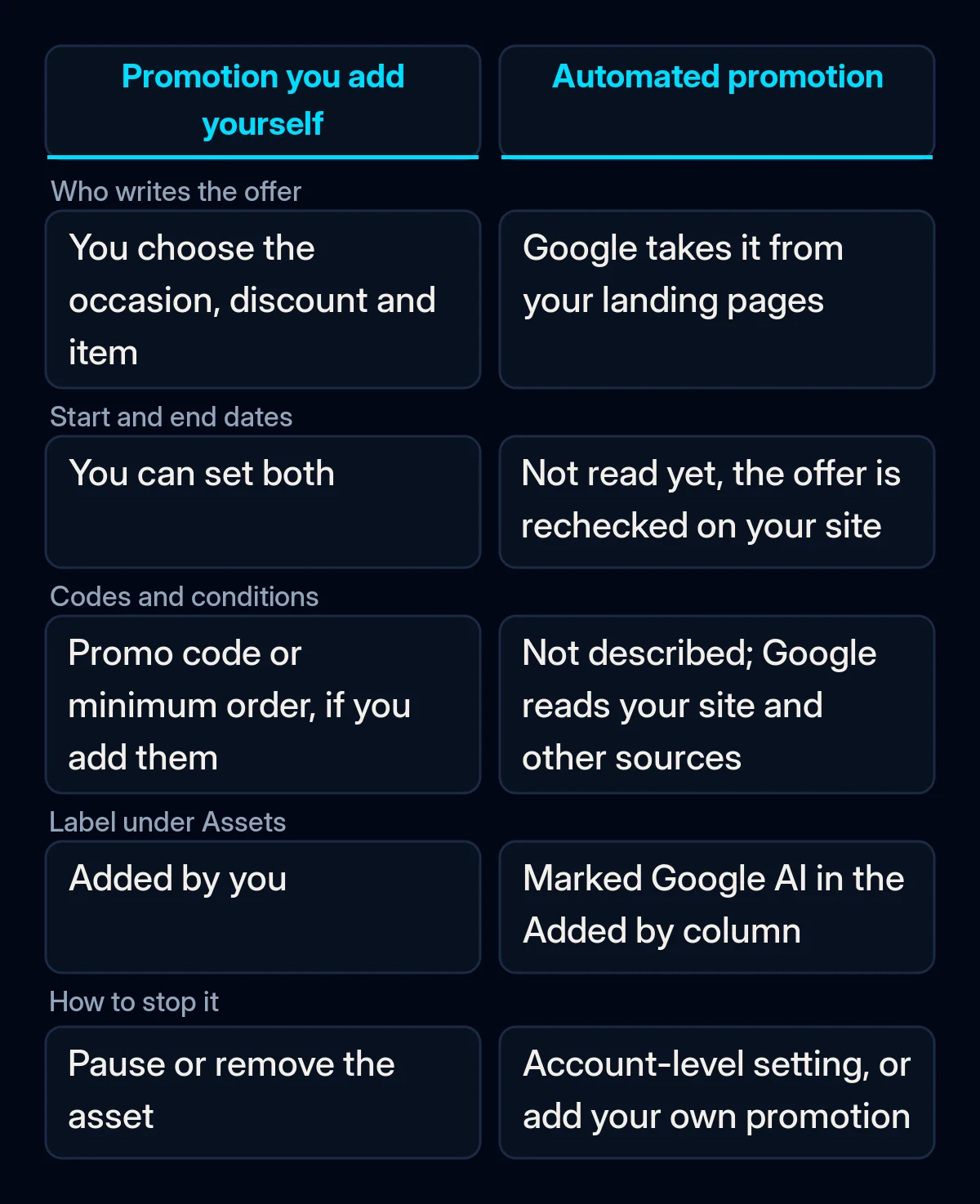
Previously, a promotion asset was something you wrote yourself. Google’s help page on automated promotions says Google Ads “identifies and sources promotions from your website landing pages” and attaches them to eligible Search and Performance Max campaigns. Google’s own examples are a “Buy one get one free” deal and “20% off on black sweaters”.
The same page adds three details:
- Each automated promotion is eligible to serve for less than 24 hours at a time. It can be switched back on as long as Google’s systems “can continuously verify that the promotion is still visibly available on your website”.
- Google does not read start and end dates yet. The page says this “is expected to change in the future when Google can extract promotion start and end dates”.
- Automated promotions can show beyond search results. They “may serve alongside your ads on Google Search or across Google’s broader ad inventory”.
In your account, the promotions Google added appear under Assets with “Google AI” in the Added by column. To measure how people interact with the offers, Google suggests segmenting campaign reports by click type.
Who is affected, and who is not
The change affects Search and Performance Max campaigns that use location assets and run no promotion of their own. For locations you own, Google’s help page lists Google Business Profile, chain store lists or Google Maps as data sources for location assets. Google’s list of account-level automated assets also includes automated location assets, so a campaign can use location assets that were not added by hand.
Campaigns with a manual promotion running are left alone: Google’s help page says the system “will bypass any campaign that currently has manual promotions running”. Standard Shopping campaigns, the product ads with a photo and price, are outside this change. Merchant Center, where those product listings are managed, has its own automated promotions feature with separate settings, so the switch for this change is in Google Ads.
What Google has not said yet
Google’s help pages do not name the countries or languages where the extraction runs, and they describe the switch only at account level, with no setting for a single campaign. They also describe no preview or approval step before an automated promotion starts to serve.
One help page says offers come from your website. The page on account-level automated assets describes them as coming “from your website and other sources”, without saying which other sources.
What EU and UK rules say about discounts
Automated promotions are taken from offers on your own website. In the European Union, Article 6a of Directive 98/6/EC says that “any announcement of a price reduction shall indicate the prior price”. The prior price is the lowest price you charged in a period of at least 30 days before the reduction, with some exceptions that member states may set.
The article was added by the Omnibus Directive (EU) 2019/2161 and has applied since 28 May 2022. In the UK, rule 8.1 of the CAP Code states: “Promoters are responsible for all aspects and all stages of their promotions.” Neither text mentions Google’s automated assets, and we draw no legal conclusion about them here.
What it means for your business
In our view, the setting is reasonable for a business whose website shows one current offer per page, and risky for one with old campaign pages, country-specific deals or codes for a closed group. The unanswered questions about countries, languages and other sources add risk for a business with several country pages.
Google used the same opt-out pattern when it began upgrading Search campaigns to AI Max. We would take these steps before 12 October.
- Check whether the change affects you. Open Assets and see which Search and Performance Max campaigns use location assets and which already run a manual promotion. No location assets means nothing changes on 12 October.
- Read the pages your ads point to as a stranger would. Look for ended sales still on the page, old prices, codes for members or newsletter readers, and offers that apply to one country only. These are the offers Google can pick up. When managing Google Ads, we check that the ad and its page tell the same story before launch, including whether old offers remain on the page.
- Decide per campaign. Where a campaign needs an exact offer, add your own promotion asset: it lets you set the occasion, discount, promo code or minimum order, dates, language and currency. While it is running, the automated one stays out of that campaign, so check its dates, because an expired promotion no longer protects the campaign. If no campaign should get automated offers, switch the setting off at account level.
- Fix the offer on the page first. Because Google checks whether the offer is still visible on the page, an ended deal or an old price left there can reach the ad. Remove ended deals and show discounts the way your market requires. We build landing pages that match your ads on the same principle: one page, one offer, stated the same way in the ad and on the page.
- Watch the first weeks. If you keep the setting, look each week for Google Ads promotion assets with the “Google AI” label under Assets, and segment reports by click type. Our Google Ads account audit checklist covers the change history check that shows what the system changed in your account.
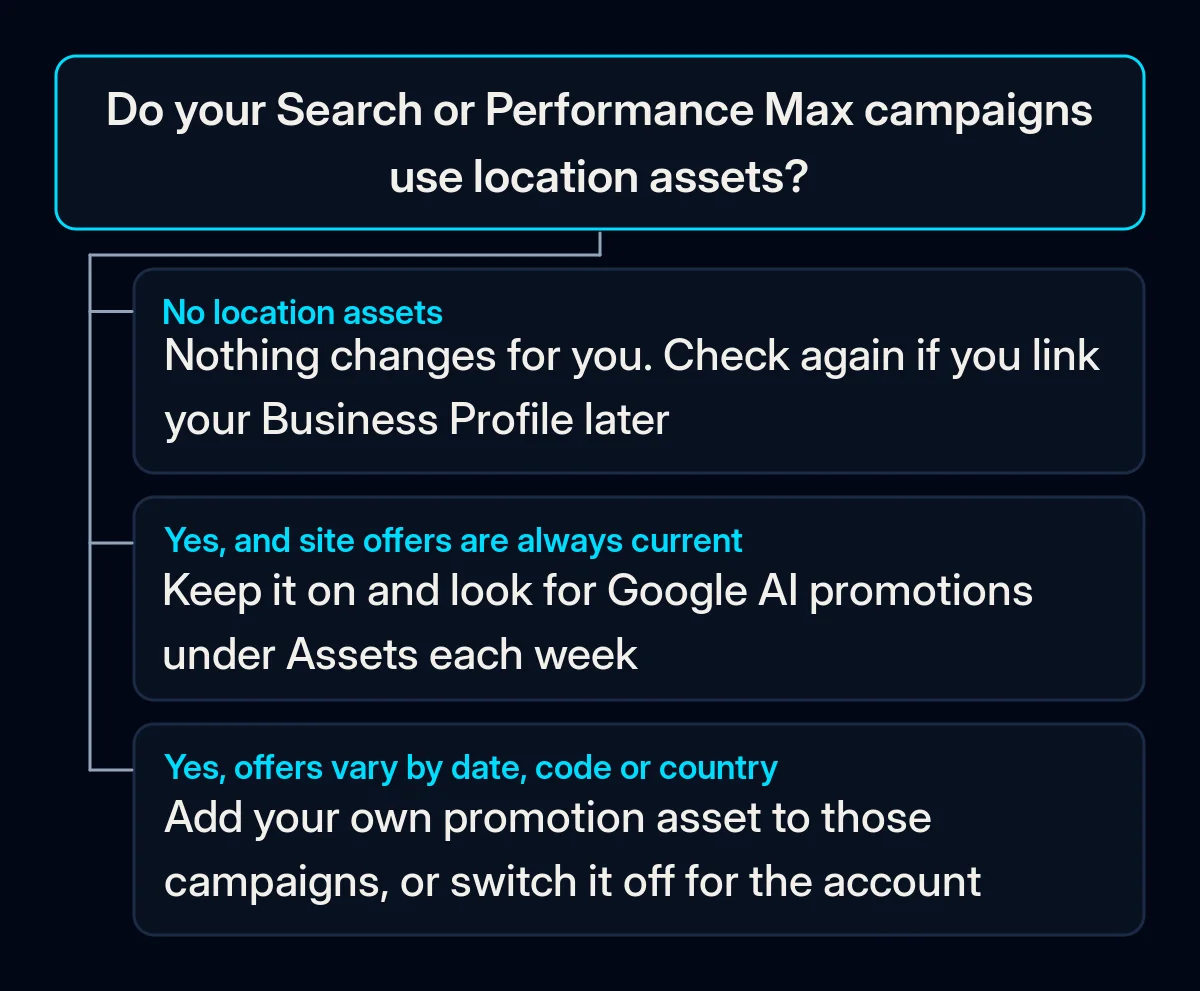
If your campaigns have no location assets, or each of them already runs a promotion of your own, nothing changes for you on 12 October. If some do qualify, check the pages they point to and, before that date, keep Automated promotions on, switch them off, or add your own promotion.