
An ecommerce website migration puts at risk every address Google and your customers already know: product pages in search, links in old emails and images. If you list every old URL before the switch, send each one to its closest new page and check the launch carefully, those addresses can keep leading to the right products. That is what helps search traffic carry over. Google says temporary fluctuations are normal right after launch.
The fear usually starts with a quote from a developer and one question: what happens to the orders that come from Google today? After a careless launch, you may see fewer orders, more “page not found” errors and a search report full of addresses that no longer exist.
Why shops lose traffic after an ecommerce website migration
Traffic drops after a move when Google and people clicking from search land on addresses that no longer lead anywhere useful. Search Engine Journal names the usual causes: “Poor redirects, leftover noindex tags, and late SEO involvement cause most migration hangovers”.
Product and category addresses change. A new platform may build addresses with a different pattern. WooCommerce’s documentation shows the effect: changing the permalink structure, its address pattern, updates the URLs of existing products. Without redirects, old links “will return 404 errors”, the “page not found” response. A 301 redirect is a permanent forward from an old address to a new one; Google uses it as a signal that the target should become the address shown in search.
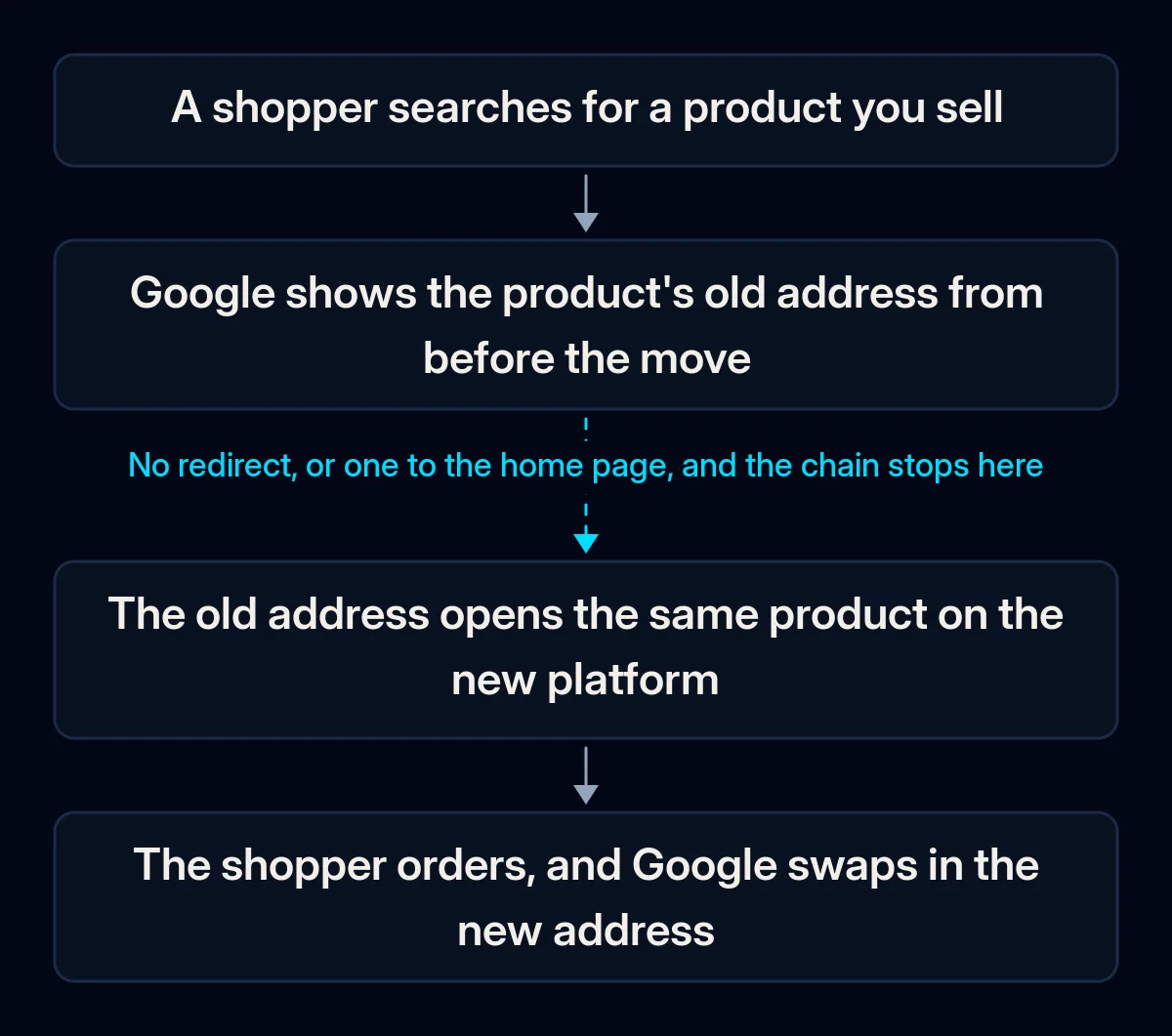
Every old link goes to the home page. Google’s site move guide says not to redirect many old URLs to one irrelevant page, “such as the home page of the new site”. Google adds that this “might be treated as a soft 404 error”, so the redirect may count as a missing page. The sign: old product links all open your home page.
A block from the test copy reaches the live shop. During the build, the test copy is often hidden with a noindex tag (a note asking search engines not to show a page) or robots.txt rules (what crawlers may not visit). Google reminds site owners to remove any noindex or robots.txt blocks “that were only needed for the migration”. If one survives launch, new pages stay out of search.
Less visible addresses get left out. Images, filter pages, blog posts and policy pages also have addresses. Google asks you to include embedded content such as images in the move plan. Shopify does not allow redirects for collection pages (its category pages) filtered by tags, so decide where each of those links should lead instead.
Tracking breaks and looks like lost traffic. Kevin Gibbons wrote in Search Engine Journal that a small analytics mistake “can make it look like traffic has fallen off a cliff, when really it’s just not being tracked properly”. Check the measurement before you decide the move failed.
If your site already lost visibility after an earlier redesign, the same mechanics are covered in why a site stops showing up on Google.
How to find what your migration will break
Before any data moves, compare what the old shop has with what the new one will do. You need only your current admin, analytics and the new platform’s documentation for these checks. They show which pages matter and which ones will change.
- Export every address the old shop has. Take products, categories, blog posts and policy pages from your shop’s admin, then add pages from your sitemap (the list of pages your shop gives search engines). Google also suggests the links report in Search Console, its free service for watching how your site appears in search. Add the pages with the most traffic in your analytics or server logs.
- Sort the list by revenue, then by visits. The pages that bring orders get redirected and checked first. A product page with steady sales from search matters more than a busy blog post that sells nothing.
- Check how the new platform builds addresses. Open a test product and a test category on the new platform and compare their addresses with the old ones. Wherever the pattern differs, every page of that type needs a redirect.
- List what will not move automatically. Shopify says reviews cannot be exported or migrated from WooCommerce to Shopify, and customer passwords cannot be migrated from another store using a CSV. Shopware’s documentation lists SEO URLs (the readable page addresses) among the data it migrates from version 5 to 6, but old templates do not move. Check the equivalent pages for your platforms.
How to migrate your shop, step by step
Run the move in this order: measure, map, check everything on a closed test copy, then switch everything at once and watch. For small and medium sites, Google recommends moving all URLs at once instead of one section at a time.
- Record a baseline before anything changes. Save visits from unpaid search results, orders from search and the number of indexed pages (pages Google keeps for its results) in Search Console. In our SEO audits, this snapshot comes first because without it nobody can prove later what the move changed.
- Build the redirect map. Google calls it important to map old URLs to new ones. In a spreadsheet, put every old address next to its closest new page, starting with the pages that bring revenue. Keep the old address where the new platform allows it.
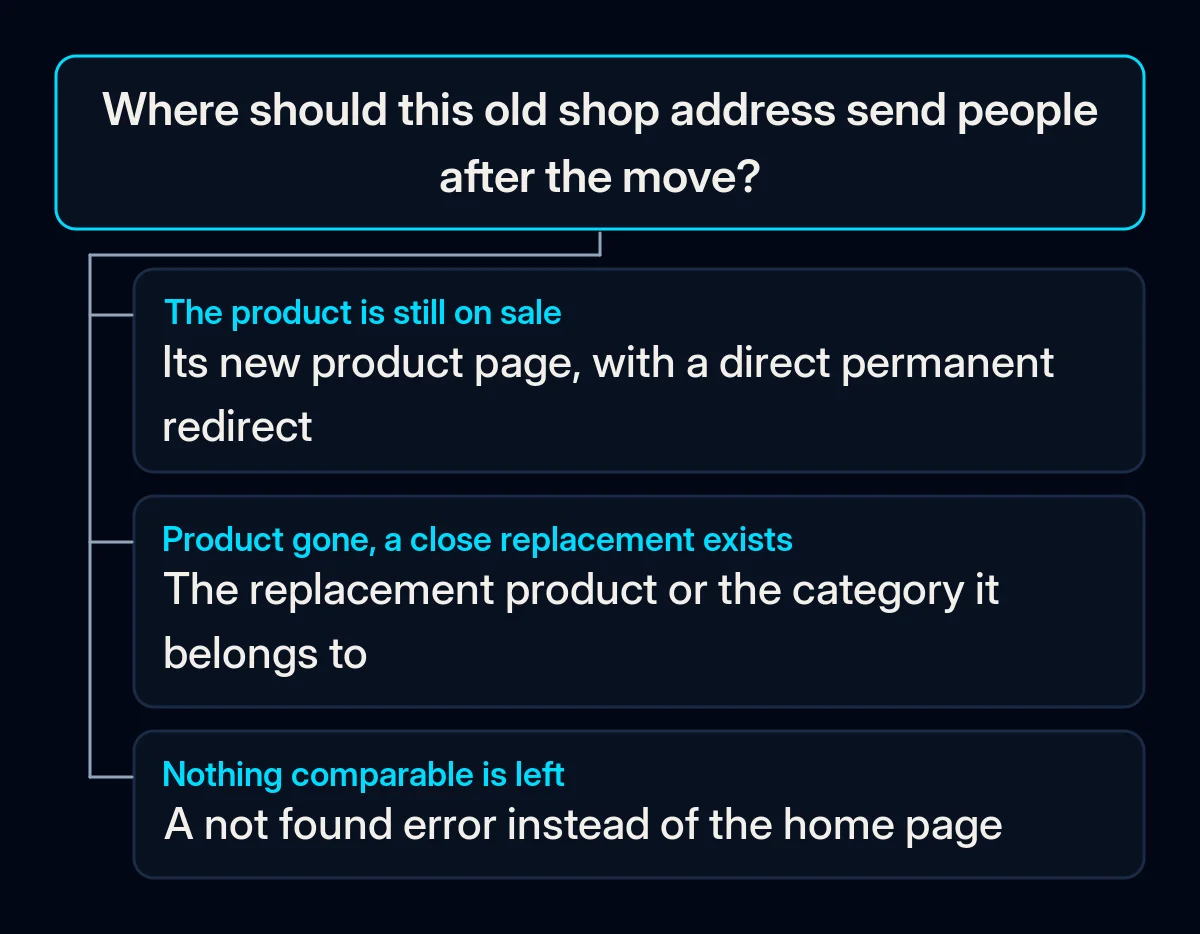
- Decide what happens to products you no longer sell. A discontinued product with a close replacement can redirect to that replacement or to its category. If nothing comparable exists, Google says the old URL should correctly return a 404 or 410 error (“not found” or “gone for good”).
- Know your platform’s redirect rules. On Shopify, a redirect works only from a broken address: if the old URL still loads a live page, the redirect will not fire. Send each redirect straight to the final page, as Google advises, without a chain of forwards in between.
- Close the test copy properly and place a real test order. Protect the test copy with a password as well, because Google says robots.txt “is not a mechanism for keeping a web page out of Google”. Import data in the order Shopify gives: products, then customers, then historical orders. Then place a test order and follow it through payment and delivery settings. It should reach your CRM, the system where you keep customers and orders, with its source recorded, as it does in our CRM setup.
- Launch everything at once. Switch on the redirects and check that each new page names itself as the main version (a self-referencing canonical tag). If the shop has several language versions, the tags linking them (hreflang) must point to the new URLs. Update internal links, remove noindex and robots.txt blocks, and submit the new sitemap in Search Console. Google’s Change of Address tool, a Search Console setting for moving to a new address, is needed only if the domain or subdomain changes as well.
- Keep the redirects. Google’s advice is to keep them for as long as possible, “generally at least 1 year”. In our website projects, redirects from the old addresses are part of the launch step, and we check them again after the switch.
Tell customers about the move before launch, and keep offers out of that message unless you hold marketing consent for the customer. Shopify’s current customer accounts sign in with a one-time code by email, while older accounts with passwords may need an invitation to set a new one.
What to watch in the weeks after launch
Some movement in rankings right after launch is normal. Google says to “Expect temporary fluctuation” and that for medium-sized sites it can take a few weeks or more before the new URLs show in search. A drop that does not recover is a sign to look for an error.
- Not found errors in Search Console. Look for old addresses that return errors instead of redirecting, and add them to the map.
- Indexed pages against the baseline. The new product and category pages should replace the old ones in the indexing report.
- Orders from search, week by week. Compare full weeks with the same weeks before the move, using the baseline you saved.
- The tracking itself. Place another test order and check that analytics and the CRM both record it with the right source.
Where we come in
In an ecommerce website migration, we start with the baseline and the redirect map sorted by revenue because they decide which pages get handled first. Then we try the new shop on a closed test copy, launch everything at once and, in the weeks after, compare the old addresses, indexing and orders with the baseline. If you would like us to go through your shop’s addresses with you, a short brief is enough to start.