You ask ChatGPT, or another AI assistant, for the best linen duvet cover for a small flat with delivery to Austria, and it suggests three shops. Yours sells exactly that, and it is not on the list. Or a customer writes that “the assistant said you do not ship to Belgium”, when you do. If you have started wondering how to get your products on ChatGPT, the first thing to know is that the answer lives mostly in your own product pages.
The usual conclusions are that assistants only show big marketplaces, that someone must be paying for placement, or that the shop now needs a separate AI strategy. In our view, for a small or mid-sized shop the cause is usually more ordinary: the assistant could not read, or could not trust, what your product pages say. There are only a few ways this happens, and you can check each one yourself.
Why products on ChatGPT and other assistants get skipped
The facts are in the photos, not in the text. The size chart is an image, the material is visible on the label in a close-up, the compatibility is in a video. A person sees it; an assistant reading the page often does not. The sign: your product pages have short descriptions and long galleries.
The product name is a code or a mood. “Aurora”, “Model K-line”, “Summer Breeze” mean something to your team and nothing to a buyer’s question. Assistants match questions like “washable wool rug for a hallway” to pages that say what the thing is. The sign: someone outside the shop cannot tell what the product is from the title alone.
The page and its data disagree. The visible price says one thing, the structured data in the code says another, and the feed you send to shopping platforms says a third. Stock shows “available” in one place and “sold out” in another. Faced with conflicting facts, an assistant tends to trust the source that looks consistent, and that is often someone else. The sign: prices or stock were changed by hand in one system and synced later, or never.
Delivery and returns are hidden. Countries, delivery times in words and return terms sit in a PDF, a footer page or only at checkout. A buyer’s question almost always includes “delivers to my country” or “easy returns”, and the assistant cannot confirm it from the product page. The sign: the product page has no word about where you ship.
The assistant is not let in. A robots file written years ago, a security plugin or a firewall rule blocks unfamiliar bots, and assistant crawlers are among them. Or the product content loads only after scripts run, so a simple fetch sees an empty shell. The sign: your site rules were set once and nobody remembers why.
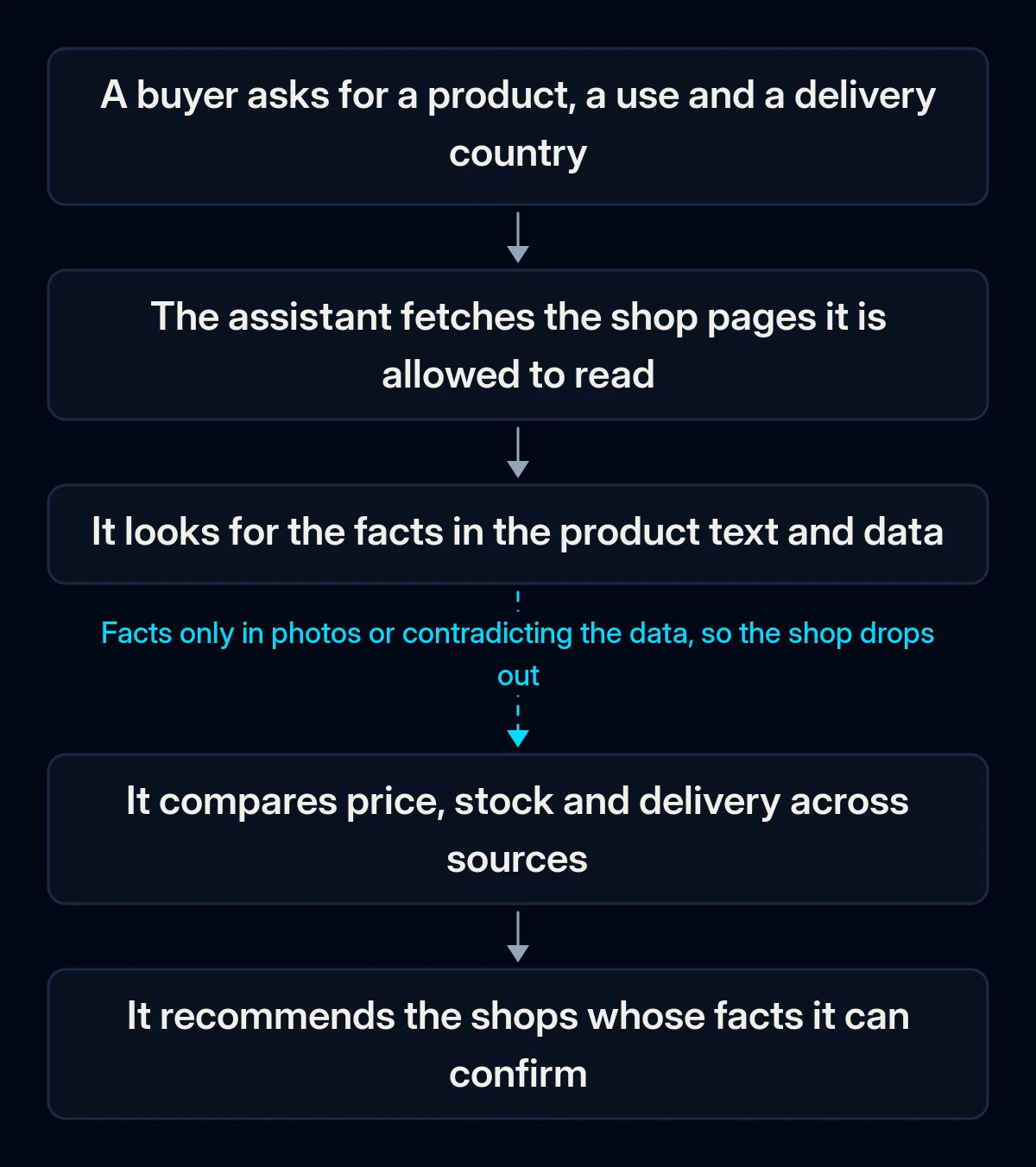
These causes stack along one path, from the buyer’s question to the recommendation, and the chain breaks at the first link your page fails.
How to tell which one is yours
Set aside an hour and run these checks in order. The first one that fails is usually your main cause.
- Ask two or three assistants a real buyer question in your category and market, then a question about one specific product of yours. Write down what they get wrong: price, stock, country, material.
- Open one product page and read only its text, without looking at photos. Can you tell what it is, its size, material, price and where it ships?
- Run the page through a free structured-data testing tool or view the page source. Compare the price and availability in the data with what the visible page shows.
- Open your robots file and your security or firewall settings. Look for rules that block bots in general or assistant crawlers by name.
- If you send a product feed to a shopping platform, put one product’s feed entry next to its page and compare every field.
In our checks the answer usually turns up in the first three steps. If everything passes and assistants still skip you, the question is no longer the page but how well the shop is known at all, which is a slower job.
The fix, in order
-
Decide on access deliberately. Choose which assistants you want to be found by and make sure your robots file and firewall let them read product pages. This is a setting, not a project. If search engines also struggle with your site, our piece on why a website is not showing up on Google walks through the same checks for crawlers.
-
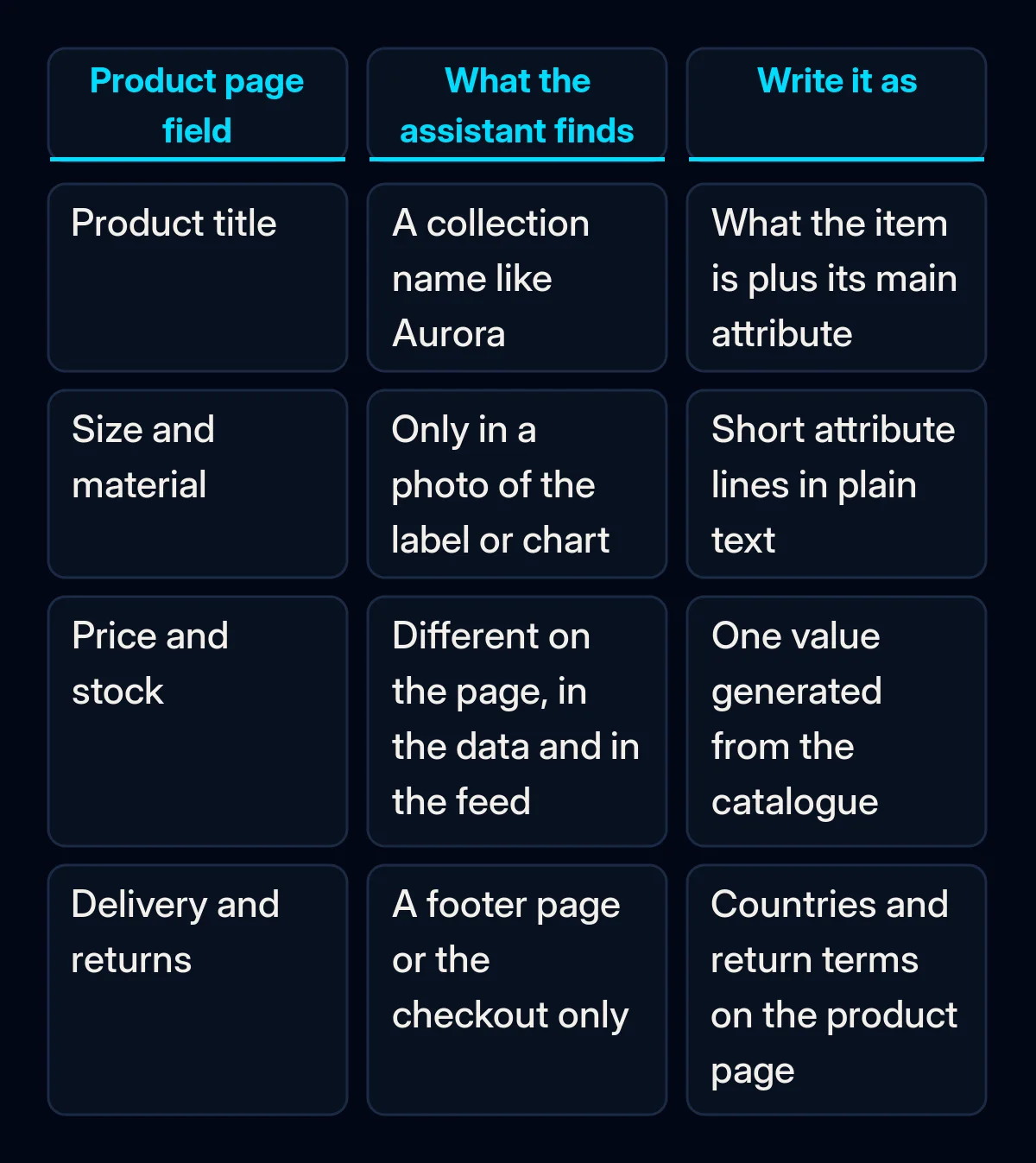
Rename products so they answer a question. Keep the collection name if you like it, but lead with what the item is and its main attribute: “Linen duvet cover, double, stone washed”. Do it for best sellers first.
-
Move facts from images into text. Size, material, weight in words, compatibility, care, what is in the box. Each one as a short attribute line, the same order on every product. This also helps shoppers on slow connections and screen readers.
-
Put delivery and returns on every product page. Which countries, how long delivery usually takes in words, how returns work. If terms differ by market, each language version should state its own; we covered that when selling in a second country with a multilingual ecommerce website.
-
Generate structured data from the catalogue, never by hand. Product markup with name, price, currency, availability, identifiers where you have them, and delivery details, produced by the shop from the same fields the page shows. In our ecommerce website projects this is part of the launch checklist, together with a test that the markup and the visible page match.
-
Keep one source of truth for price and stock. When the shop, the feed and the back office each hold their own copy, they drift. Syncing them from one system is the slow and boring step that stops assistants from seeing contradictions; in our CRM and automation projects the stock and price sync is set up before any new sales channel is connected.
-
Only then look at platform programmes. Merchant feeds and checkout inside assistants are worth considering once the pages are clean, because they repeat what the pages say.
What to measure
- Answers to the same questions. Ask the assistants your fixed set of buyer questions once a month and log whether your shop appears and whether the facts are right.
- Visits from assistants. In your analytics, watch referral traffic from assistant domains over the following months; it starts small, so compare month to month, not day to day.
- Data errors. Structured-data and feed errors in the tools you already use should go down to none and stay there after each catalogue change.
- What customers say. Add an option like “an AI assistant recommended you” to your “how did you hear about us” question and read the answers.
Where we come in
We start with the same hour of checks on your best-selling products and agree what to fix in the catalogue, the site and the stock sync, in that order. Most of the work is making the shop say clearly what it already sells. If you want a second pair of eyes on your product pages, tell us about your shop.