Do I need a CRM? You probably do once several people handle enquiries, follow-ups depend on someone remembering them, and you cannot link a sale back to where the enquiry came from. Until then, a shared spreadsheet kept properly does the job.
A CRM, or customer relationship management system, keeps every contact, deal and next step in one place. Before you pay for one, write down how you sell and test the system on one of your real enquiries.
The question usually comes up after a near miss: a customer chases a quote nobody sent, or two people call the same enquiry on the same day. The temptation is to book demos that same week. Each demo will look good, so do the checks below first.
Do I need a CRM, or is a spreadsheet still enough?
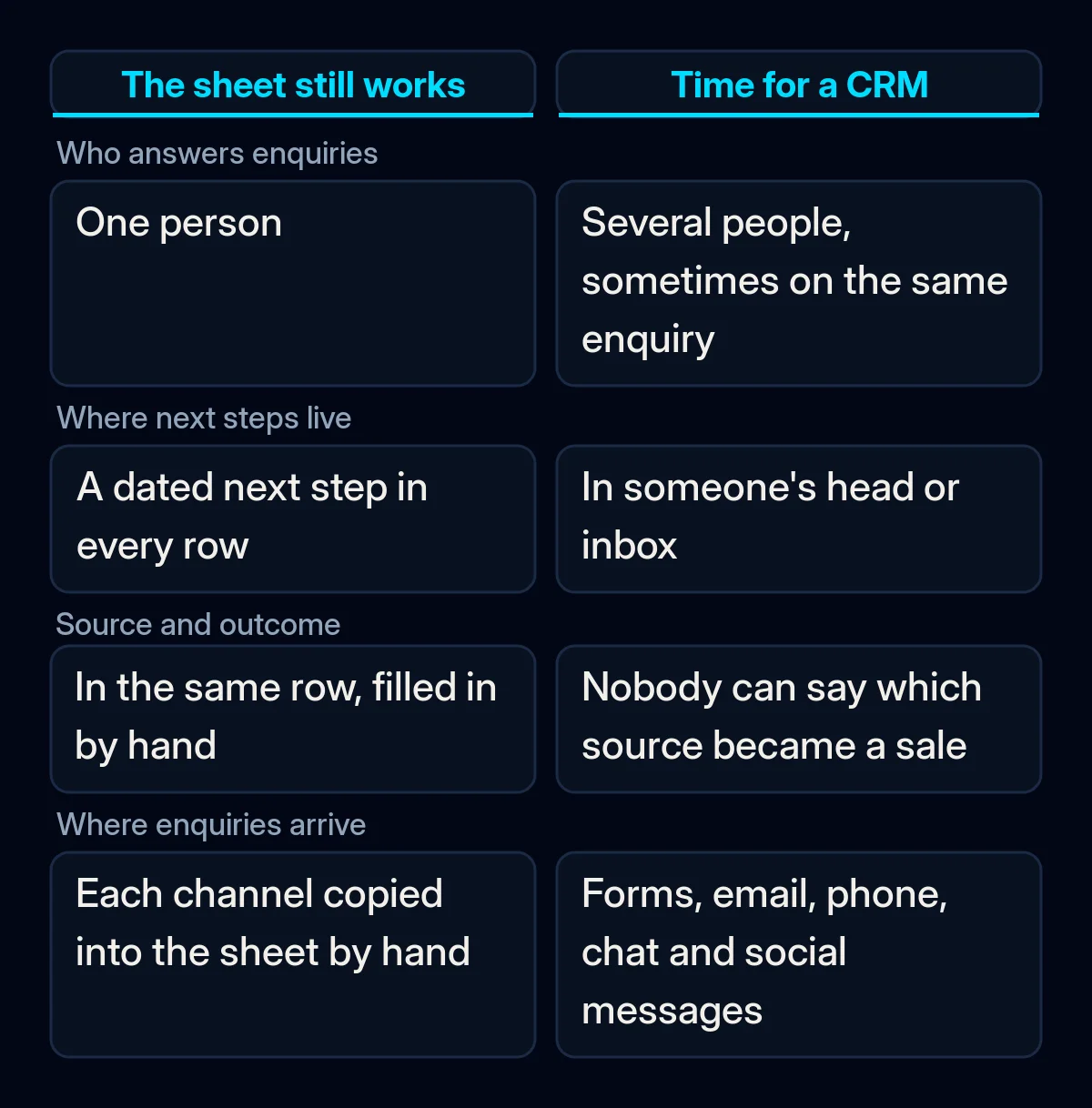
A spreadsheet is enough while one person handles enquiries, every enquiry has a row with its source, owner, status and next step, and nobody needs a reminder to follow up. When one of those conditions no longer holds, first see whether you can fix the sheet. If you cannot, a CRM is worth considering. You can check which side you are on with last month’s enquiries.
- Count the people who answer enquiries. One person can keep a sheet in order. With several, rows can go stale, two people can take the same enquiry, and a missed reply may only surface when the customer complains.
- Look for next steps that live in someone’s head. Pick a handful of last month’s enquiries and ask who will do what next and when. If the answer is “I remember”, you need dated reminders, and a CRM can send them.
- Check whether source and outcome sit in the same row. If you cannot say which enquiries from your website, ads or referrals became paying customers, every budget decision is a guess. A CRM can record the source on the deal automatically once your forms pass it in.
- Count the places enquiries arrive. Website form, email, phone, chat and social messages each need someone to copy them into the sheet. Each copy is a chance to lose one.
If all four checks pass, keep the sheet and tidy it, as we describe in where enquiries disappear between ads and sales. If a check fails, try to fix it in the sheet first, with an owner column, a next-step date or a source column. When the fix needs something a sheet cannot do on its own, such as sending reminders, assigning new enquiries or recording the source automatically, it is time to choose a CRM.
Why a CRM bought too early ends up unused
A CRM project can go wrong at the point of choosing, before setup starts, if the system is picked from a demo before anyone has written down how the business sells. Writing in Harvard Business Review in 2002, Darrell Rigby and colleagues at Bain pointed to “a single flawed assumption: that CRM is software that manages customer relationships for you”.
The process was never written down. Setting up a CRM means naming your deal stages (the steps an enquiry passes through from first contact to payment), the fields that must be filled in and who owns each step. If the team has never agreed on them, the setup copies today’s habits or someone’s guess, and people go back to their notes.
The demo showed the vendor’s sale, not yours. A demo follows a clean example built for the product. Your enquiries arrive half-filled from several channels and need a quick callback. Those differences only show up when your own enquiry runs through the system.
The free plan was checked only against today’s team. HubSpot’s free plan covers up to two users and 1,000 contacts, and Salesforce’s Free Suite has a two-user maximum. Paid plans are usually priced per user, so each extra person adds to the monthly bill: Pipedrive, for example, lists its prices per user per month after a 14-day free trial. One more salesperson can change the bill.
Getting your data out was never checked. Exporting depends on permissions, which an administrator grants. HubSpot requires export permissions to export records, and in Pipedrive only users with global admin permissions can export by data type. If nobody in your team holds those rights, you may need an administrator to grant them before you can export.
What to check before you choose a CRM
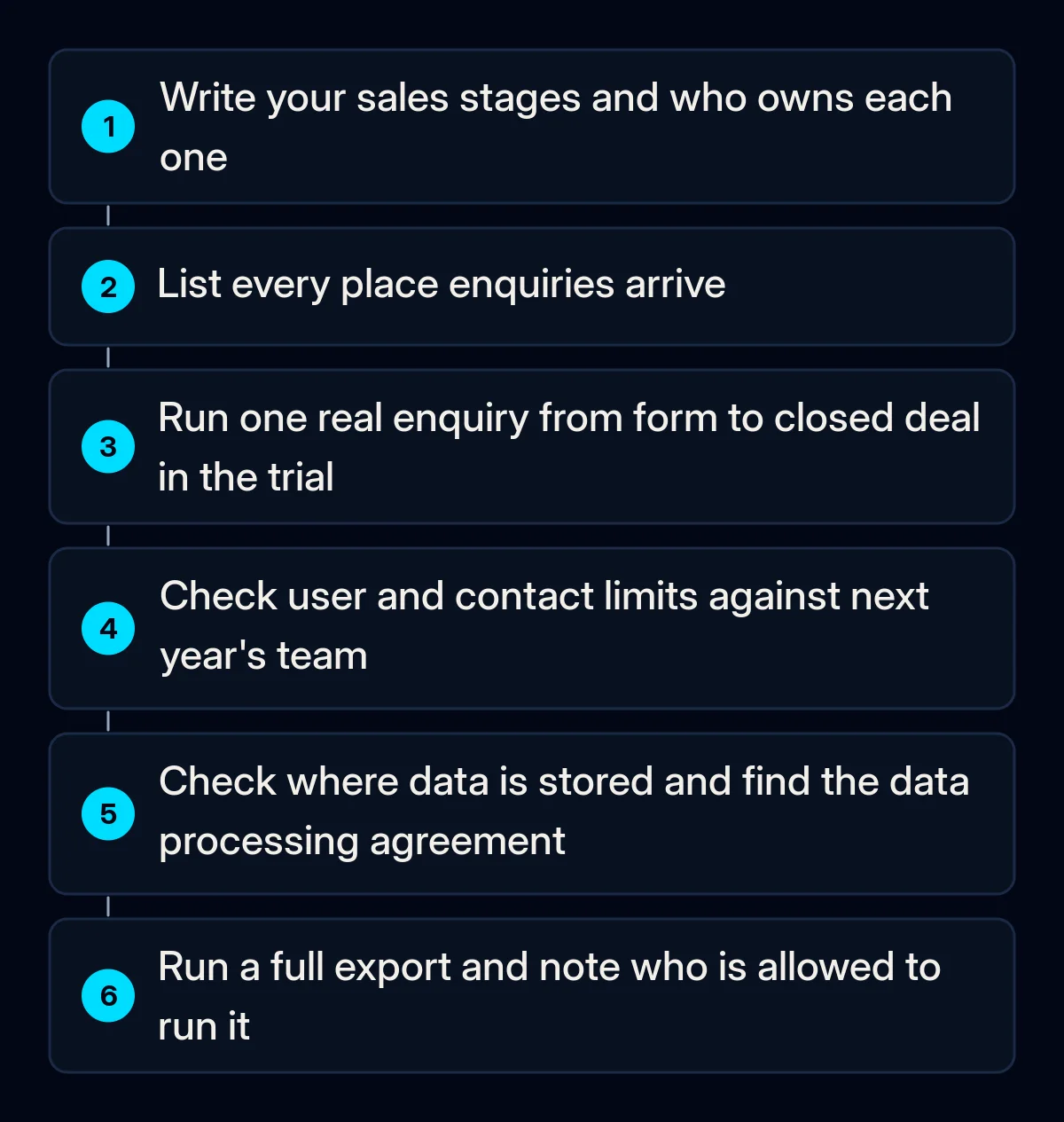
Run these checks in order. The first ones cost nothing and work in any trial; the later ones need the vendor’s own pages and a conversation with whoever will own the system.
- Write your sales stages and who owns each one. Name each stage from new enquiry to paid, with one person responsible at each step. Our CRM implementation work starts here, with a map of how enquiries move today, before any software is chosen.
- List every place enquiries arrive. Forms, email, phone, chat and marketplaces. Each one needs a route into the CRM, and website forms should pass the source along with each enquiry. Our website forms and landing pages are built to feed the CRM with the source recorded.
- Run one real enquiry through the trial. Take last week’s enquiry and move it from form to closed deal with your stages, your fields and a reminder. If that takes a manual workaround, the daily routine will too.
- Check the limits against next year’s team. Count users and contacts for the plan you want, and price the plan for the team you expect to have next year.
- Check where your data is stored and who processes it. HubSpot says customers who only use free services “will be assigned a data center in the United States”. If your business or your customers are in Europe, ask how transfers outside Europe are covered. Find the data processing agreement, the contract that sets how the provider may handle your customers’ data on your behalf, and check that it covers your plan under the GDPR. The European Data Protection Board says having less negotiating power than a large provider is no justification for accepting terms that break data protection law.
- Run a full export before you commit. Export contacts and deals during the trial, check that the file opens and holds everything, and note which role in your team may run it.
Finally, name the person who will keep the system tidy and answer the team’s questions. A CRM without an owner drifts back to the spreadsheet; we cover the warning signs in why teams stop using a CRM.
How to tell the CRM is working
Judge the system by what happens to enquiries once everyone has moved over and worked in it for a while. A CRM is working when enquiries stop depending on memory: each one has an owner, a source and a next step, and nobody keeps a second list on the side. Check four signs:
- Every new enquiry has an owner and a dated next step.
- The source is filled in on new enquiries without anyone typing it.
- Nobody keeps a private sheet or notebook next to the CRM.
- You can see which sources turned into paying customers last month without exporting anything.
If one of these fails, fix the setup before you add features or users. Often the fix is a missing field, a form that does not pass the source or a stage nobody owns.
Where we come in
We start with the map of how your enquiries move today and the stages you want. Only then do we match a system to your process, team size and budget, with the reasons written down. After setup we come back and check that people use it.
You can run the checks from the first section on last month’s enquiries without any software. If they point to a CRM and you want help with the choice and the setup, a short brief is enough to start.