Apple’s new EU terms, in force since 1 October 2026, let apps offer their own payment or a website link next to in-app purchase. Google Play’s billing choice program, live since 30 June 2026, lets apps offer their own payment next to Google Play Billing. Both options cost a lower commission than the store’s own checkout. App store fees do not disappear, though: the store still takes a share of those sales, and payment, VAT, refunds and support move to you.
A subscription may sell at a fair price while a large slice of every sale stays with Apple or Google. With the stores opening up in the EU, the practical question is whether you should move payment to your own website. In our view, the answer depends on three things you can check yourself: what your app sells, where your paying users are, and which rate you already pay.
What changed with app store fees in the EU?
Both stores now let apps in the EU take payment their own way, at a lower commission than the store’s own checkout. Apple’s new EU terms took effect on 1 October 2026 and replace the earlier mix of fees with one table of commissions. On 30 June 2026 Google Play started its billing choice program, which lets an app offer its own payment next to Google Play Billing. The program covers the UK and the European Economic Area (the EU plus Iceland, Liechtenstein and Norway, or EEA); in the EEA, links to a website go through Google’s external offers program.
Apple’s announcement says two of the earlier fees are gone, and the per-install Core Technology Fee is replaced by a 5% commission on digital sales in apps distributed outside the App Store. Google now splits its charge in two: a service fee for selling through the store and a billing fee for processing the payment. The service fee starts at 10% on a developer’s first USD 1 million in annual earnings, whichever way the buyer pays. The 5% billing fee applies only when the purchase goes through Google Play Billing.
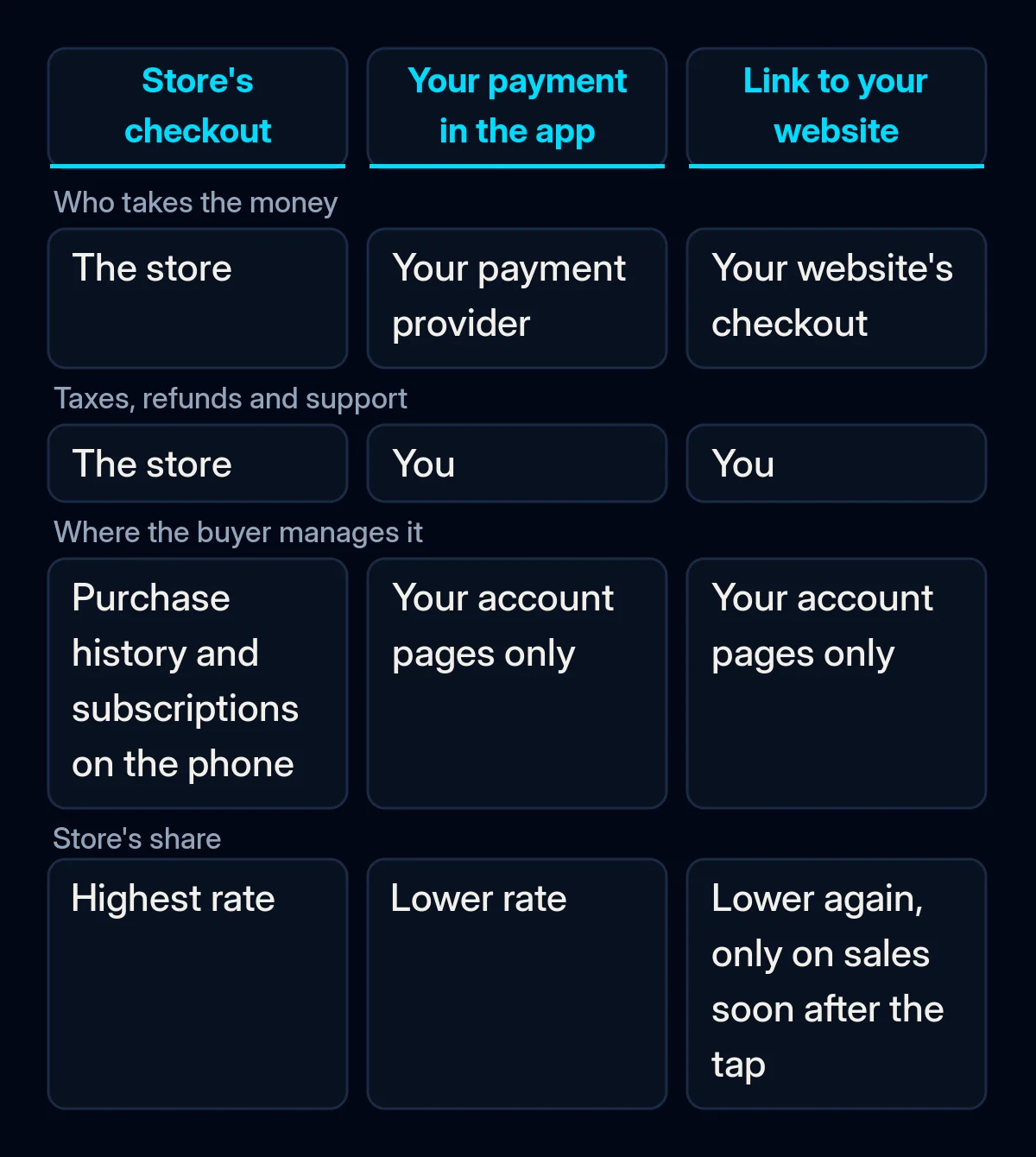
In-app purchase is the store’s own checkout inside the app: the buyer taps, confirms with the phone’s usual payment prompt, and the store takes the money. A storefront is the App Store of one country.
The Small Business Program is Apple’s reduced rate for new developers and for those with up to USD 1 million in proceeds last calendar year. You have to apply for it. The rates below come from Apple’s and Google’s help pages as they stood on 8 October 2026.
| How the buyer pays | Apple, EU storefronts | Google Play, EEA and UK |
|---|---|---|
| The store’s own checkout | 26%, or 15% for Small Business Program members and auto-renewing subscriptions after their first year | Service fee from 10%, plus a 5% billing fee |
| Your own payment provider inside the app | 20%, or 10% for the same groups | 10% on the first USD 1 million a year and on subscriptions, otherwise 20%, or 25% for users who installed before 30 June 2026; no billing fee |
| A link to buy on your website | 15%, or 10% for the same groups, on sales within 7 days of the tap | 10% on the first USD 1 million a year and on subscriptions, otherwise 20%, on purchases within 24 hours |
| Physical goods and services | No commission: payment other than in-app purchase, such as card or Apple Pay | Google Play’s billing must not be used |
Why selling outside the store saves less than it looks
Moving payment away from the store lowers app store fees on digital sales. For sales that follow a link from the app, the fee stays, and the work the store used to do moves to you. For a small app on the reduced rate, the gap can shrink to a few percentage points before your own costs. You can check each cause below in your own reports.
You may already pay the reduced rate. In Apple’s Small Business Program, and for auto-renewing subscriptions after their first year, in-app purchase costs 15% and a link to your website costs 10%. On Google Play, the first USD 1 million and all subscriptions start at the 10% service fee on every route, so what you save is the 5% billing fee. The sign: your payout report already shows the lower rate.
The store still counts the sales that follow the link. Apple charges on sales made within 7 days of the link tap, and Google on purchases within 24 hours of following the link. A buyer who taps through and pays straight away is a sale both stores count.
Payment work moves to you. With your own payment, Apple says you collect and pay the taxes yourself, need a VAT number registered in the EU, and report every alternative transaction to Apple each month. Google leaves refunds and customer support to you and asks for a report of each transaction within 24 hours. Your payment provider charges its own fee on top, and someone on your side now has to handle VAT for digital sales.
Buyers drop off between the app and the website. In-app purchase is one tap with a card the phone already knows; a website checkout asks for a login and card details. RevenueCat, a subscription platform, ran an A/B test moving iOS users from in-app purchase to a web checkout and reported “a clear dip in conversion rates”.
Subscribers lose the phone’s own controls. On Apple, purchase history and subscription management on the device show only in-app purchases, and Family Sharing and Report a Problem do not reflect purchases made another way. Cancelling and refunds become your job.
The choice is locked for a year. Apple requires you to keep the payment options you choose for 12 months, across all EU storefronts at once. A link cannot be tried for a month and quietly removed.
Does selling outside the store pay off for your app?
Work it out on your own numbers before you change anything. You need the sales report from App Store Connect or the Play Console, the rate you pay today and a rough list of what payment would cost you outside the store. Run the checks in this order, because the first two often settle the question.
- Sort what you sell. Physical goods and services used outside the app, such as deliveries, bookings, tickets or gym memberships, should not use in-app purchase. Apple’s guideline 3.1.3(e) requires payment methods other than in-app purchase for them, such as card or Apple Pay, and Google’s payments policy says its billing must not be used. If the store takes a cut of those today, fix that setup first, whatever you decide about the EU options.
- Find where your paying users are. The new options cover EU storefronts at Apple and the EEA and UK at Google. On the UK App Store, Apple’s guideline 3.1.1(a) still forbids buttons and links that send buyers to pay elsewhere; the US storefront is the exception. Split your revenue by country in the sales report.
- Check the rate you pay now. See whether you are enrolled in the Small Business Program, which fee tier the Play Console shows for your account, and how much revenue comes from auto-renewing subscriptions older than a year.
- Write the comparison for your main product. Include the price, the store’s share today, the store’s share through your own payment or a link, your payment provider’s fee, VAT handling, refunds and support time. If the gap after your costs is small, a drop in conversion can eat it.
- Check who your buyers are. Apple does not allow links to outside offers for users under 13 and puts alternative payment behind a parental gate, a step where a parent confirms the purchase. In a family or teen app, a web link may reach few buyers.
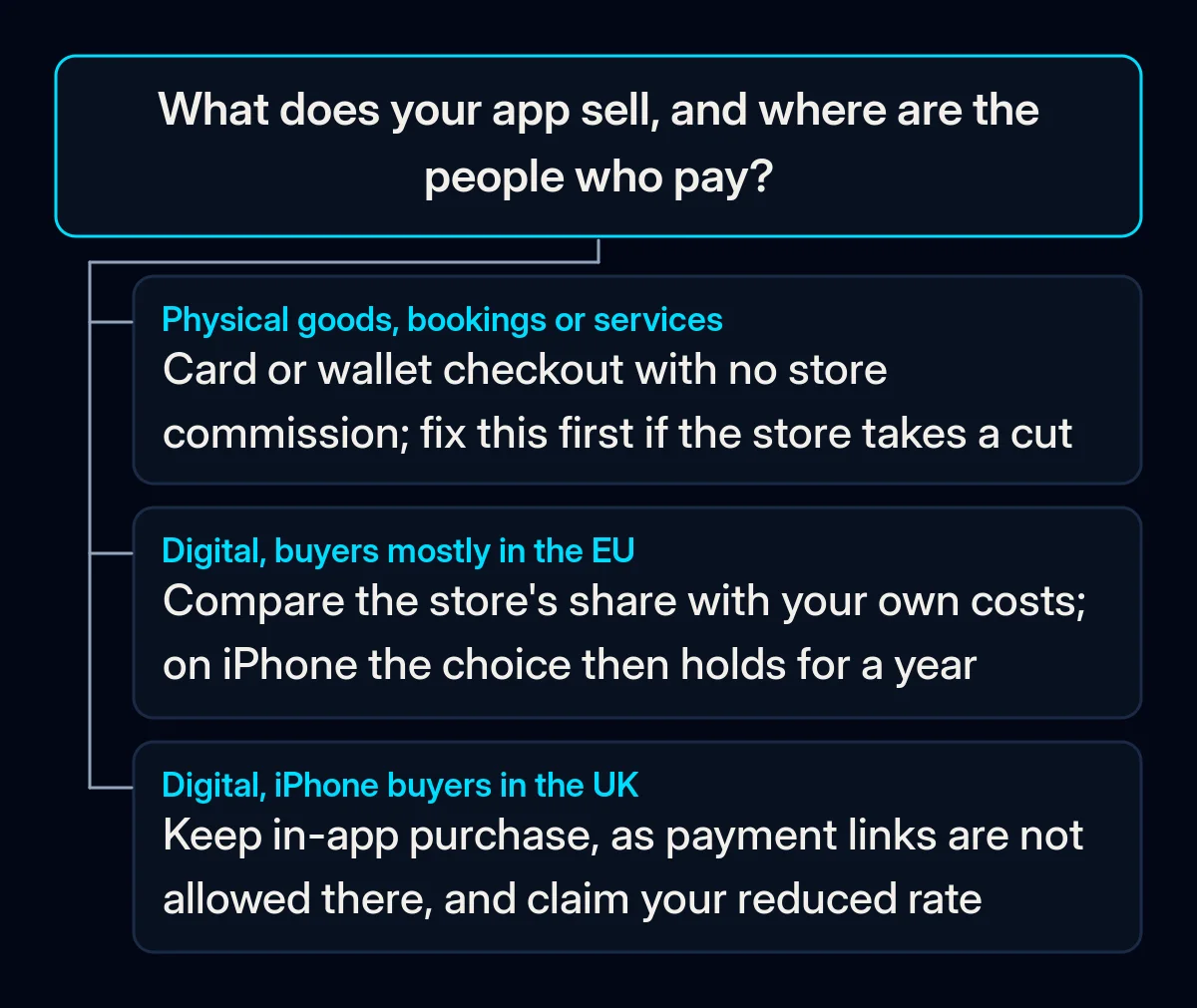
How to change your payment setup, step by step
Start with the changes that cost nothing and leave your current checkout untouched, and only then build a new one. We decide the payment route during discovery and write it down with the reasons, because at Apple it stays fixed for a year once chosen.
- Move physical goods and services to a normal checkout. Use card or wallet payment in the app or on your site, with no store commission. If your orders and bookings already run through your site, our website projects cover the checkout and payments.
- Claim the reduced rate you qualify for. Apply to Apple’s Small Business Program if you earned up to USD 1 million in proceeds last year, and check the tier for your first USD 1 million on Google Play. This changes the comparison before anyone touches code.
- Add a route and keep in-app purchase. Apple requires in-app purchase to be shown at least as prominently as any other option. In Google’s billing choice program, its billing must be offered alongside yours. Website links in the EEA fall under Google’s external offers program instead, where an app may not use Google Play Billing. On Android in the EEA, a link therefore replaces the store’s checkout. On iPhone, keep the one-tap checkout for buyers who want it, and add a web link for the product where the gap after your costs is real.
- Build the web checkout to the same standard as your shop’s checkout. The buyer stays logged in when moving from the app, the purchase is available in the app at once, and refunds and cancellation sit on a page the buyer can find. Payment pages lose buyers for the same reasons we cover in why shoppers leave a checkout before paying.
- Prepare for review, reporting and VAT before launch. Leave the other payment off your App Store product page, since Apple forbids mentioning it there. Set up the monthly report to Apple, due within 15 days of the month’s end, and the 24-hour transaction report to Google. Apple’s terms leave VAT on these sales to you; how it applies to your company is a question for your tax adviser. In our mobile app development process, payments sit in the backend and integrations step, and purchase events are tracked from the first day.
Some apps mainly sell digital content to buyers who arrive from the web anyway. If yours is one of them, ask whether buying needs the app at all; our piece on app vs mobile website walks through that choice.
What to measure after you switch
Judge the switch by what each buyer leaves you after app store fees, payment costs and VAT. Four numbers show whether it worked. The first monthly reports from your payment provider and from the store show the initial direction, and the following months confirm it.
- The share of buyers who pick each route, in-app purchase or your own payment.
- Conversion from tap to paid on the web, against in-app purchase for the same product.
- Refunds, chargebacks (a buyer disputing the payment with their bank) and support requests about billing.
- Net revenue per buyer on each route after the store’s share, the payment fee and VAT.
Look at these four numbers again before the 12 months run out, so the next choice rests on your own data.
Where we come in
When we plan an app, we settle the payment route during discovery: what you sell, where your buyers are and which app store fees and rules apply, written down with the reasons. We build payments and the web checkout together with the app’s backend and track purchase events from day one, so the fee comparison runs on your own figures. A short brief is enough to start.