
Meta commercial terms change on 30 October 2026. The new version adds a clause that lets Meta use crawlers (programs that read web pages automatically) on websites linked to your business, and lets Meta return for updates. The terms cover any business use of Meta’s products, such as Facebook and Instagram, even if you only manage a Page.
According to PPC Land, continuing to use Meta for business after Meta’s notice of the update counts as accepting the new terms. Before 30 October, decide which of Meta’s crawlers may read your website, and check that your rules do not break link previews.
What changes in Meta commercial terms on 30 October?
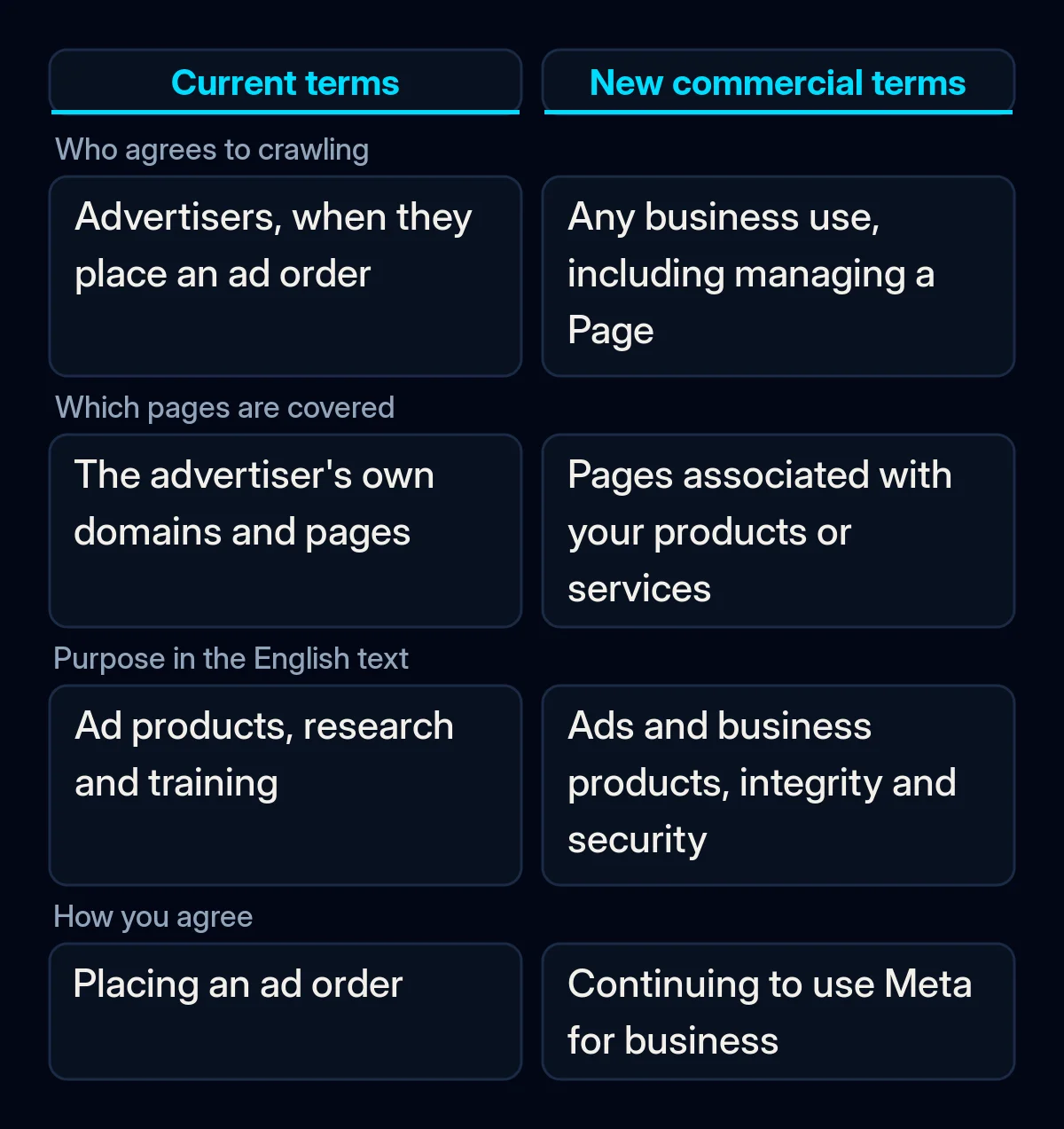
The updated Commercial Terms add a crawling clause that the version in force since 6 March 2024 does not have. The preview of the new terms says you authorise Meta, or anyone acting on its behalf, to use “automated software (such as web scrapers, bots, robots, spiders, crawlers and user agents)”. It may also “create test credentials”, meaning login details Meta creates for itself.
The clause covers the domains, web pages and URLs “that are associated with your products or services”, and URLs made available through your or other users’ use of Meta’s products. Meta may also “periodically pull updates” from them. In the English text we read on 20 October, the stated purposes are advertising and business products, and “the integrity and security of Meta Company Products”.
The terms apply well beyond advertisers. Meta lists “managing a Page”, “creating or using a product catalogue” and using Meta Business Suite among the business purposes.
Advertisers have granted something similar before. Meta’s current Self-serve Ad Terms, in force since 22 August 2025, already give Meta the right to crawl an advertiser’s domains, including for “research and training”. The preview of the new ad terms carries the same clause.
Why did Meta change the wording within a week?
The first published version of the new Commercial Terms went further. A separate sentence said Meta may use content from websites linked to a business “to provide, develop, improve, research, train and maintain the integrity of” its products. PPC Land quoted that sentence on 16 October, and publishers and lawyers objected, as Search Engine Journal reported.
Meta then removed the training purpose from the US English text. Search Engine Journal cites Meta spokesperson Daniel Roberts, who told The Verge that the new wording is narrower. In his words, the crawling terms “only applied to our ads and business products, and we’ve clarified that in the terms themselves.” Another Meta spokesperson, Andy Stone, said “there’s no change to how Meta uses web crawlers”, as quoted by PPC Land.
PPC Land found the old sentence in the UK English preview on 18 October, and Search Engine Journal still found it in the UK English ad terms preview on 19 October. When we read both English previews on 20 October, the word “train” was gone. Other language versions may still lag, so check the text in your account’s language.
Not everyone reads the new wording as narrower. Lawyer Matt Topic said “I think ‘develop’ is broad enough to include ‘train,’” according to Search Engine Journal.
Which Meta crawlers visit your website?
Meta documents five crawlers on its Meta Web Crawlers page. Each one sends its own name, called a user agent. Your robots.txt file, the text file that tells crawlers which pages they may read, can treat them differently, for example by allowing link previews while blocking AI training.
| Crawler (user agent) | What Meta says it does | Note from Meta |
|---|---|---|
| FacebookExternalHit | Reads pages shared in Meta’s apps to show a title, description and image | “might bypass robots.txt” for security or integrity checks |
| Meta-ExternalAds | Improves advertising and other business products | Can be blocked in robots.txt |
| Meta-WebIndexer | Improves search results from Meta AI, Meta’s AI assistant | Allowing it “helps us cite and link to your content” |
| Meta-ExternalAgent | Training foundation AI models, or indexing content for products | Can be blocked in robots.txt |
| Meta-ExternalFetcher | Fetches a link when a user asks for it, including when an AI assistant opens a page for them | “may bypass robots.txt rules” |
To block one of them, Meta’s page says to “add a disallow for the relevant crawler to robots.txt”. It also warns that crawlers “may cache the contents of robots.txt for up to 24 hours”, so a change can take a day to work.
Your firewall or CDN (content delivery network, a service such as Cloudflare that sits in front of your site) may already be deciding for you. Cloudflare lets sites manage AI crawlers by category, and its changelog says it has blocked the Training and Agent categories by default on pages with ads for new domains since 15 September 2026. Cloudflare’s bot list names Meta-ExternalAgent and Meta-ExternalFetcher but not Meta-ExternalAds, Meta-WebIndexer or FacebookExternalHit.
What is still unclear?
The new Meta commercial terms do not mention robots.txt at all. Meta says content owners can keep using robots.txt to show their preferences. Search Engine Journal notes that it is unclear whether a robots.txt rule limits what a business grants in the terms. It also cites a law professor who explains that following robots.txt is voluntary for crawlers.
Meta has not defined which URLs count as “associated with your products or services”. Its crawler page does not say that any of the five crawlers collects product information for catalogues, and it lists no IP addresses for checking that a visitor really comes from Meta.
What it means for your business
In our view, the new terms are a good reason to decide what each Meta crawler may do on your website. We would do it in this order, before 30 October, when the new terms take effect.
- Read the terms Meta shows you. Open the preview in your account’s language and find the paragraph on automated software. If your content is your product, for example paid articles or a members’ area, ask a lawyer what the clause means for you. We are not lawyers, and we do not give legal advice.
- Open your robots.txt. Go to yourdomain.com/robots.txt and look for rules that name Meta’s crawlers, and for a rule that blocks all bots. A broad block left from development also hides your site from search, as we explain in a robots.txt rule left over from development.
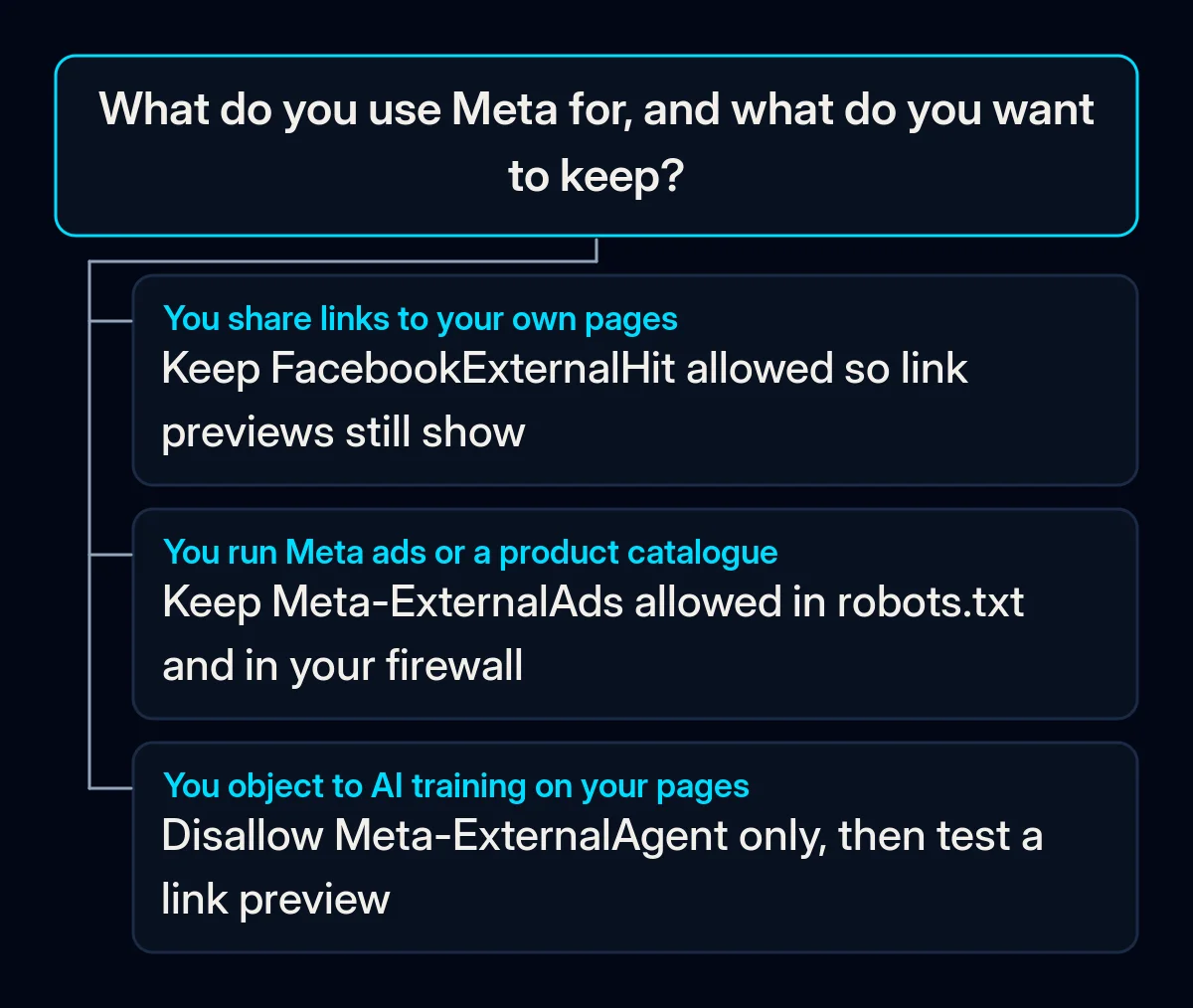
- Decide crawler by crawler. Keep FacebookExternalHit if you share links to your pages. Keep Meta-ExternalAds if you run Meta ads or a product catalogue. Allow Meta-WebIndexer if you want Meta AI to cite your pages. Block Meta-ExternalAgent if you do not want your pages used for AI training, keeping in mind that the legal effect of such a rule on the terms is unclear. We use the same logic when letting AI assistants read your product pages.
- Check what your firewall, security plugin or CDN already blocks. Do not allow every visitor that has “facebook” in its name. On our own website we have seen requests that used the name of a Meta crawler, came from networks outside Meta and asked for configuration files. Reading the crawl logs before writing new rules is part of our technical SEO work.
- Test a link preview after any change. Wait a day for the robots.txt cache, then paste a page address into Meta’s Sharing Debugger and check that the title and image appear. Open Graph tags, which supply that title and image, are on the launch checklist for website projects we work to.
If nobody looks after your robots.txt, start with step 2 today. It shows whether Meta’s crawlers are currently allowed, blocked or never mentioned.