
If you sell online to consumers in the EU, the European Accessibility Act website requirements have applied to your shop since 28 June 2025, unless your business is a microenterprise. You can find many of the serious problems yourself: place a test order using only the keyboard, zoom the page and try every form. What a self-check cannot do is prove that the whole site meets the standard.
A developer may have mentioned the law, or an email may have offered a widget that makes any site “compliant” with one line of code. A customer who cannot get through your checkout with a keyboard or with a screen reader (software that reads the page aloud) may go to another shop without complaining.
Does the European Accessibility Act apply to your website?
The European Accessibility Act applies if your website sells to consumers (people buying for themselves) and your business is not a microenterprise. Directive (EU) 2019/882 lists e-commerce services among the services it covers: services offered through a website or an app “with a view to concluding a consumer contract”. Countries had to apply its rules from 28 June 2025. This is our reading of the directive; for a legal opinion on your own case, ask a lawyer.
- Microenterprises that provide services are exempt. That is Article 4(5). The directive defines a microenterprise as one with fewer than 10 persons and an annual turnover or an annual balance sheet total of no more than EUR 2 million. The headcount and one of the two financial tests both count: a team of ten is outside the exemption, however small the turnover.
- Selling only to businesses. The definition is about consumer contracts. If private buyers can order through your checkout, treat the site as covered.
- A site that sells nothing. A company website without orders, bookings or payments is generally not an e-commerce service as the directive defines it. Bookings and payments change that.
- The 2030 date is for products and old contracts. The transitional period to 28 June 2030 in Article 32 covers products used to provide a service and contracts signed before June 2025.
Each EU country enforces the Act through its own law and sets its own penalties; in Germany that law is the BFSG. If your business is in Switzerland or the UK and sells to consumers in the EU, ask a lawyer how those countries’ rules apply to you.
Why do shop websites fail accessibility checks?
The failures below usually come from design and form decisions made once in a theme and repeated on every page. Directive (EU) 2019/882 asks for websites that are “perceivable, operable, understandable and robust”. The European standard that turns this into tests, EN 301 549, follows WCAG, the Web Content Accessibility Guidelines published by W3C. WCAG sorts its criteria into three levels: A (the minimum), AA and AAA. Level AA is the target the standard uses.
The focus outline was removed for looks. When someone moves through a page with the Tab key, the browser draws a frame around the active link or button. Some themes hide it because it looks untidy, although WCAG requires a visible focus indicator. A criterion added in WCAG 2.2 also says the focused element must not be entirely hidden by the site’s own content, such as a sticky header or a cookie banner.
Text is too pale. WCAG asks for a contrast ratio, how much darker or lighter the text is than its background, of at least 4.5:1 for normal text and 3:1 for large text. WebAIM’s 2026 scan of a million home pages found low-contrast text on 83.9% of them. Light grey on white and white on a pastel button are the usual cases.
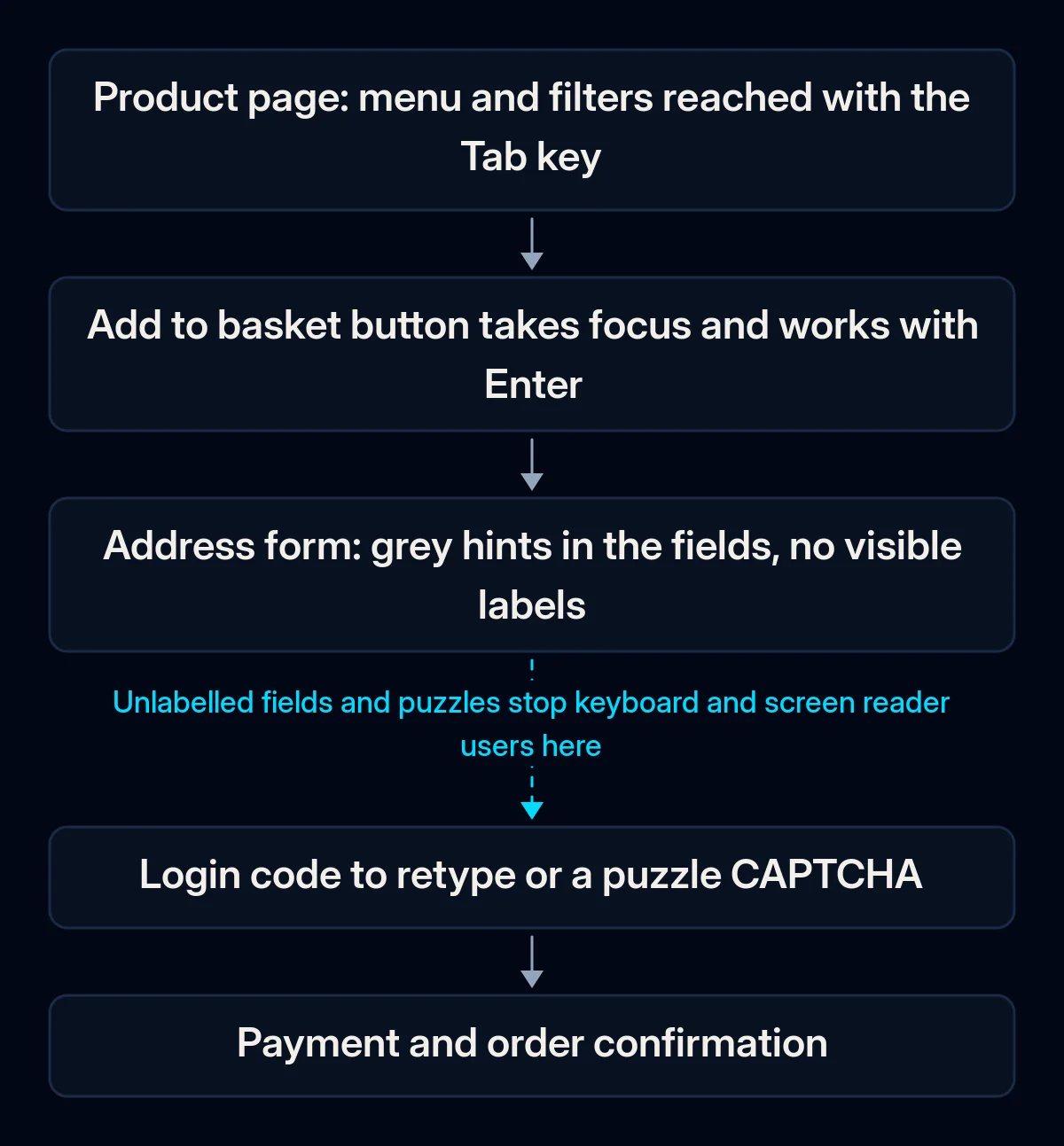
Forms rely on placeholders and colour. A grey hint inside a field disappears as soon as you type, and a red border alone does not say what is wrong. WCAG requires labels or instructions wherever input is needed, and errors described in text.
The checkout was built for a mouse. Custom dropdowns, puzzle CAPTCHAs and logins that ask you to remember or retype a code stop people who use a keyboard or a screen reader. The directive names identification, security and payment separately for e-commerce. In March 2026 the Dutch consumer authority ACM reported that at 61% of the large Dutch web shops and other big consumer websites it checked, an order could not be placed with assistive technology such as a screen reader.
A widget or a score stands in for the fix. Overlay widgets add an accessibility toolbar on top of the site. The European Commission says overlays and similar tools that do not make the website itself meet the standard “are not an appropriate solution”. An automated test helps, but in W3C’s words, “no tool alone can determine if a site meets accessibility standards.”
How to run a European Accessibility Act website check yourself
You can run a first review with a browser and a keyboard, without paid tools. W3C, the body behind WCAG, publishes a set of Easy Checks built on this idea. Pick three pages: the home page, a product or service page, and the checkout or contact form. Go in order and write down every place where you get stuck.
- Put the mouse away. Move through each page with Tab and Shift+Tab, and use Enter, Space and the arrow keys. You should reach the menu, filters, the add-to-basket button, every form field and the pay button. You should always be able to see where you are. Note where the frame disappears behind a sticky header or a cookie banner, and whether you can leave a menu or a chat window.
- Zoom in. Set the browser to 200%. WCAG expects text to stay readable without content being cut off or overlapping. Then make the window about 1280 pixels wide and zoom to 400%: the content should fit the width without scrolling sideways, except for things like maps and data tables.
- Check the pale text. The developer tools in Chrome, Edge and Firefox show the contrast ratio of a selected text colour. Check body text, prices, buttons and the small grey text under form fields.
- Try every form empty, then wrong. Each field needs a visible label that stays when you type. Submit the form empty: the error should say in words what is missing, next to the field, and keep what you already typed. A new WCAG 2.2 criterion also asks that information you already entered in the same process, such as an address, is filled in automatically or offered for selection. Other ways a form costs you orders are in our piece on website traffic but no enquiries.
- Log in and pass the anti-spam check. WCAG 2.2 says logging in must not depend on a cognitive function test, such as remembering a password or solving a puzzle, unless there is an alternative or a mechanism that helps, such as a password manager or pasting. A puzzle CAPTCHA with no other option fails here.
- Look at the product images. Right-click an image and choose Inspect. The alt text, the short description a screen reader reads out, should say what the product is; purely decorative images can have an empty one.
- Repeat the key steps on a phone. Small icons placed close together are hard to tap. WCAG 2.2 sets a minimum target of 24 by 24 CSS pixels (a size unit of the web page itself), with exceptions such as enough space around the target.
W3C notes that a page “could seem to pass these checks, yet still have significant accessibility barriers”. The next step is a test by someone who uses a screen reader every day.
What should you fix first?
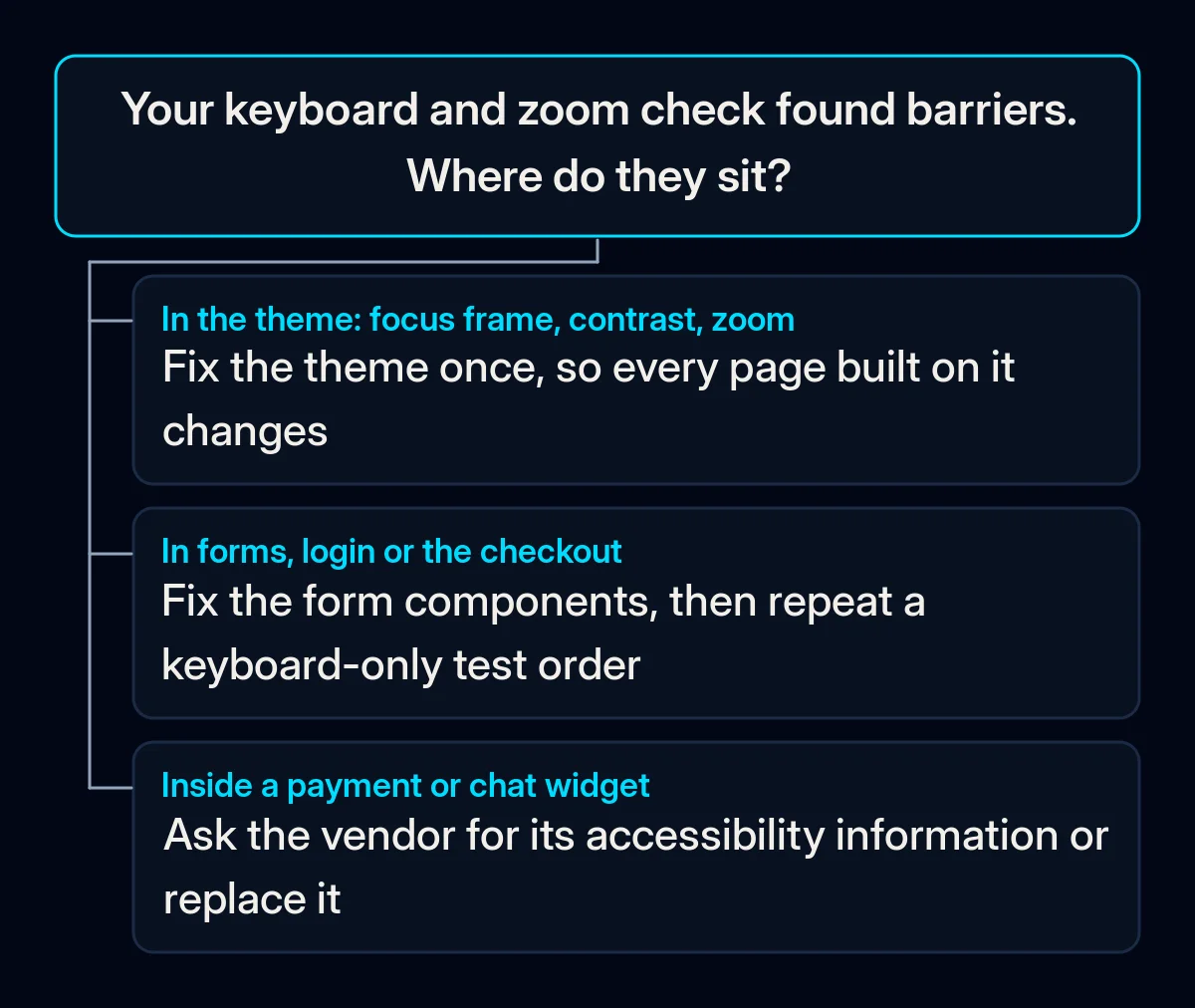
Start with fixes in the theme and the form components, from cheapest to most expensive. One change in a template corrects every page built on it. Publish the accessibility information after you know what the site does and does not do.
- Do not install an overlay. The European Commission’s advice is to fix accessibility issues “at their source”, which for a shop means the theme, the forms and the checkout.
- Bring back the focus frame and darken the text. Both usually live in the theme’s colour and style settings. We start by setting contrast once in the design palette and checking it in the light and dark versions of a site, so new pages use colours that already pass.
- Rebuild the forms. Visible labels, errors in words next to the field, typed data kept after an error, focus moved to the first field that needs fixing, and browser autofill for name, email and address. In our website projects we start with the form component itself, so each new form starts with these fixes.
- Add alt text and the page language. Describe product and content images, and make sure each page declares its language, so a screen reader pronounces it correctly. Search engines read the same alt text and language attribute, which is why they also belong in technical SEO work.
- Fix checkout, login and third-party widgets. Replace puzzle CAPTCHAs with checks that do not ask the customer to solve anything, and offer a way to log in that does not depend on memory. Payment and chat widgets come from vendors: ask each vendor for its accessibility information, and replace the ones that a keyboard cannot reach.
- Publish your accessibility information. Annex V of the directive asks service providers to describe how the service meets the requirements, in the general terms and conditions or an equivalent document. Your national law sets the details.
- Work towards WCAG 2.2 Level AA. EN 301 549 version 4.1.1, published in September 2026, adds six requirements from WCAG 2.2, AccessibleEU reports. Until the Commission cites it in the Official Journal of the EU, the same source notes, the reference remains version 3.2.1, based on WCAG 2.1 Level AA. Ireland’s National Disability Authority expects the citation on 16 December 2026. Fixing to WCAG 2.2 now means the new requirements are covered when that happens.
The directive allows an exception when compliance would be a disproportionate burden, but it requires an assessment, and its recitals state that “lack of priority, time or knowledge” is not a legitimate reason.
What should you check after the fixes?
Check whether a person can complete the main tasks with a keyboard and a zoomed page. Repeat the same European Accessibility Act website check on the same three pages, and compare where you got stuck before and after the changes. Recheck whenever the theme, a plugin or the payment provider changes.
- A test order with the keyboard only, from the product page to the confirmation, without touching the mouse.
- The list of findings from a free automated test, such as Lighthouse in Chrome, run on the same three page types. Review the findings and check which ones remain.
- Forms submitted with errors, to confirm that every error is described in words and nothing typed is lost.
- Your published accessibility information, updated after each change that affects how customers order.
Where we come in
When we look at a shop’s checkout, we follow the path a customer takes: the product page, the basket, the forms and the payment step, first with the keyboard, then on a phone. Problems that live in the theme or the form components are cheapest to fix there; what a self-check cannot settle is left for a test with a screen reader. If you would like a second look at your checkout, tell us about your site.