A low app store rating is a reason to inspect recent complaints and decide what needs a repair, an explanation or a policy check. Start with the task a reviewer could not complete and the release they used, if known. The useful outcome is a repair plan with a responsible person and a check of the available fix.
You may need to answer a support question while that investigation is open. Keep the answer truthful about what you know. Asking for more ratings, replying to a complaint and repairing the product are separate actions, with different evidence of completion.
What does a low app store rating tell you?
A score gives you a starting point for investigation. A written complaint may identify an affected task, but the cause still needs checking. Record which store and market you are looking at before comparing ratings. Apple describes its App Store summary rating as territory-specific; Google’s console help distinguishes the Google Play rating, which weights recent ratings, from the lifetime average.
A rating without written feedback leaves the reason unknown. A review posted after a release also needs its version checked before you assign it to that release. Keep missing information visible rather than treating the date as proof of which build the person used.
Build a complaint record before choosing a fix
Use the console for your own app with an authorised account. If you cannot view the relevant feedback, ask the colleague who manages that access to perform the check. Begin with current complaints and preserve their context. Older reports remain worth checking when the same task still appears to fail.
- Open the relevant review view. Apple’s help directs you to the selected app’s Ratings and Reviews in App Store Connect, with platform, country or region and app-version filters. In Play Console, Google’s help uses Ratings and reviews > Reviews, where filters include date, language, app version and device. The controls differ between platforms.
- Write the attempted task. Summarise what the reviewer tried to do and what reportedly happened. Separate that report from your proposed explanation. Leave the version, device or account state marked unknown when the available feedback does not identify it.
- Keep a minimal working record. Record the store, market, review date, known version, task, observed failure, missing information, owner and next check. Use an anonymous description in a shared work list; keep any necessary source reference in an access-controlled record. Avoid copying names, order details or private diagnostics into a public reply.
- Group comparable complaints. Put reports about the same task together while preserving release and device differences. A cluster is a lead for investigation. It does not establish how many users experienced the issue or which change caused it.
Choose the next action from the complaint
Choose a check that could resolve the uncertainty in the report. A task that should be supported but fails needs reproduction and a repair decision. If a screen is unclear, or the listing differs from the actual product, check what was promised and how the feature works. A request for an unsupported feature needs a product decision and a clear explanation.
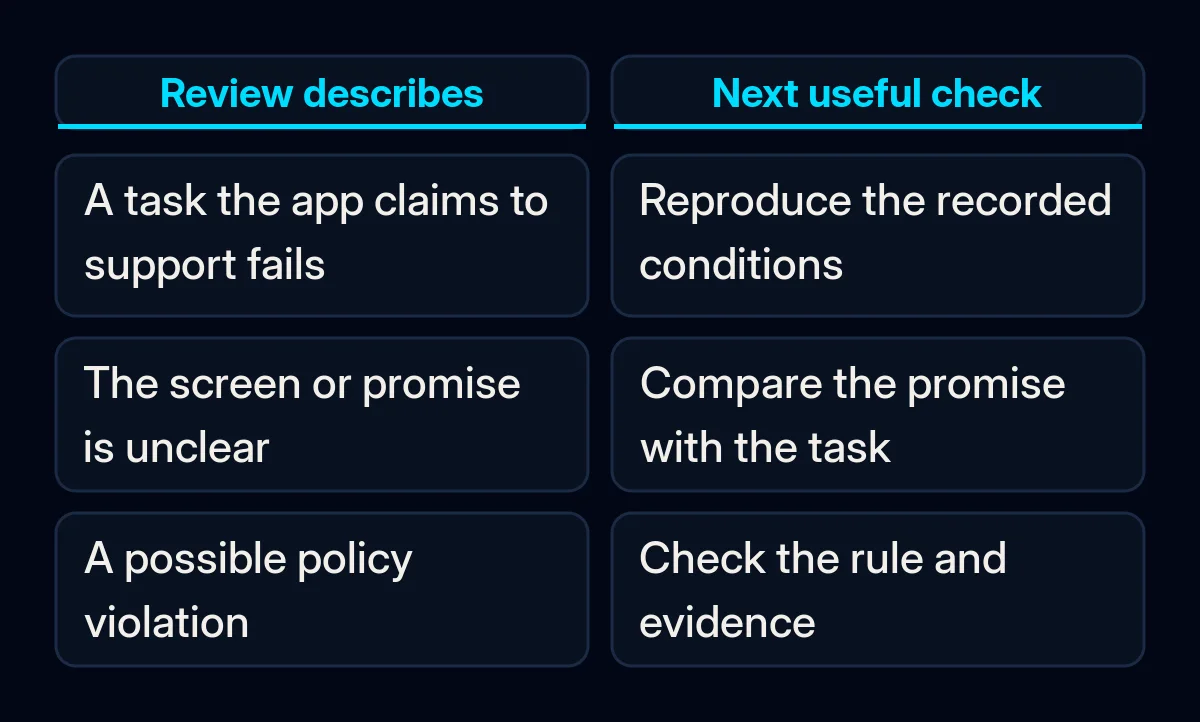
For a possible defect, ask the person responsible to repeat the reported task under recorded conditions. Use agreed test accounts and data, with emails, charges and other side effects controlled. If it does not reproduce, retain the conditions you tested and the information still missing; keep the issue open for the next relevant check.
When the uncertainty is what a screen or button means, our guide to a confusing app interface covers that narrower observation. Keep the complaint record linked to that investigation instead of commissioning a full redesign from the star average alone.
Reporting a review is another route with its own condition. Apple’s guidance and Google’s reporting help concern policy violations. Name the suspected rule and evidence before reporting. A negative opinion is not by itself a demonstrated breach, and the store’s decision remains unresolved until it is actually made.
Repair the task and write a truthful reply
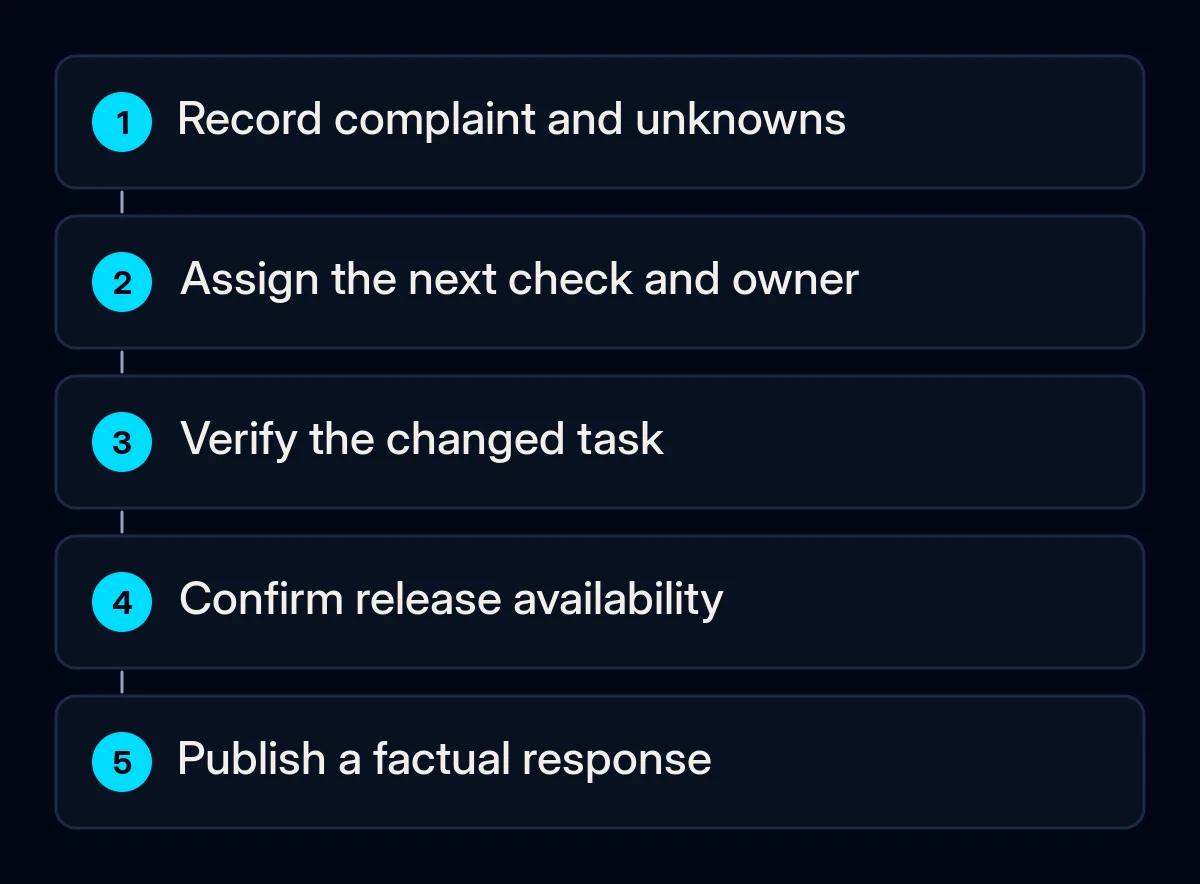
Give the complaint an owner and a testable next action. A useful handoff says what failed, under which known conditions, what remains unknown and how the changed task will be checked. Keep the support response moving without calling an unverified or unavailable change fixed.
- Assign the repair or clarification. Our mobile app audits and maintenance start with the reported task and evidence. Include the expected outcome, the affected build if known and the check needed before closure.
- Check the implemented change. Replay the affected task in the approved release under comparable conditions. Record what you saw after the task, including whether the change was saved when that matters. Check adjacent supported paths that the change could affect; a successful result on another device does not settle an unresolved report.
- Confirm availability before announcing a fix. Record the released version and who can obtain it. Distinguish an internal test build, an approved release and a change available to the affected user. If availability is still uncertain, say that in the working record and response.
- Reply with confirmed facts. Acknowledge the reported issue, state the actual investigation or available change and give a suitable support route. Apple’s reply help requires an Account Holder, Admin or Customer Support role. Google requires Reply to reviews permission. A saved response still needs its publication state checked.
Google’s policy advises keeping replies focused on the issue without asking for a higher rating. Apple’s response guidance calls for respectful, specific replies without personal information. Keep account details and diagnostic follow-up in your existing protected support channel. If that route uses a help page, check that it works from the app; website support and development can address the web part of that route.
Keep requests for reviews separate from support
Review invitations need their own platform check. Do not offer rewards, buy feedback or make help conditional on a changed review. Google’s ratings policy prohibits fraudulent or incentivised ratings, and Android’s in-app review guidance disallows opinion or predicted-rating questions before the review card. Avoid a route that sends only satisfied people to the store while diverting dissatisfied people to private feedback.
The same Android guidance describes a quota-controlled review dialog whose limit can change. Calling the review flow therefore does not establish that someone saw the card or submitted a review. Leave detailed implementation work with the developer; a new invitation does not resolve the complaint you are investigating.
What should you check after the release?
Return to the task and the available feedback with the release conditions beside them. Record whether the reported failure was reproduced before the change, what happened afterwards and what remains untested. Review new complaints using the same recorded store, market and version scope where available. Keep the score beside these observations without using it as proof of repair.
Track the affected task’s result, unresolved complaints by theme, and the actual publication state of relevant responses. If you count reviews, preserve the date window and the filters used; the count describes those reviews. Compare the same scope at your next review, and investigate any recurrence rather than assuming the release closed every case.
A changed rating after a release does not establish what caused the change. On Apple’s App Store, resetting the summary rating with a new version also leaves written reviews in place, according to its ratings guidance. Treat that as a separate store decision after you understand the feedback, not as the repair plan.
Where we come in
We start with the complaint, the task the app should support and the evidence needed to choose the next action. We can turn that record into a repair brief, check the changed path through the app and include its support page when needed. Bring an anonymous description of the task and the unresolved point to a project discussion.