
A Google Business Profile policy update bars businesses from putting time-bound promotions, prices and direct calls to action in their listing, the profile that shows a business in Google Search and Maps. Posts, the short updates published on that profile, may not carry email addresses, phone numbers, social media links or links to other websites “that are not related to your business”. Offers and news in posts are still allowed.
Google made no announcement and has not given an enforcement date or a penalty for the new merchant rules. Search Engine Roundtable reported the change on 6 October 2026, after Hiroko Imai shared before and after screenshots on LinkedIn.
What the Google Business Profile policy update says
The change sits in the “Advertising & solicitation” section of Google’s Prohibited & restricted content policy. The section now opens with a reason: contributions “should reflect genuine experiences or define a business’s permanent identity”, so that the platform “remains reliable rather than a marketplace”.
A new “For merchants” part then lists two rules:
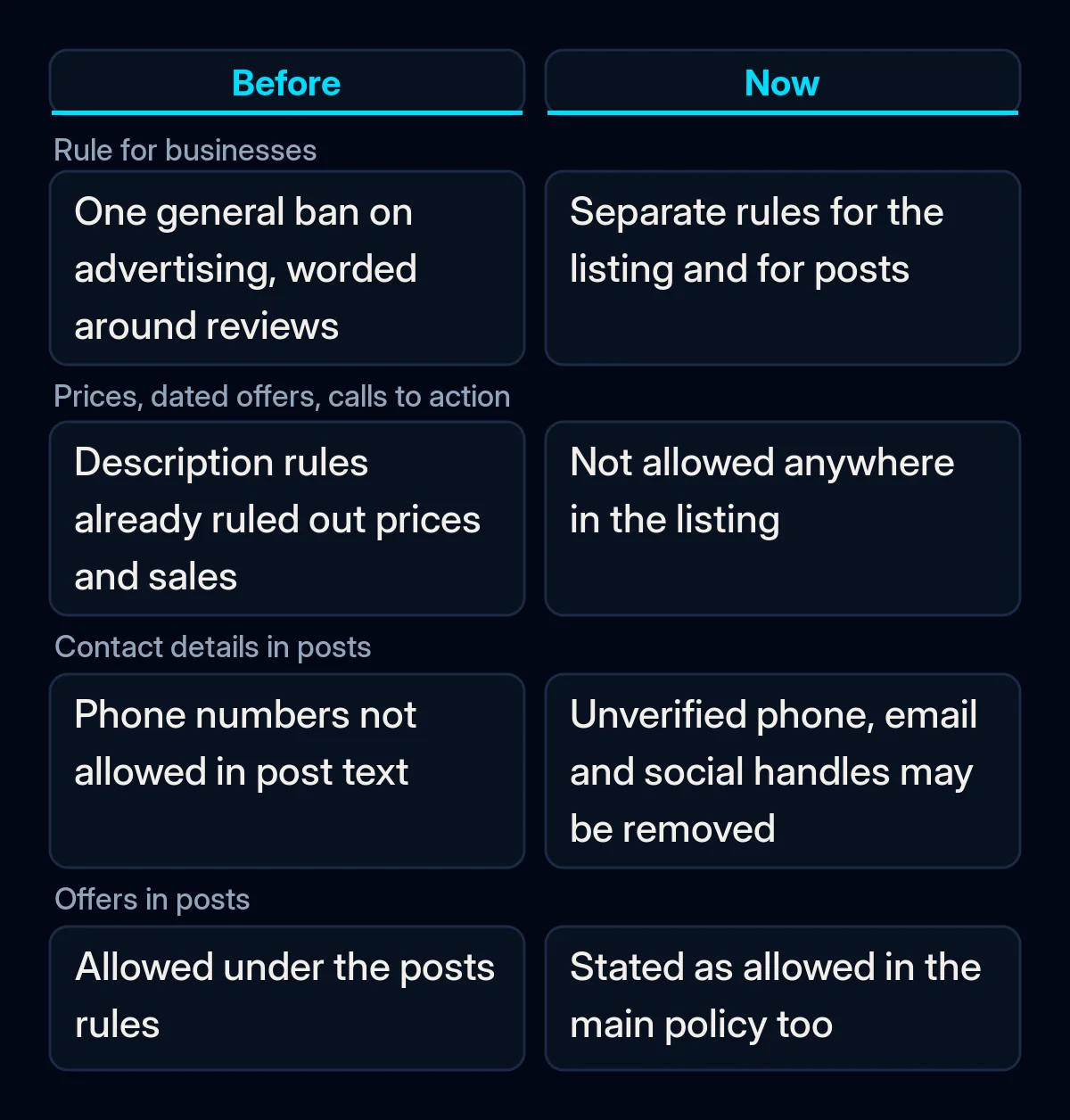
- In the listing: “Promotional or commercial content that contains any of the following: Time-bound promotions, pricing, or direct calls-to-action.”
- In posts: “Email addresses, phone numbers, social media links, or links to other websites in your posts that are not related to your business.”
The same part ends with a permission for posts: “Offers and updates that may be seen as promotional or commercial content are otherwise permitted in posts.” Google does not define a direct call to action. In our reading, it is a line like “Call now” or “Book today” written into the text.
When did Google change the rules?
The help page carries no date. Archived copies of the Maps version of the policy in the Wayback Machine show the old wording on 16 September 2026 and the new “For merchants” part on 19 September 2026. Before, the section was one short rule for everyone: “Don’t post content for advertising or solicitation purposes.”
In the same weeks, Google rewrote its posts content policy. It used to say “we do not allow your post content to include a phone number”. It now says “we may remove posts with unverified contact information”, and adds email addresses and social media handles to the list. Search Engine Roundtable covered that change on 25 September.
What did Google already ban before the update?
Part of the new rule repeats older guidance. Google’s guidelines for the business description have long said it must not “Focus on special promotions, prices, and offer sales”. Google’s own examples are “Everything on sale, -50%” and “Best bagels in town for $5!”, and the same guidelines say “No links of any type are allowed.”
What is new is the wording “direct calls-to-action” and “time-bound promotions”, and that the rule covers the listing as a whole, not only the description field. For posts, phone numbers were already a problem. The new text spells out email addresses, social media links and links to unrelated websites.
What Google has not said
Google has not given a date from which it enforces the rule, or said whether it will review old descriptions and posts. It has not defined which fields count as “the listing”, what a “direct call-to-action” is, or whether “pricing” covers the prices in your Products, Services or Menu sections. Relevant Audience, which covered the change on 8 October, pointed out the same gaps on dates, old content, listing fields and prices.
There is also no penalty named for the new merchant rules. Google’s general policy says that when violations occur it will “restrict the content from displaying, or restrict access to the profile or merchant account”. A pattern of violations can restrict access to the profile, and if the account is restricted, “all Business Profiles associated with that account will be suspended.”
Does the update apply in Europe?
Yes, as far as the help pages show. The British English, German and French versions of the policy carry the same merchant rules, and the section has no regional exceptions. For businesses in the UK and the European Economic Area (EEA), the one difference Google describes is how an appeal works.
Google says appeals “are handled differently” for businesses in the UK or the EEA. There you can appeal a rejected post, photo or edit in the appeals tool, and in the EEA you can also refer the appeal to an out-of-court dispute settlement body. A decision can take up to 5 business days, and Google asks you not to file several appeals for the same issue.
What it means for your business
In our view, most profiles need only a small text edit. The risk sits in old text: a sale line in the description written years ago, or a phone number typed into a post. We would take these steps now.
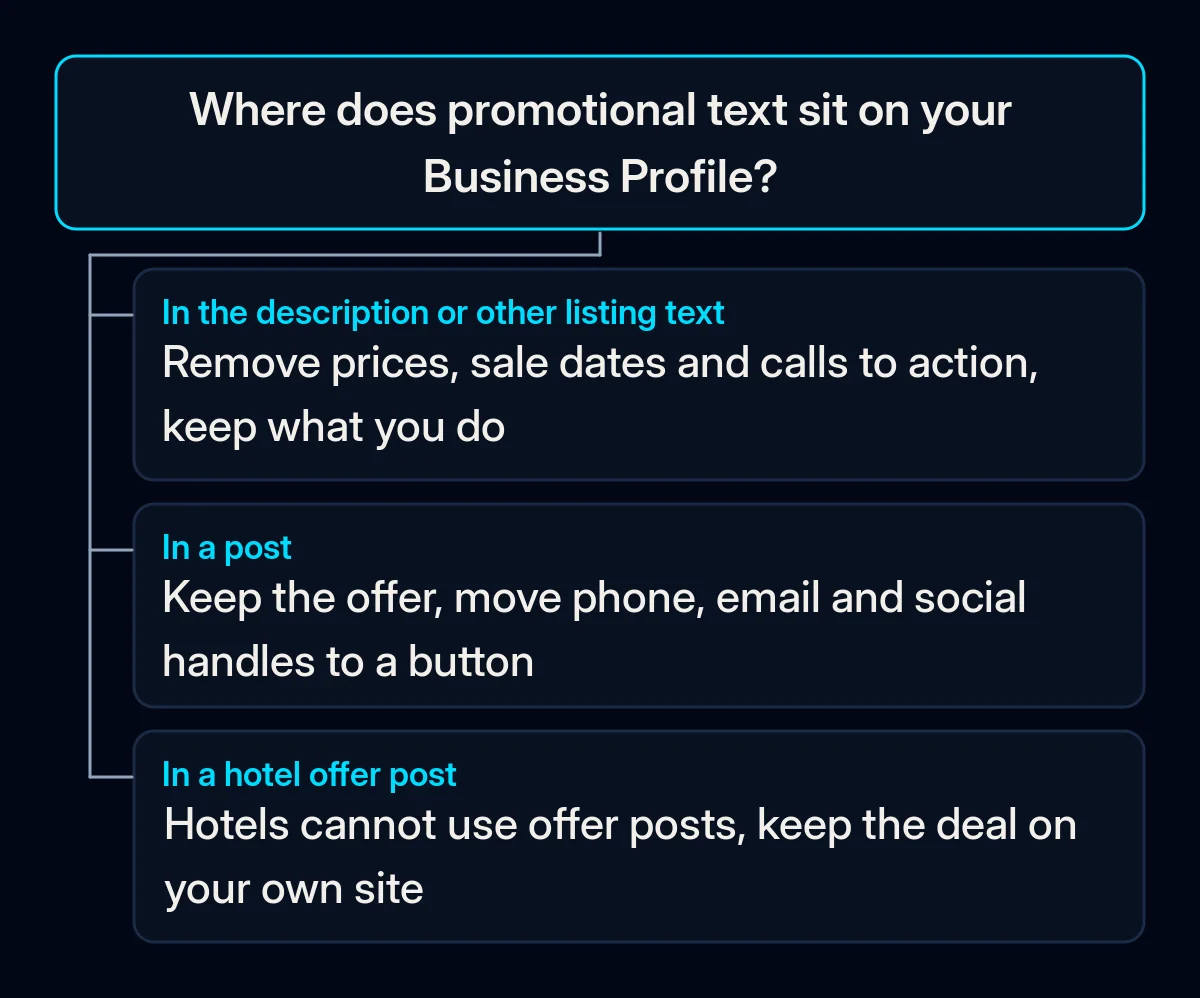
- Read your listing as a stranger would. Open the description and the other text fields and look for prices, sale dates, “this week only”, “call now” and “book today”. Keep what Google’s guidelines ask the description to cover: your services and products, your mission and history. In an SEO audit we start the same way: we read what is already there before changing anything.
- Move dated offers into an offer post. Google says offer posts are allowed, and an offer post needs a title, dates and time. It gets a View Offer button. Hotels cannot create offer posts at all. On our own profile, prices live on our website, and the description says what we do.
- Take contact details out of post text. Remove phone numbers, email addresses and social media handles from posts. Use the Call now button, which uses the verified number on your profile, or an action button that links to a page on your own site. It is the same idea we use when packaging social media profiles: the profile works like a landing page, and its link goes to a tracked page on your own site.
- Leave the rest of the profile alone. Change only the text that breaks the rule. The update does not mention the business name, address, category or website fields, so leave them as they are unless they carry a price, an offer or a call to action.
- Check post statuses. A post marked “Not approved” does not show on Search or Maps, and the question mark next to the status shows which policy it broke. Appeal once and wait for the decision; in the UK and EEA, use the appeals tool.
If your offers live on your website, they can still reach people. From 12 October, Google Ads can pull promotions from your website into some ads. And if you are still setting up your profile, our guide on why a website does not show up on Google covers how the profile and the site support each other.