A customer forwards you a chat: your website assistant told them returns are free for sixty days, while your policy says thirty. Or a colleague quotes a contract clause that the internal assistant “found”, and nobody can find it in the contract. Both are cases of AI giving wrong answers. The short answer: you cannot switch the errors off completely, but you can usually find which kind of error it is and make confident wrong answers rare, visible and handed to a person.
The usual reactions are to blame the model, to add “do not make things up” to its instructions, or to switch the assistant off. Often the cause is more ordinary: the assistant was asked something its material does not answer, it read the wrong page, or nobody told it that “I don’t know” is an acceptable reply. Each of these leaves a trace you can check yourself.
Why is your AI giving wrong answers?
A language model writes the most plausible next words. When it has the fact in front of it, the plausible answer is usually the right one. When it does not, it still writes something fluent, and NIST calls this confabulation: “confidently stated but erroneous or false content”, known colloquially as hallucinations.
OpenAI’s researchers explain the confidence: standard training and evaluation “reward guessing over acknowledging uncertainty”. Its help centre adds that “confidence isn’t reliability”: a fluent, certain reply can still be wrong. In a business assistant, that general habit shows up through a few specific gaps.
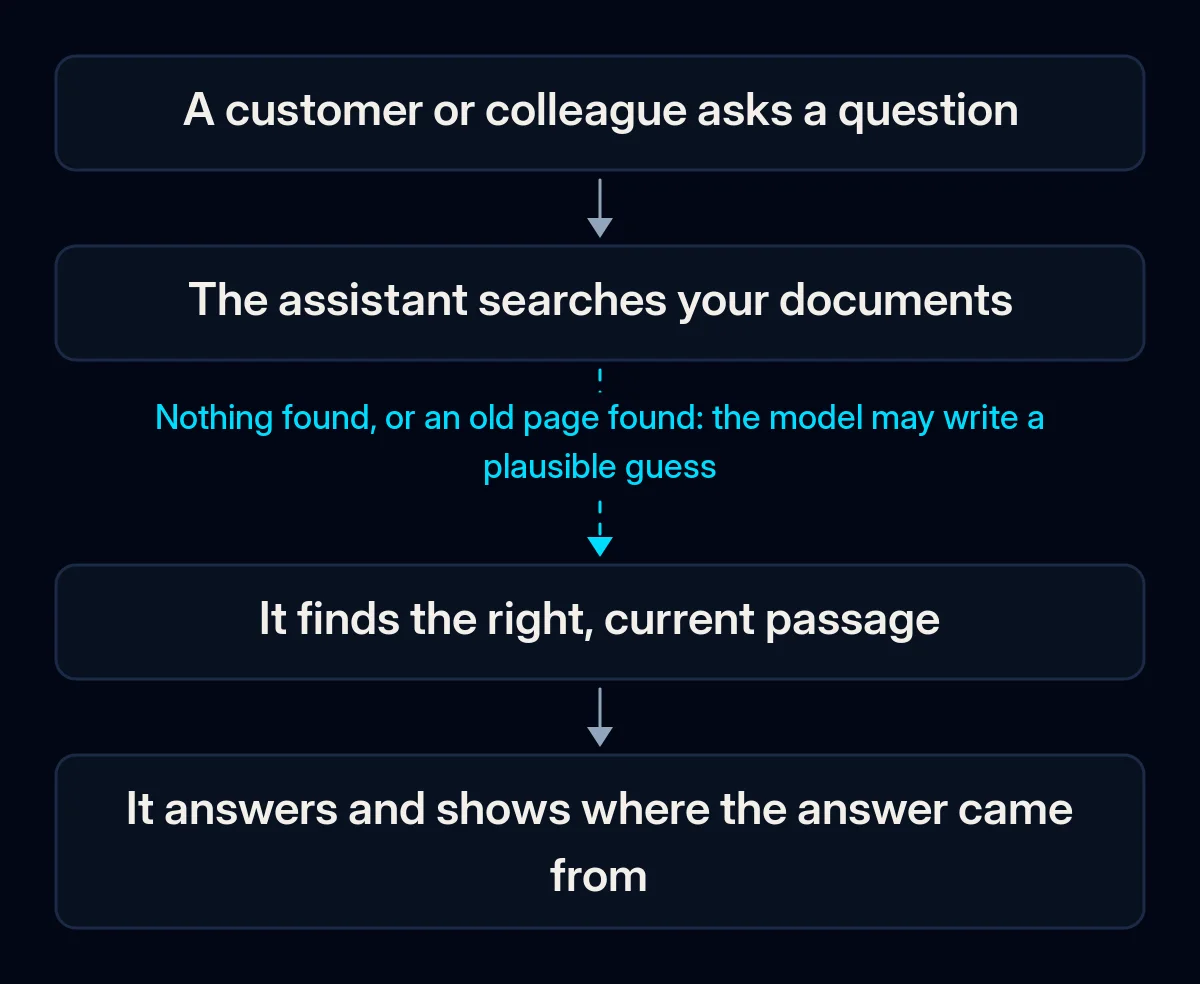
The answer is not in its material. A customer asks about a service you stopped offering, a country you never shipped to, or a discount that was never written down. A study of document-based assistants by Barnett and colleagues lists this as the first failure point: a question “that cannot be answered from the available documents”. The assistant guesses from its general knowledge, which is how a plausible but invented return period appears.
It found the wrong page. The assistant searches your documents first and answers from what it finds, so if last year’s price list, a draft policy and the current one all sit in the same folder, it may quote any of them. Microsoft’s guidance on checking answers against sources starts from the same point: the sources themselves have to be “accurate and up-to-date”. You will recognise this cause when the wrong answer turns out to be true somewhere in your files, only outdated.
The rule exists only in someone’s head. Your team knows that refunds over a certain amount need a manager, or that you do not promise delivery dates in December. When nothing the assistant reads contains that rule, it fills the gap with a sensible-sounding policy of its own.
The question is outside its job. An assistant set up for opening hours and bookings gets asked for legal, medical or pricing advice. With no instruction to decline, it tries to help.
Nothing allows it to say “I don’t know”. Instructions like “always help the customer” can push the model to answer even when it has nothing to answer from. Anthropic’s documentation says that explicitly allowing the model to admit uncertainty “can drastically reduce false information”.
These gaps sit along one path from the question to the reply, and the reply goes wrong at the first step that fails.
Who answers for what the assistant says?
The business did in one well-known case. In Moffatt v. Air Canada (2024), the airline’s chatbot suggested a customer could apply for a bereavement fare retroactively, which the airline’s policy did not allow. The tribunal in British Columbia found that “It makes no difference whether the information comes from a static page or a chatbot”. It held that the airline “did not take reasonable care to ensure its chatbot was accurate”, and awarded the customer CA$812.02.
The same principle applies to assistants your staff use. In Mata v. Avianca (2023), a US court ordered two lawyers and their firm to pay a joint $5,000 penalty after they filed court decisions invented by ChatGPT and continued to stand by them when questioned. The court said there is “nothing inherently improper” about using a reliable AI tool, but the person filing keeps a “gatekeeping role” over accuracy. When someone forwards an internal assistant’s wrong answer to a customer, the customer is likely to read it as your company’s answer.
How to tell which cause is yours
To find the cause of AI giving wrong answers, collect a set of real questions and check each reply against what you know is true. You need no paid tools, only the assistant, your documents and access to its conversation history. Taken together, the wrong replies tell you which gap to close first.
- Write down real questions. Take them from recent chats, emails and calls, in the customers’ own words. Add questions your documents do not answer, and a few that are outside the assistant’s job.
- Write the correct answer next to each. For the questions with no answer in your material, the correct answer is “I don’t know, let me pass you to a colleague”.
- Ask the assistant every question, then ask some again in other words. If the facts in an answer change between runs, the assistant is probably guessing them.
- For each wrong answer, look at what it used. Many knowledge assistants can show the source passage or log which documents they retrieved; check whether yours does. Note whether there was no source, an old or conflicting source, or the right source that it misread.
- Sort the wrong answers by cause. No document, wrong or outdated document, unwritten rule, outside the job, or a case that needed a person anyway. The largest group is where to start.
Keep this set and run it after every change. The Barnett paper notes that validating such a system “is only feasible during operation”, so add the new questions people ask after launch.
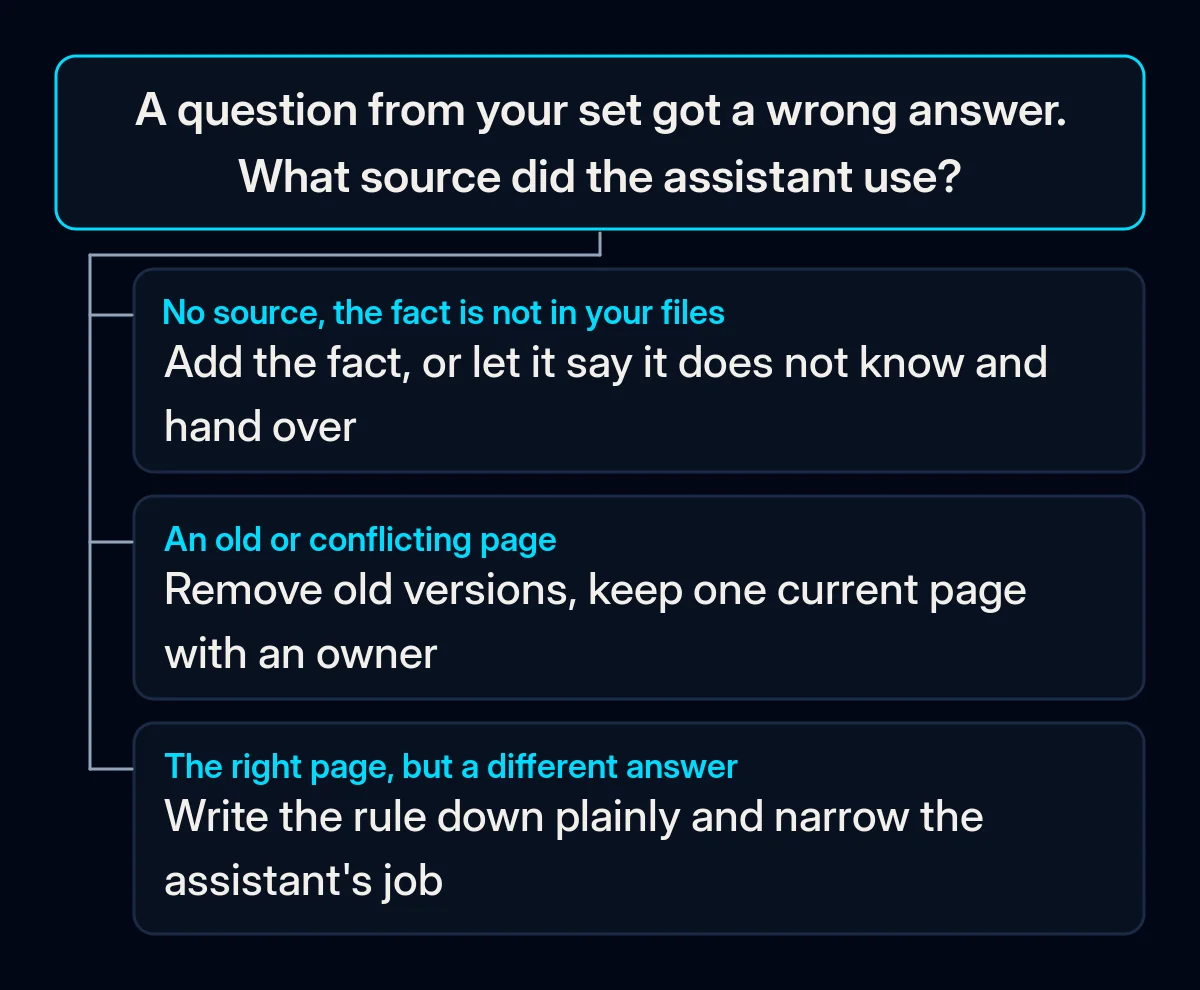
How do you stop an AI assistant making things up?
Start with the cheapest fixes: let the assistant say “I don’t know” and hand the conversation to a person, make it answer only from your documents with a visible source, and keep those documents current. Writing down rules, narrowing its job, labelling it as AI and regular re-tests come next. Re-run your question set after each change, so you can see which one helped.
-
Let it say “I don’t know” and hand over. Change the instructions so that when the documents do not contain the answer, the assistant says so and passes the conversation to a person, with the customer’s question and contact details attached. OpenAI’s researchers make the same point from the other side: models “can abstain when uncertain”. A handover helps only if someone picks it up; our piece on whether an AI chatbot should answer your customers covers where those handovers should land.
-
Make it answer only from your documents, and show the source. This setup is often called retrieval-augmented generation, or RAG: the assistant first searches your material, then answers from the passages it found. Anthropic’s guidance is to restrict the model to “information from provided documents and not its general knowledge”. A visible source under each answer lets customers and staff check it, and lets you see which page caused an error. In our AI implementation projects, a knowledge assistant answers with a link to the source, so a wrong answer can be traced to the page behind it. Expect some errors even then: Stanford researchers testing AI tools for legal research found that “even RAG systems are not hallucination-free”.
-
Clean the material it reads. One current version of each policy, price list and contract template; old versions out of the folder; each document with a named owner who updates it when the rule changes. If the assistant answers from your CRM, the same applies to the records there, as we covered in our piece on CRM data quality.
-
Write down the rules it keeps inventing. Refund conditions, delivery promises, discounts, what counts as a complaint. Where the stakes are high, give the assistant a fixed wording to use, or make that topic one where a person confirms the answer before it goes out.
-
Narrow its job. List what it answers and what it politely declines. Questions outside the list get a short refusal and, where useful, a handover.
-
Tell people they are talking to an AI. In the EU, the AI Act requires that people are informed they are interacting with an AI system unless it is obvious, no later than the first interaction. The duty sits with the system’s provider and has applied since 2 August 2026. Labelling AI replies also sets expectations: after its support bot invented a usage policy in 2025, Cursor began labelling AI replies in email support. In the website projects where we add an assistant, telling visitors they are talking to an AI is part of the page from the start.
-
Re-test after every change. New documents, edited instructions and model updates from the vendor can all change answers to questions that used to work. Run the question set after each one and before a busy season.
What doesn’t stop AI hallucinations on its own?
Three fixes often get tried first: a line telling the model not to hallucinate, a temperature of 0, and fine-tuning on your own texts. Each changes only one part of the assistant. The facts it lacks and the permission to say “I don’t know” come from its documents and instructions, so if wrong answers continue after these fixes, check those first.
| What people try | What it changes | What stays the same |
|---|---|---|
| A line saying “do not hallucinate” in the instructions | How the request to the model is phrased | Without permission to say “I don’t know”, the model still has to produce an answer |
| Lowering the temperature to 0 | How much the wording varies between runs; Anthropic notes that even at 0 “the results will not be fully deterministic” | The documents the assistant reads, and the facts missing from them |
| Fine-tuning (further training) a model on your own texts | In our view, mainly how the model writes and behaves | Prices and terms that change, which belong in documents it reads at answer time |
How do you know the wrong answers are getting rarer?
Track a few numbers from the question set and from real conversations, starting before your first fix so you have something to compare with. Check them after every change, then on a regular schedule once the assistant settles, and read the wrong answers themselves alongside the totals.
- Correct answers on your question set, including the questions where the right answer is “I don’t know”.
- Wrong answers per week by cause, from reading real conversations. A cause that keeps coming back is the next fix.
- Handovers picked up by a person, and how long they waited. A handover nobody answers often ends with the customer leaving anyway.
- Answers that show a source. If the share of answers without a source grows, check whether the documents still cover the questions people ask.
Where we come in
We start from your questions and documents: the question set, the correct answers and the sources the assistant should use. Then we set up the assistant to answer from that material with a visible source and with a person approving answers where it matters. We keep checking it against the question set as part of regular quality checks. If an assistant of yours is already giving wrong answers, the brief is the simplest way to show us where.