The morning starts in the inbox and stays there. Order confirmations to check, invoices to retype into the accounting system, the same delivery questions answered again, attachments saved into the right folder by hand. When people search for how to automate emails with AI, this is usually the picture: skilled people spending the best hours of the day on work that feels like it should do itself.
Many teams have already tried something. An AI assistant wrote drafts that nobody trusted, or an automation started filing emails into the wrong places and was switched off within a week. The usual conclusion is that AI is not ready for email, or that the business is too specific for it. In our experience the cause is more ordinary, and you can find it yourself in one afternoon.
Why attempts to automate emails with AI go wrong
The whole chain is handed over at once. Answering an email is not one task. Someone reads it, recognises what kind of request it is, looks up the facts, decides what to do and then replies and updates a record. Reading, sorting and looking things up are where an agent is strong. Deciding is where it guesses. When the whole chain goes to the agent at once, the guesses go straight to customers. The sign: the drafts read well, and the content is wrong in small, important ways.
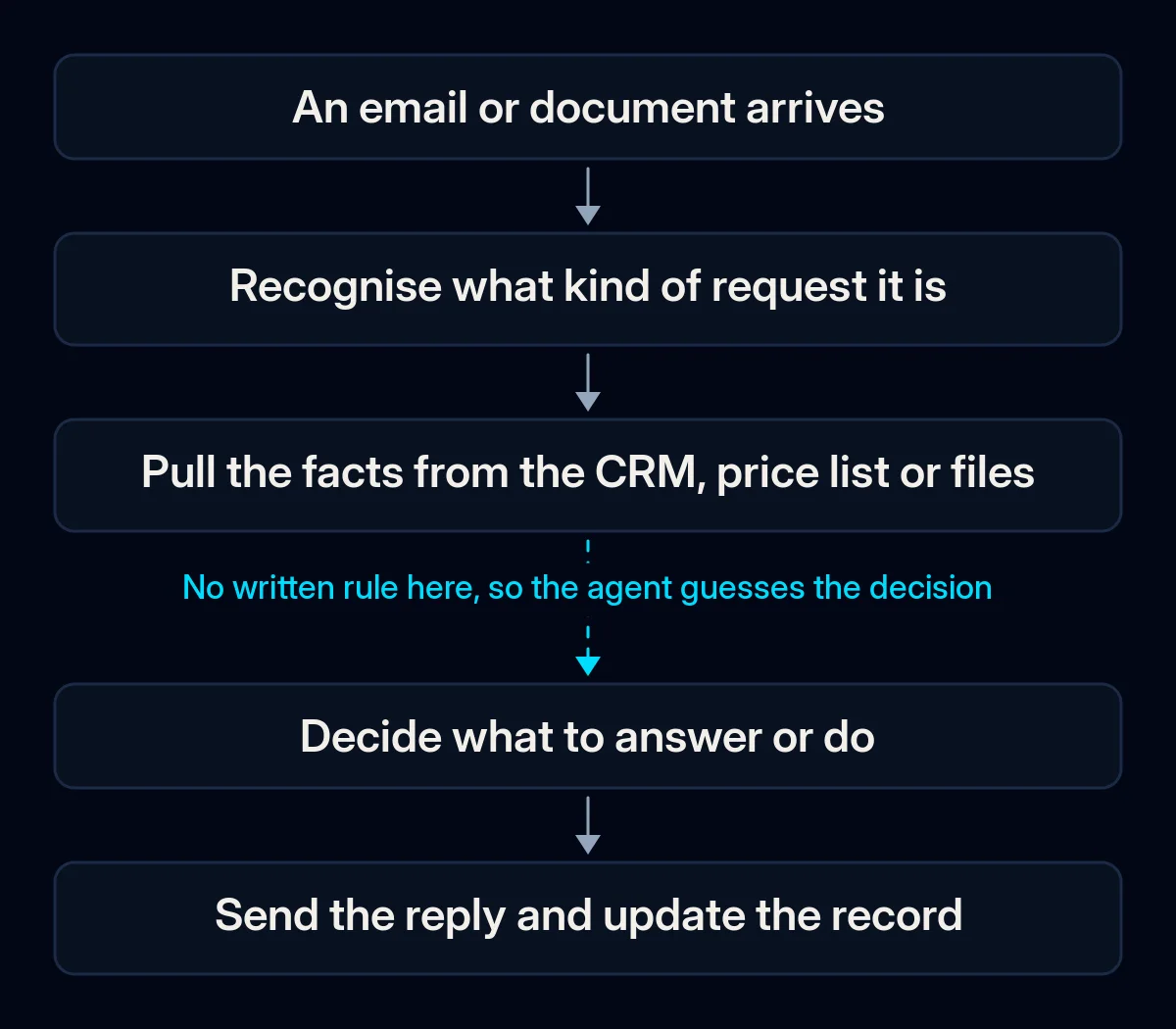
The rule lives in one person’s head. “We give a discount if they have ordered before, unless it is a sale item” is a rule, but if nobody has written it down, the model cannot follow it. It fills the gap with something plausible and says it confidently. The sign: only one person on the team can tell whether a draft is right.
The facts are somewhere the agent cannot see. Stock, prices, order status and customer history sit in the CRM, a spreadsheet or someone’s memory. An agent that sees only the email can only answer from the email. The sign: drafts are polite and vague, and a person still has to look everything up before sending.
The inbox itself is chaos. One shared address receives orders, invoices, supplier offers, complaints and newsletters. Attachments arrive with random names. Automation does not tidy this up; it repeats the mess faster. The sign: even a person needs a moment to work out what each email is.
There is no checkpoint. Replies go out without anyone looking, one wrong answer reaches a good customer, and trust in the whole tool is gone. The sign: the automation was switched off after a single bad email.
How to tell which one is yours
Set aside an hour and go through these checks in order. No paid tools are needed; the first check that fails is usually your cause.
- Sort one day of email by type. Take yesterday’s inbox and put each email into a group: order, invoice, delivery question, complaint, supplier, other. If you cannot name the groups, start with the inbox structure.
- Pick the group that repeats most and write down its steps. What does the person read, where do they look, what do they decide, what do they send and what do they update? Write it as they actually do it, not as it should be done.
- Look for the decision rule. For the deciding step, ask whether the rule is written anywhere. If the answer is “ask the office manager”, the rule is the gap.
- Trace each fact the reply needs. For every piece of information in a typical reply, note where it comes from: the CRM, a price list, a spreadsheet, a person. Facts that live only in a person cannot be automated yet.
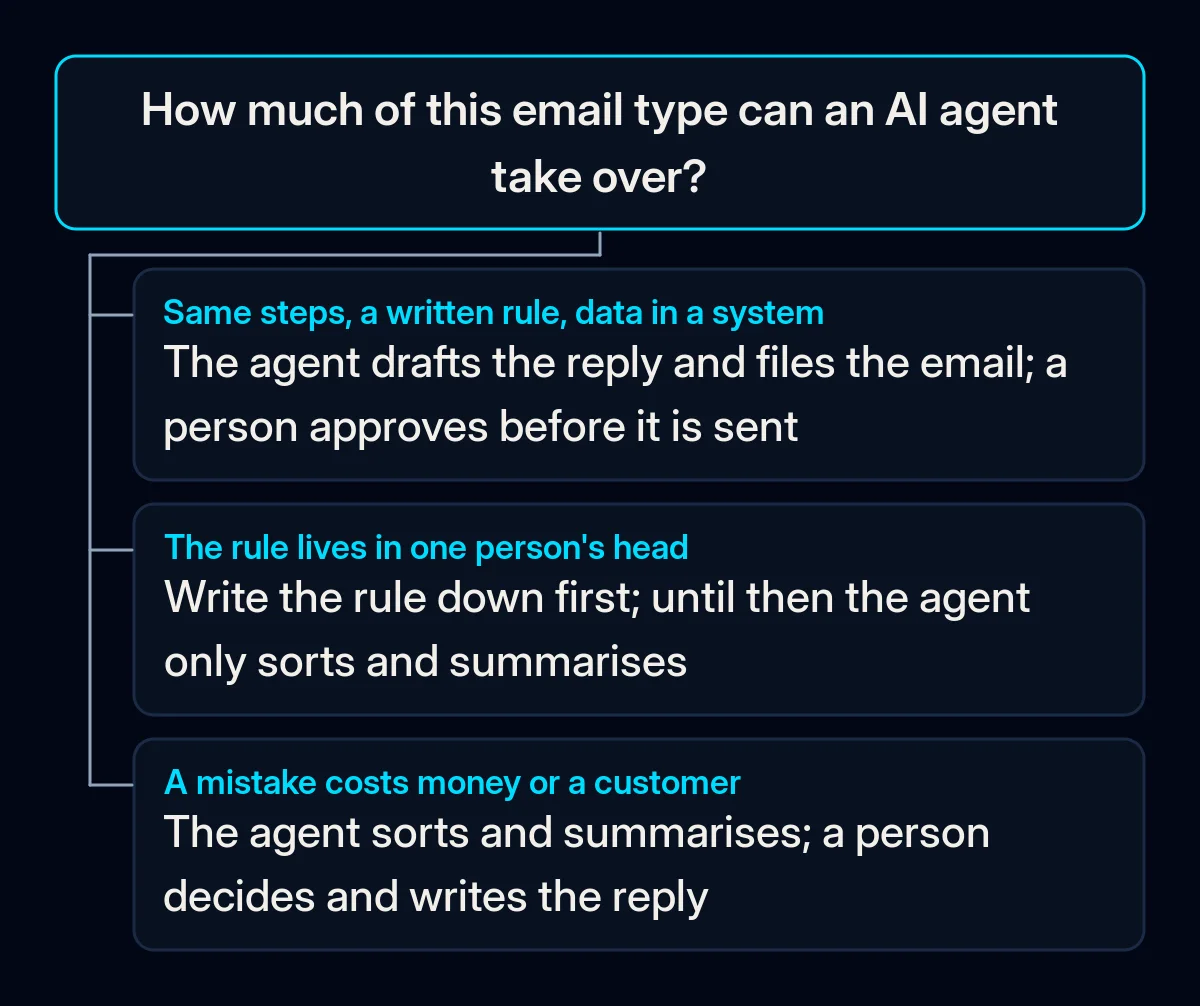
- Ask what a wrong reply would cost. A mistaken delivery estimate is an apology; a mistaken price or refund is money. The higher the cost, the longer a person stays in the loop.
The fix, in order
Cheapest first. The early steps need no new software, only decisions.
- Give the inbox a structure. Separate addresses or folders for orders, invoices and customer questions, and sorting rules in the mail tool you already use. This alone saves time and gives any later automation clean input.
- Write the rule for one email type on one page. What to check, what to answer, which saved reply to start from and when to pass the email to a person. Pick the type that repeats most and has the cheapest mistakes.
- Let the agent read and sort first. The first job for AI is labelling each email and writing a short summary at the top: what is asked, which customer, what is attached. People still reply, but they stop reading everything twice.
- Then let it draft, while a person sends. The agent prepares the reply from the written rule; a person checks and sends. Use a business plan with admin controls rather than personal accounts, and agree what may be pasted into it; we covered those ground rules in what to do when employees use ChatGPT without rules.
- Connect the facts. Let the agent read the customer record, order status or price list, and let it take the fields out of invoices and order forms straight into the system instead of someone retyping them. This is where the work moves into CRM automation: the agent is only as good as the records it can read.
- Only then let it send on its own, for one narrow type. Choose the email type with the cheapest mistakes and a stable rule, and keep a weekly look at a sample of what went out. Everything else stays at “draft and approve”. In our AI agents and automation projects we set this boundary for each email type before anything is connected, and we move it only after the drafts have been right for a while.
What to measure
- Time spent on the chosen email type, noted by the people doing it before you start and again monthly; this is the number that shows whether the work actually moved.
- Drafts sent without edits, counted weekly; when most go out unchanged, the rule is good enough to consider the next step.
- Mistakes caught at approval, logged with the reason; each one points to a missing rule or a missing fact, not to a bad tool.
- How quickly customers get an answer for that type, checked monthly; automation that saves time inside the team but slows replies is not finished.
Where we come in
A team that writes down its rules and tidies its inbox can automate emails with AI in small, safe steps on its own, and this order is meant to make that possible. What we bring is the map of which email types to hand over and where people stay, the rules written so an agent can follow them, and the connection between the agent, the mailbox and the CRM. If you want us to look at your inbox flow with you, a short brief is enough to start.