Whether you pick Wix or Shopify for ecommerce matters less than knowing what your shop has run into. Both can run a standard online shop. Before you move, compare the workarounds your team runs every week with the limits each platform publishes. Then move only for a reason that no setting or app on your current builder can fix.
The problem usually appears gradually. A supplier adds a fourth size range, a second stockroom opens, or a wholesale buyer asks for a separate trade price list. Someone finds a way around it, then another way around the next thing. After a while, every small change in the shop needs a trick, and someone suggests that Shopify would make all of it go away.
Why an online shop outgrows its website builder
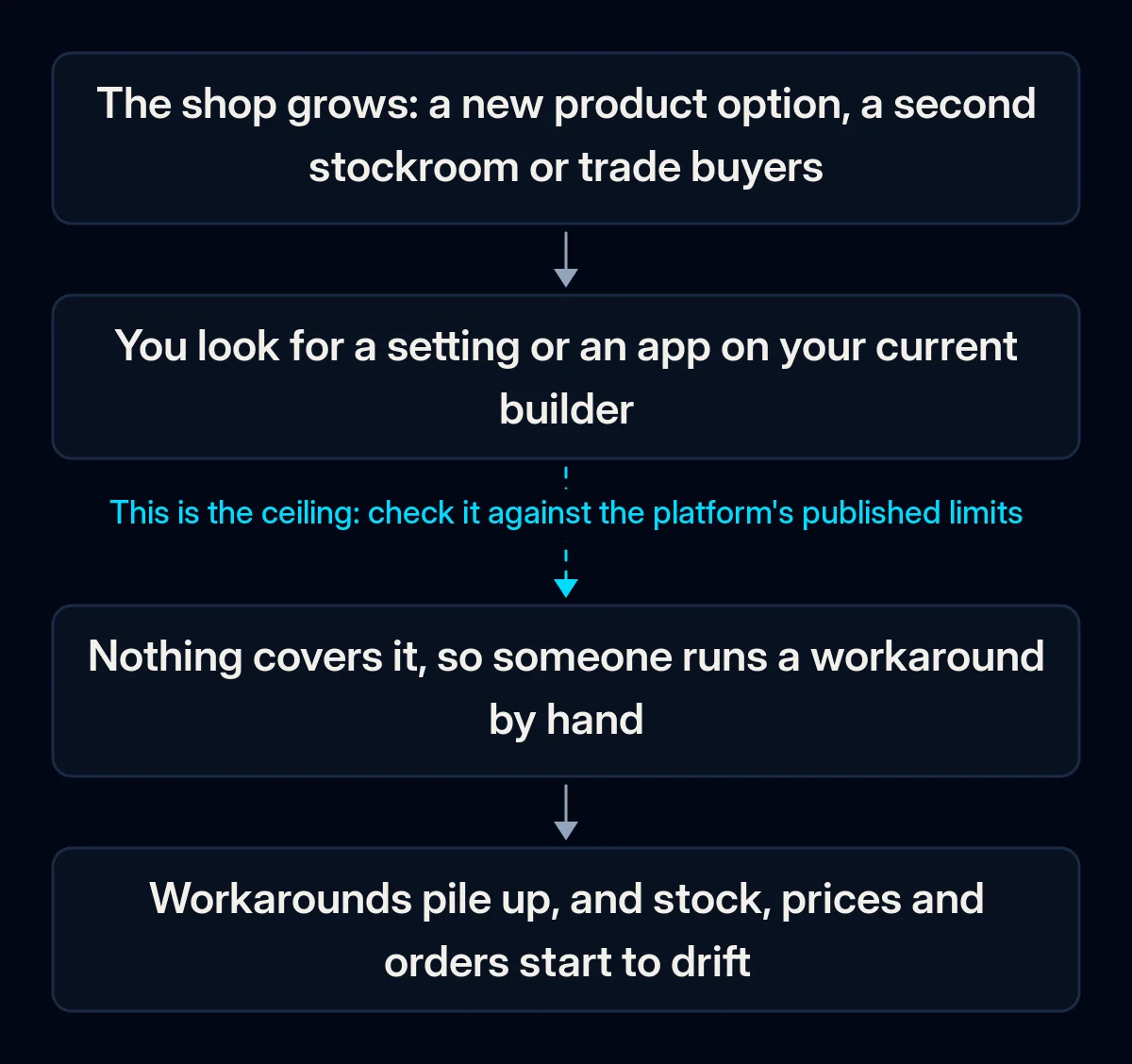
A shop outgrows its builder when the business changes faster than the platform’s model of a product, a stock count or a price. The builder still works, but each new need is handled outside it, by hand. The clearest ceilings appear in the platforms’ own help pages.
The product has more options than the builder allows. An option is one characteristic a customer picks, such as colour or size; a variant is one combination of them.
Wix allows up to 6 options per product and up to 1,000 variants. More options on Wix is still a feature request where Wix is “collecting votes”, and its suggested workaround is to split one product into several. If your catalogue already has the same item listed twice to get around this, you have met the limit.
Stock lives in more than one place. The new Wix Stores catalogue supports several stock locations. Wix’s developer documentation adds that for online orders, “inventory automatically deducts from the default location”, and the standard checkout cannot take stock from another one. If someone moves stock counts between a stockroom, a shop and a warehouse by hand after online orders, this is the mechanism behind it.
Wholesale prices need an app with exceptions. Wix’s help describes selling wholesale through SparkLayer, a third-party app, and lists subscriptions, digital products, Wix Loyalty, automatic discounts and Wix coupons as unsupported with it. A shop that runs retail promotions and trade price lists at the same time may feel that gap. One sign is that wholesale orders still arrive by email and get typed in.
The checkout, where a customer confirms and pays for an order, needs a step its settings do not offer. On the Wix checkout page, you can change colours, buttons and form fields. Wix’s help adds that the page “comes with a number of essential fields that cannot be deleted.” It becomes a ceiling only if your business needs a step or a rule that these settings do not offer.
You want to sell in a second currency. Multi-currency is now available on Wix, so customers can see prices and pay in their local currency if the site uses Wix Payments, PayPal or Stripe. Wix notes that Klarna is only available for the site’s main currency. Selling to a second country is therefore a settings question first: currency, payment methods and delivery before any rebuild.
How to tell whether your shop has really hit the ceiling
You can check this yourself before talking to anyone about a new platform. All you need is your shop’s admin and the help pages of the platforms you are considering. This separates real limits from things that a setting, a cleaner product setup or an app already solves.
- List every workaround you run in a normal week. Products split into two listings, stock counts moved by hand, wholesale orders typed in from email, a spreadsheet next to the shop. Write who does each one and how often.
- Open your most complex product and count its options and variants. Compare them with the option and variant limits in your platform’s help. Do the same for the product you plan to add next season, because that is where a new limit tends to show up first.
- Search the current platform’s help for each item on the list. Search for the exact need, such as “multiple currencies” or “wholesale”, and read the date and conditions. Features change: Wix’s old request page for multiple currencies is now marked as released.
- Check what you can take with you. Wix lets you export up to 5,000 rows per CSV file (a spreadsheet file), and says exporting digital products “is not currently supported”. You can export orders to CSV as well. Try an export now, so you know what a move would carry and what someone would have to rebuild.
- Trace one order from checkout to delivery. Note every place where someone retypes data: stock, invoice, courier, accounting. Retyping between systems is often an integration problem, and a new storefront alone may not remove it.
Wix or Shopify for ecommerce: what changes if you move
A move fixes the limits you hit only if the new platform’s model covers them, and it can bring new ones. The table compares options, variants, stock locations, wholesale and checkout using each platform’s help pages as of October 2026. Plans and limits change, so check the pages again before you decide.
| What you hit | Wix (Wix Stores) | Shopify |
|---|---|---|
| Options per product | Up to 6 | Up to 3 |
| Variants per product | Up to 1,000 | Up to 2,048 |
| Stock locations | Several, with the new catalogue; online orders deduct from the default location | Up to 10 on Basic, Grow and Advanced; up to 200 on Plus |
| Wholesale | Through apps such as SparkLayer, with exceptions | Shopify B2B on Basic, Grow, Advanced and Plus; up to 3 active B2B catalogs (product sets with B2B prices) below Plus |
| Checkout | Design and custom fields; essential fields stay | Logo, colours and fonts from Basic; advanced customisation only on Plus |
Shopify raised its limit to 2,048 variants in October 2025, but each product can still have only three options without a third-party app, while Wix allows six. Squarespace’s help says its builder allows up to six options and 250 variant combinations per product. A product described by colour, size, material and length can therefore hit a new ceiling on Shopify. Shopify also notes that some apps on older interfaces may break on products with more than 100 variants.
Payments can add another cost. If you keep your own payment provider instead of Shopify Payments, Shopify’s help says third-party transaction fees apply.
WooCommerce, a shop plugin for WordPress, works differently: you run it on your own hosting. WooCommerce’s documentation lists hosting requirements such as PHP 8.3 or greater (the server language WordPress runs on) for WooCommerce 10.8 and later. Updates and security then become your job or your developer’s.
What to do before you change platforms, in order
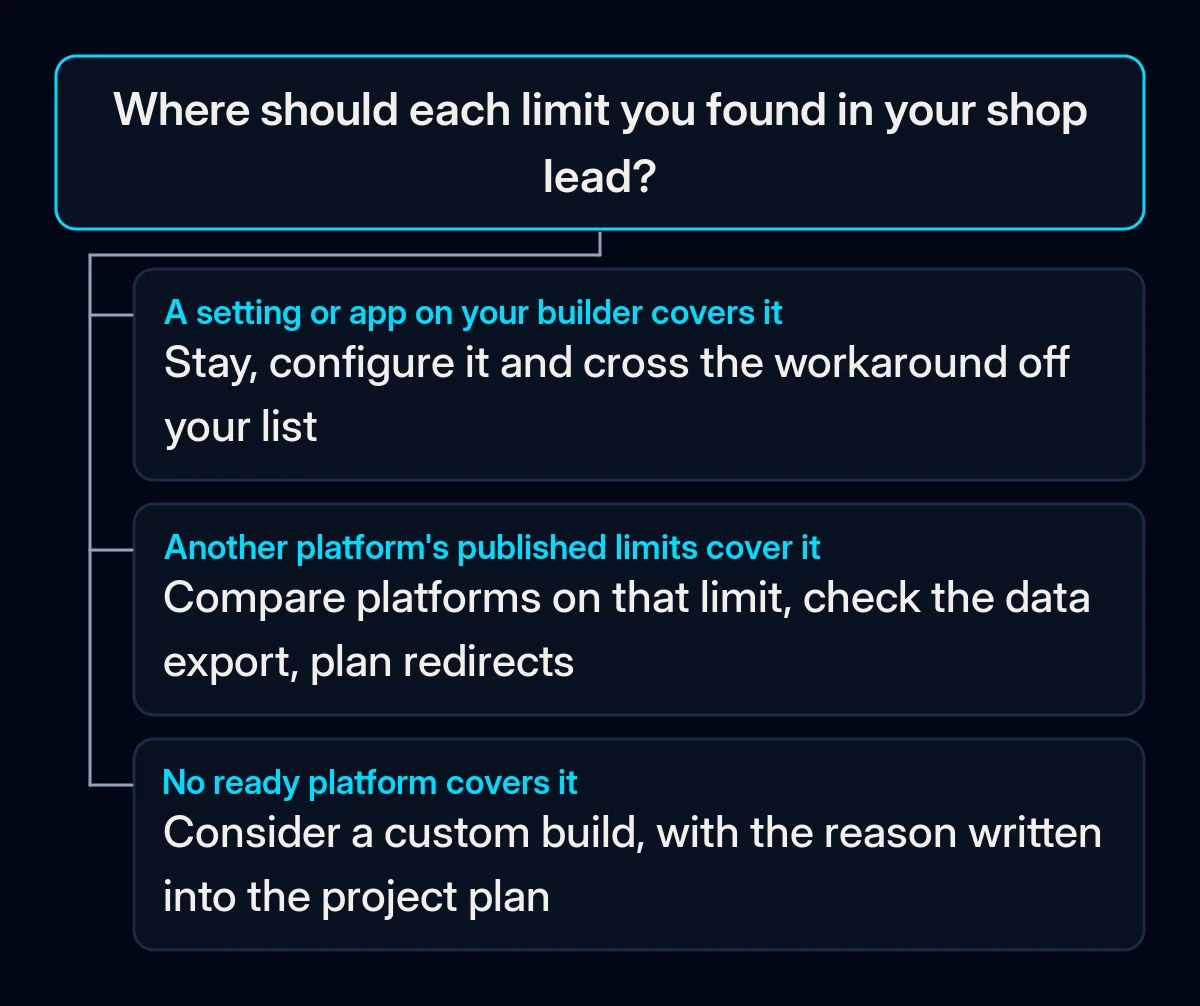
Work from the cheapest change to the most expensive one: settings first, then integrations, then a new platform, and write down the reason at each step. Our rule from what an ecommerce website costs applies here too: start from a platform unless a checked reason forbids it.
- Fix what settings already fix. Switch on features that exist now, tidy the product setup and remove apps you no longer use. If the shop feels slow, look at heavy images and unused apps before you blame the platform.
- Keep stock and orders in one place that every system reads from. If the pain is retyping between the shop, the stockroom and accounting, the fix may be an integration. In our CRM and integration projects, we first map where someone retypes each order, then choose the tool.
- Compare candidates only on the limits you hit. Take your list of workarounds and check each one against the candidate’s help pages: options, variants, locations, wholesale, checkout and payments. In our ecommerce website projects, the platform choice and its reasons go into the project plan, so you can challenge them.
- Check the data before you commit. Run a test export from the old shop and a test import into a trial of the new one. Shopify’s own migration guide says to import products first, then customers, then historical orders, and its Store Migration app warns that some platforms don’t export all data.
- Plan the move around your old addresses. Shopify says its link structure “is likely different from your previous service”. Google’s site move guide adds: “It’s important to map your old site’s URLs to the URLs for the new site.” The full order of work is in our guide to an ecommerce website migration without losing search traffic.
What to measure once you have decided
Whether you stay or move, four figures show if the decision worked: workarounds per week, orders with a manual step, time from a change request to live, and stock mismatches. Take them from your own week before you change anything, then compare them again after the change has settled.
- Workarounds per week. Your list of weekly workarounds should get shorter. If it stays the same length on a new platform, the cause is probably elsewhere.
- Orders with a manual step. Count how many orders need someone to retype or correct something before they ship.
- Time from a change request to live. How long it takes to add a product type, a price list or a delivery option.
- Stock mismatches. How often the shop sells something the stockroom no longer has.
How we handle the decision
We start with your list of workarounds and check each item against the current builder’s settings and apps before anyone mentions a new platform. If a move is justified, the reasons go into the project plan, and we plan the redirect map and the data export before design work starts. A short brief gives us enough information to start that review.