If your site uses Google Tag Manager, Google is changing how Tag Manager starts on your pages. In a release note dated 8 October 2026, Google says every Tag Manager container (the box in Tag Manager that holds your site’s tags) will start as soon as it loads instead of waiting for a gtag('config') command on the page. This Google Tag Manager gtag config change matters most for sites that mix Tag Manager with separate Google tag code, and for containers with rules (triggers) that run tags on every event.
Google emailed the owners of containers it considers set up wrongly. It has not published how many there are, and its help page on the fix still says the update is coming “soon”.
What changed in Google Tag Manager on 8 October?
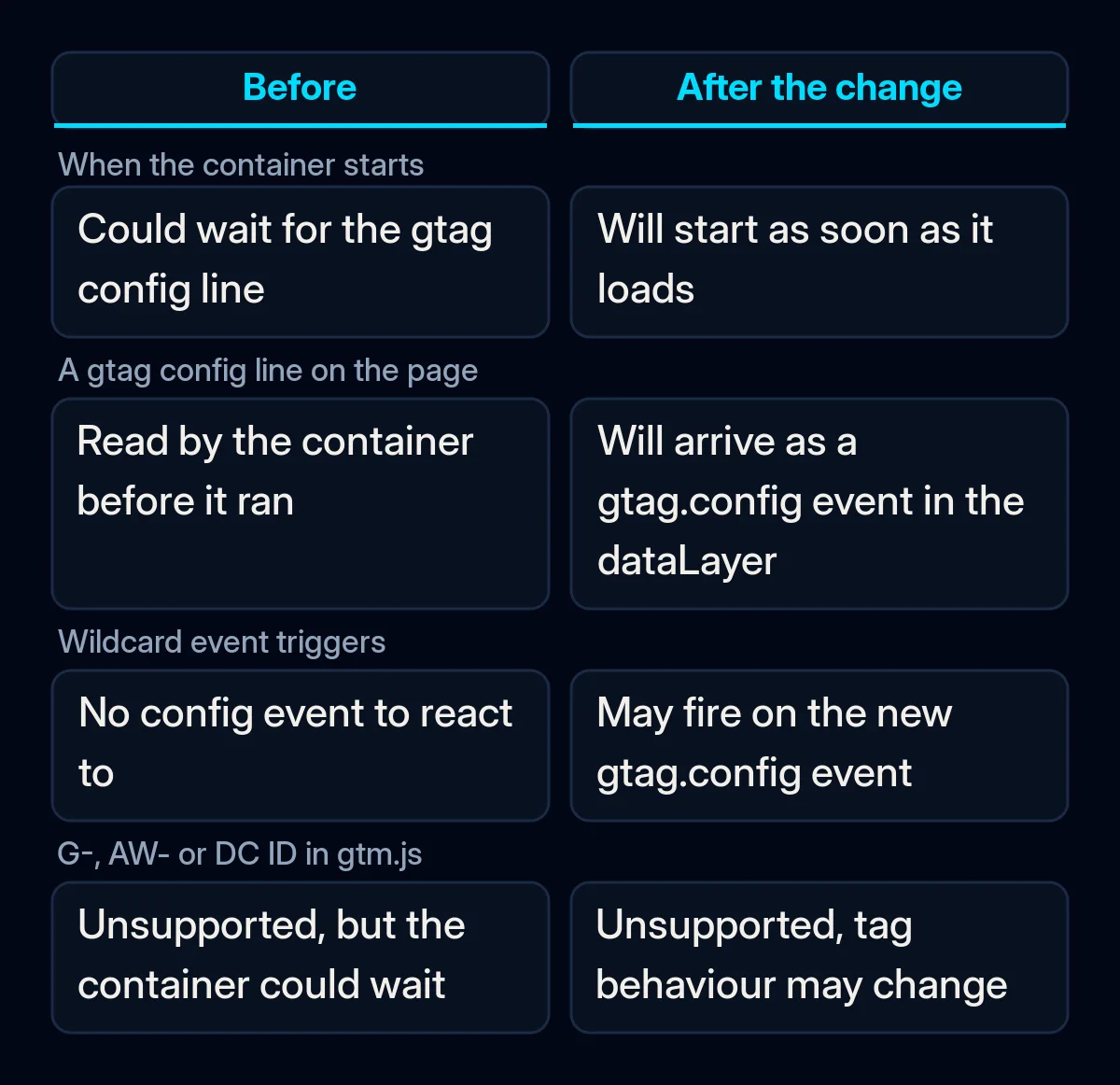
Google says Tag Manager containers will no longer wait for the gtag('config') line, the command that tells a Google tag which account to send data to and with which settings. The release note of 8 October says: “all Google Tag Manager (gtm.js) container snippets will initialize on container load, regardless of any gtag(‘config’) commands.”
A snippet is the few lines of code pasted into every page of your site. A tag is a small piece of code that reports what happens on your site, such as a page view or a sent form. The tag sends this information to a tool like Google Analytics or Google Ads. A website can load Google’s tags with one of two snippets:
| Tag Manager snippet | Google tag snippet | |
|---|---|---|
| File it loads | gtm.js | gtag.js |
| ID it uses | Starts with GTM- | A product ID, such as G- or AW- |
Both snippets write to the dataLayer, a queue of messages on the page that Tag Manager reads. Until now, a container could spot a gtag('config') line elsewhere on the page and wait for it, and some sites relied on that. The release note also changes what the container sees: “config commands will now surface in the dataLayer as visible gtag.config events.”
Which sites does the Google Tag Manager gtag config change affect?
Two groups of sites are affected. Google’s emails went to the first group, which runs what Google calls an “unsupported implementation”. The second group can have a setup Google considers correct, but has rules (triggers) that run tags on every event.
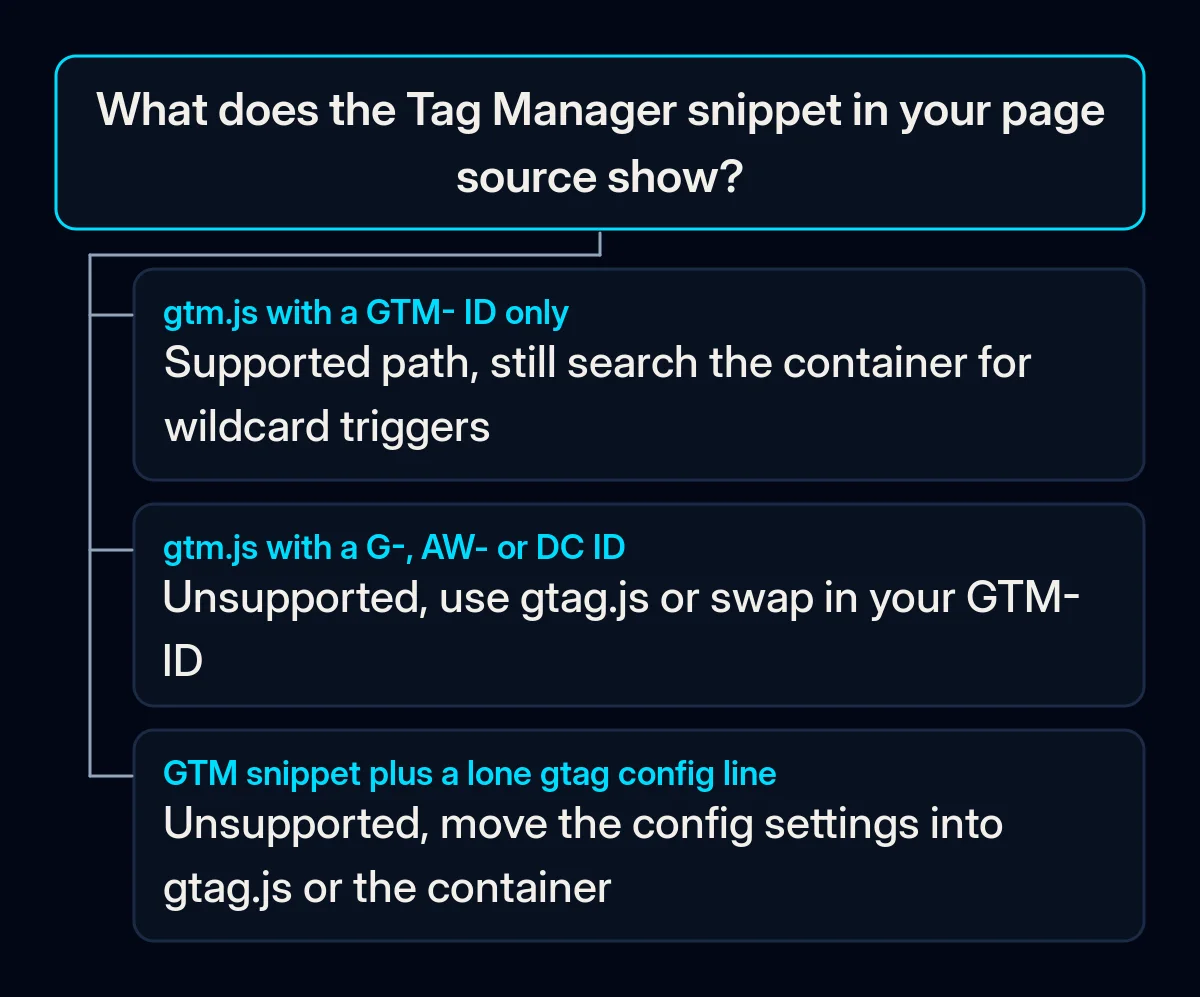
Mixed setups. Google’s help page on the gtag.js setup describes sites that load a G-, AW- or DC ID through the Tag Manager snippet path. Its example of a wrong setup is the standard GTM- snippet followed by a standalone gtag('config') line. For these sites, Google says they “may experience unexpected changes to their tag behavior”, and that their owners “received an email notification”.
Wildcard triggers. A trigger is the rule that tells a tag when to run. A custom event trigger can match event names with the pattern .*, which matches every event in the dataLayer. Google’s release note warns: “If your Google Tag Manager containers use wildcard custom event triggers, this change may cause those tags to fire.”
Google’s help on custom event triggers already recommended a narrower pattern, because .* also matches events that Tag Manager and the Google tag send automatically. PPC Land notes that the wildcard trigger risk also applies to sites whose setup Google considers correct, because the standard gtag.js snippet itself contains a config call.
When did Google announce the gtag config change?
The warning came weeks before the release note. PPC News Feed reported the notice on Google’s help page on 27 August 2026. On 20 August, a user of the WordPress.org support forums posted the email a customer had received from Google. The email read: “Starting on October 02, 2026, all gtm.js snippets will initialize on container load”.
The release note is dated 8 October. Google’s help page on the fix still says Tag Manager snippets “will soon be updated”. As PPC Land and Relevant Audience both point out, Google has not said whether the change reached all containers on one day or is being phased in.
What Google has not said
Google has not given a final deadline or any measure of how much data the change may disturb. Relevant Audience notes that the release note “does not mention any country or regional limit”, and the help page on the fix names none either.
There is also a practical gap. The email went to whoever is listed on the container. Relevant Audience points out that if that person is a former employee or an earlier web developer, “the warning may never have reached whoever manages the site today”.
What it means for your business
In our view, this calls for a careful check of your tracking setup. The task is to check what your pages load, choose one of Google’s two fixes if your setup is mixed, and test that each enquiry is counted once. We would take these steps in this order, before changing anything in your ad accounts.
- Find out who owns the container. You need access to Tag Manager to check anything, and the business should own it, with any agency added as a user. Our guide on how to evaluate a marketing agency explains why the accounts should sit with you.
- Look at the snippet your pages load. Open your site, view the page source and search for “googletagmanager.com”. If the URL contains gtm.js with an ID that starts with GTM-, your container path is the supported one. If gtm.js carries a G-, AW- or DC ID, or a standalone
gtag('config')line sits next to the Tag Manager snippet, you have the setup Google warned about. - Pick one of Google’s two fixes. Use the Google tag (gtag.js) snippet on every page and remove the gtm.js snippet and any standalone config lines. Or, if Tag Manager runs your other tags, keep the snippet with your GTM- ID and set up the Google tag inside the container. Carry over any settings the old config line passed, and leave your cookie consent setup in place, so tags still follow the visitor’s choice in your cookie banner.
- Search the container for
.*triggers. Open the triggers list and look for custom event triggers that match all events. Narrow each one to the event names it needs, because a tag that runs on gtag.config can send the same data again, for example, by counting one enquiry as two. - Test with Tag Assistant and a real enquiry. Tag Assistant is Google’s troubleshooting tool for checking the tags on your website, and Google’s help page says your tag ID should show a green or blue status icon there. Then send a test enquiry from your phone and check that it is counted once, the way we describe for Google Ads that bring clicks but no enquiries. In our Google Ads management, we check tracking before any bid changes.
- Compare counts with your inbox or CRM. Put the enquiries in your inbox or CRM next to the conversions Google reports for the same days, before and after 8 October. We use the same check in our CRM and analytics work, and if the numbers no longer match, the tags are the first place to look.