
Set HubSpot required fields at the point where someone can truthfully supply the information the next decision needs. For a manual deal-stage change, use the relevant stage setting, then check missing and complete values before rollout. Automated entry needs a separate check because the configured rule and the software route used to send the data can change what happens.
A deal is ready to move, but the screen asks for details nobody knows yet. Elsewhere, a record reaches the next colleague with a blank field. We start by writing down the decision that needs that information. This guide concerns deal-stage requirements; a website form or a record-creation panel has its own settings.
Which HubSpot required fields rule are you changing?
Identify when the information is needed before choosing a setting. HubSpot’s pipeline guide distinguishes showing a field at a stage from requiring its value. Its create-form guide describes requirements at manual record creation. These controls apply at different moments: the first entry and a later handover can need different information.
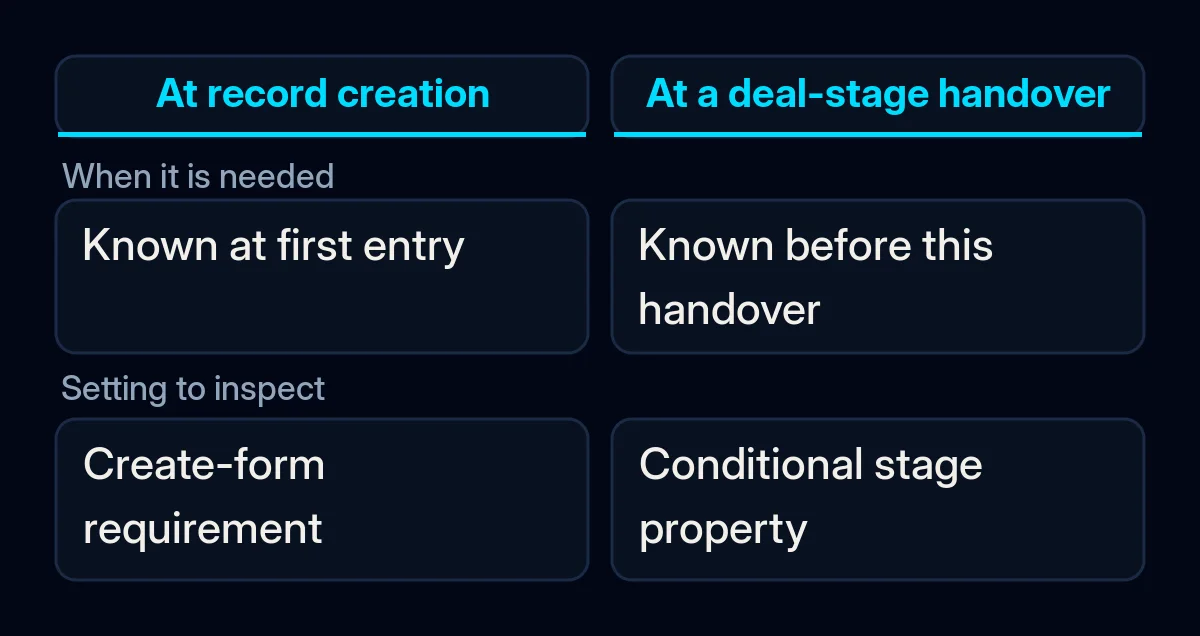
A property is a field on a record. A pipeline is the sequence of stages through which a deal moves. Use the following distinctions when asking your administrator what is already configured.
| Control | Question it addresses |
|---|---|
| Create-form requirement | What must be entered when someone manually creates the record? |
| Conditional stage property | What should appear or be required when someone manually creates a record in, or moves it into, this stage? |
| Conditional property logic | What other fields should be requested when a controlling property meets a condition? |
| Website form’s Required toggle | What must a visitor complete to submit this form? |
| Value validation | Does the entered value meet a supported format or range rule? |
HubSpot documents these as separate controls, with their own availability and scope. A field appearing on screen does not establish that it blocks a save. A non-empty field still needs a meaningful answer.
Decide what the next colleague needs to know
Write the intended decision in ordinary language, then name the information needed to make it. For each proposed required field, record who uses the answer, when it can be known and what a useful value explains. If nobody can explain its use, leave the requirement under review.
For example, a colleague may need a clear account of what the prospect has asked for before preparing a proposal. Agree what that account must contain. Asking for a guessed answer earlier would leave the decision unresolved even if the field contained text.
Keep an explicit way to handle information that is still unknown. Ask the responsible person to review the stage or the timing of the requirement. Preserve existing data and check dependencies before changing a rule; deleting fields or adding dummy values is outside this procedure.
If conflicting records make it unclear whose information you are changing, resolve that identity question first. Our separate guide to reviewing duplicate HubSpot contacts explains why a merge needs its own checks.
Set the field for the intended deal stage
Use HubSpot’s documented stage procedure with an existing authorised administrator. The pipeline guide requires Edit property settings permission and an existing editable dependent property. Check the actual account’s subscription and object availability before proceeding; a missing control is a reason to ask the administrator, not to purchase an upgrade based on an assumption.
Before changing anything, record the previous rule and agree how to restore it. Arrange approved test records in an environment where the checks cannot contact customers, trigger campaigns or billing, or alter live reporting. If that isolation is unavailable, ask the administrator to prepare it before testing.
- Open Settings, then Data Management and Objects. Select the relevant object and its Pipelines tab.
- Select the intended pipeline. In the target stage row, open Add rule under Conditional logic rules.
- Confirm the stage condition, then add the dependent property. Select Required when the missing value should prevent the covered manual action.
- Save logic and record exactly which stage and property the rule covers.
Read-only properties, including calculated and score values, cannot be used as stage properties according to the same guide. If the field is unavailable, check its definition before creating another field with the same purpose.
Check missing and complete values before rollout
Test the agreed condition with an approved synthetic record and record the expected result before taking the action. Start with the selected field empty, then supply a meaningful test value. Inspect the saved stage and field after reopening the record. The result applies only to the condition, person or system, and route you actually checked.
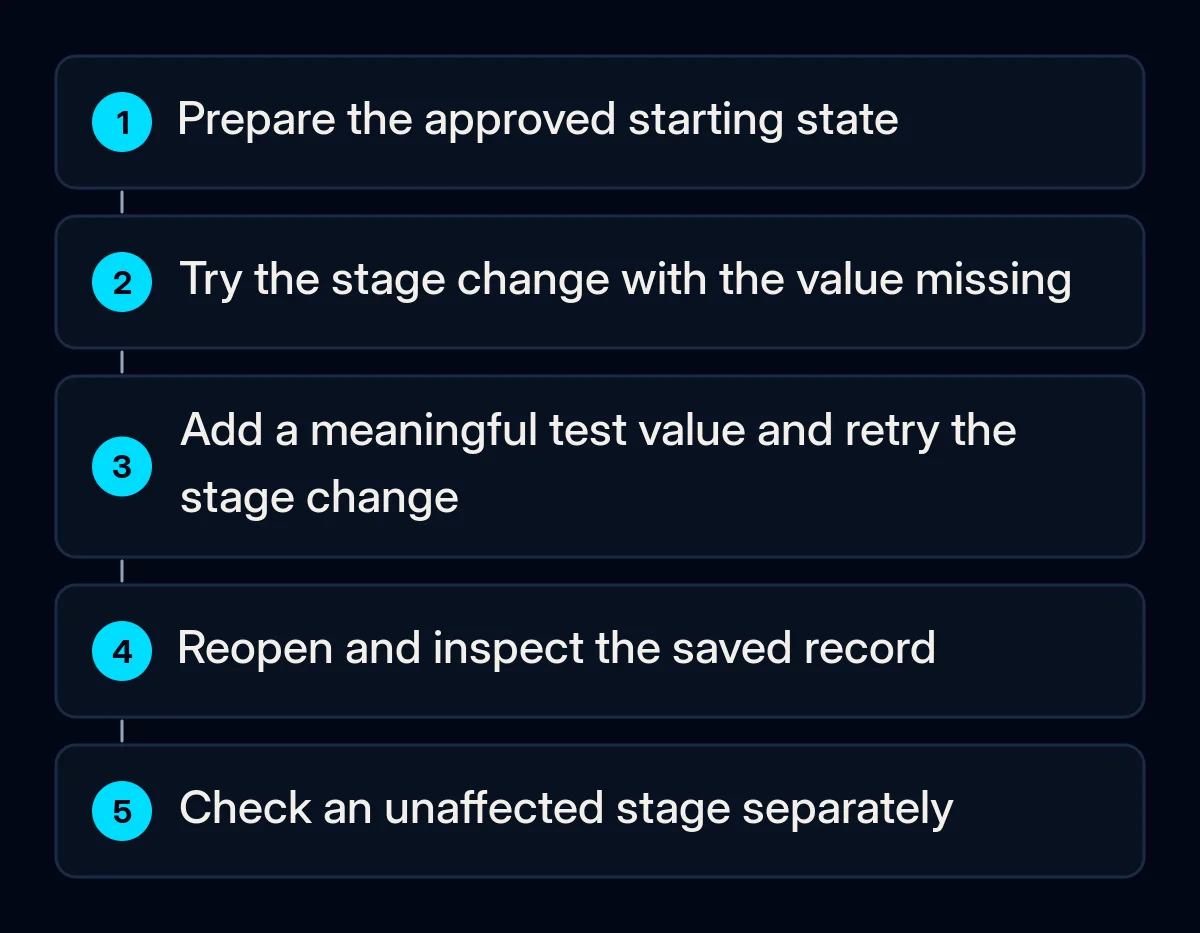
- Try the covered manual stage change with the dependent value missing. Note whether the relevant prompt prevents the save; an unexpected result remains an open issue.
- Supply a clearly fictional test value that still matches the agreed meaning. Repeat the action and inspect what was saved.
- Check a stage outside the configured condition separately, so an unexpectedly broad requirement is visible.
- Keep the starting state, expected result, observed result and person responsible for any mismatch together.
Use the same record carefully so that a previously saved value does not invalidate a later missing-value check. Have the administrator prepare the intended starting state. A completed screen interaction alone is insufficient evidence of the stored result.
Check the routes that write your records
Manual success does not establish how a workflow, import, website form or connector handles the requirement. A workflow is an automated process within HubSpot; an API is the software interface a connector can use to write records. HubSpot’s conditional-property guide excludes workflow edits from its documented manual coverage.
Its developer changelog describes enforcement of configured conditional required properties and record-creation requirements in the 2026-09 API version, with creation requirements applying to POST requests. A connector’s actual route and version matter.
Ask the person maintaining each route you use to identify the rule and run approved missing-input and complete-input checks. There is no need to add an import or an integration merely to test it. Keep a separate result for each existing route, including the returned message and the stored stage and value where inspection is available.
The API changelog advises against retrying the same rejected request unchanged. If a write is rejected, preserve the enquiry through your approved process and give the correction a visible owner. Investigate the missing information or mapping before retesting; do not weaken the rule simply to make the request pass.
In CRM configuration and integration checks, we connect each field decision with the routes that write it. If a stage also feeds paid advertising measurement, agree what that status means before it is used there. Filling a field does not establish a sale or a valid advertising outcome.
What to review after the change
Review the requirement against the decision it was meant to support. Compare the same kind of records and routes before and after the change. Keep untested routes visible and repeat affected checks after a relevant rule or integration change. Keep the original limits of a passed manual check.
- Are values useful for the next colleague’s decision, or are people entering placeholders?
- Can the person responsible see incomplete or rejected writes and correct them?
- Does an honest unknown remain visible with an agreed next action?
- Which stages, actors or write routes still lack a recorded result?
These observations support the next configuration decision. They do not establish an improvement in sales or prove that every entered value is true.
Where we come in
We start with the field’s purpose, the stage where it becomes known and the person who needs it. We map that decision to the existing setting and a check for each route in use. Write down the problematic stage, the missing information and every route that writes the record. You do not need customer exports or account credentials to define that question.