
Before moving from Meta Verified to Meta One, compare your current business profile’s essential benefits with the offer shown in that account. Check support, protection and the recurring cost shown in the offer.
If a required benefit is missing or the switch is unavailable, pause the change. Start with a private note of the exact profile, plan and functions your team uses.
Can you switch Meta Verified to Meta One now?
Meta’s switching guide describes a gradual, optional move and currently excludes annual plans. Its detailed plans guide also limits eligibility by account and location. A public plan page cannot confirm whether your particular business can switch.
Open the subscription details in the app and account used for the purchase. Record the current plan, the subscribed business profile, where you bought the subscription and the renewal terms. Look for an offered switch for that same business profile. If the option is absent, leave the current subscription unchanged and check the guidance that applies to your account.
Our earlier Meta One business subscription overview covers the launch packages. Here we are checking what an existing subscriber needs to preserve before changing plans.
Which benefits could your business lose?
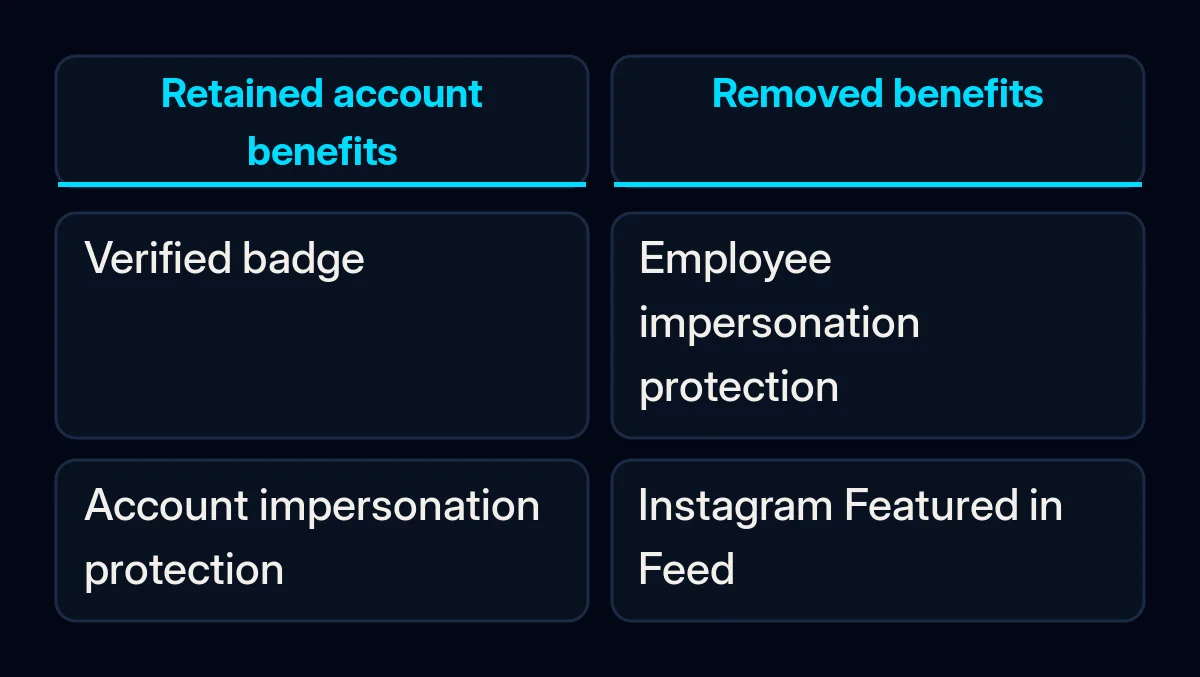
Meta’s switching guide says that the badge, account impersonation protection and linksheet (the profile feature for links) remain. Businesses lose employee impersonation protection, and Instagram’s Featured in Feed benefit is removed. Account protection and employee protection cover different people.
Support needs its own row in your notes. Essential does not include human support. Higher plans differ, and Meta’s support guide says capacity or account restrictions can limit access. If reaching a person is essential, verify the offered support terms. An open support case is another reason to clarify continuity first; the public guidance does not establish how your case will be handled.
Avoid assuming that every linked account receives identical benefits. Meta’s plans guide distinguishes benefits attached to the subscribed profile from shared features. Write down which business profile each required function covers.
What happens to the bill when you switch?
For the offered switching flow, Meta describes a new purchase. The old Meta Verified subscription ends immediately, with a prorated refund for the unused period. The billing cycle restarts, and existing discounts do not carry over. Compare the recurring amount as well as any initial offer before confirming.
Keep the new charge and the old-plan refund as separate records. Google Play explains that the timing of an approved refund depends on the payment method. If you paid through another store, check its refund process separately. Do not assume the cash returns before the new charge.
Meta’s billing guidance directs you to the original purchase platform and account. Find that payment history before changing plans. A colleague looking in a different store account may not have the records needed to compare the charges.
How do you decide whether to switch?
We use a comparison sheet to expose unresolved requirements before a charge or included benefits change. Fill the current-state column from your subscription details, then read the proposed offer for the same business profile. Keep a required function marked unknown until you have an answer you can rely on.
| Check | Current subscription | Proposed offer |
|---|---|---|
| Business profile and app | Record the subscribed profile | Confirm the same profile |
| Support and protection needed | List each function the team relies on | Record retained, changed, absent or unknown |
| Payment terms | Record renewal, seller and discount | Record new charge, recurring amount and refund terms |
| Decision | Name the colleague resolving gaps | Keep, wait or proceed, with a reason |
- Name the functions that matter. Ask the people who use the account what work depends on each benefit. This is the starting point in our social media account audits: understand the existing account before recommending a change.
- Read the offer against the sheet. Check the right profile, required benefits and ongoing bill. If a must-keep function is absent, or its scope is unclear, pause and ask through the support option in the subscribed account or the store handling the payment.
- Record a decision before confirming. A new publishing tool may be useful while the package lacks the support access your team needs. Choose from the completed comparison, without assuming a familiar plan name preserves the old service.
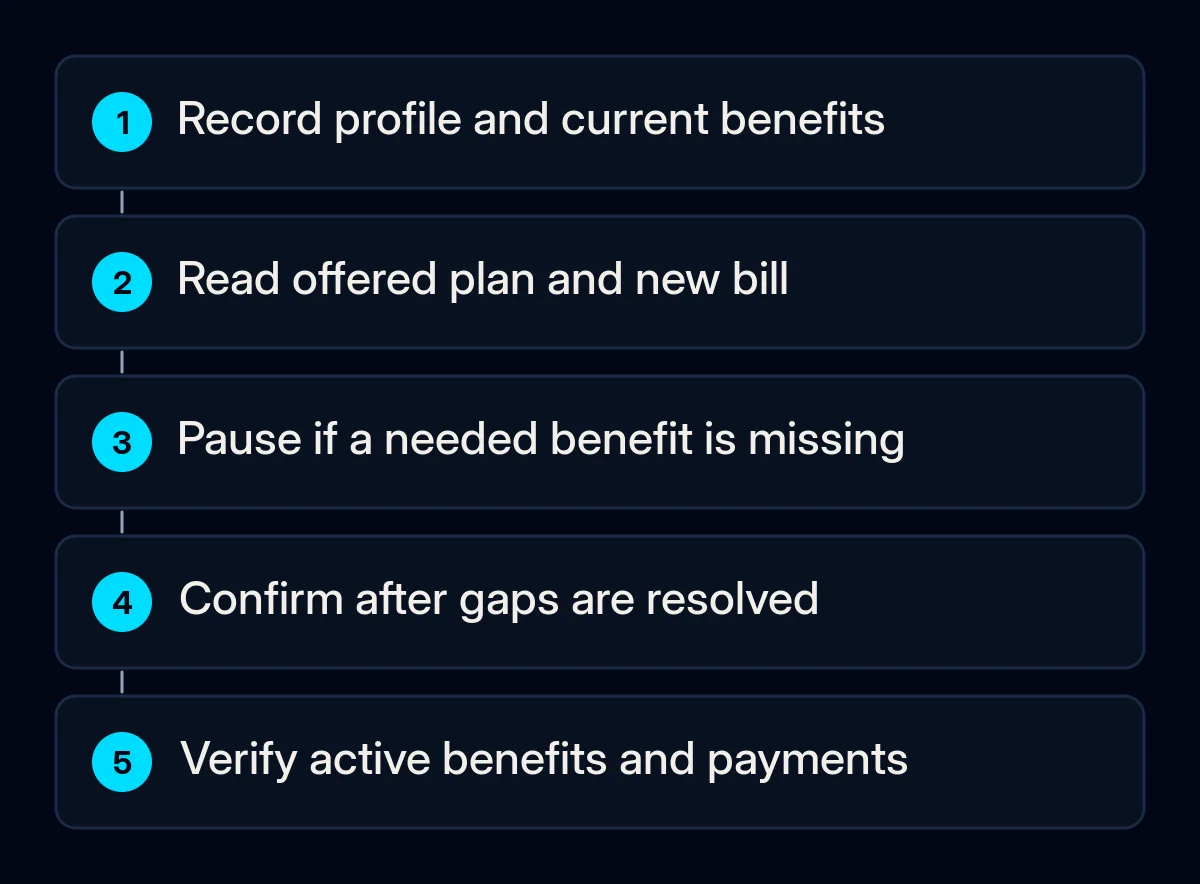
The sheet is our suggested method. The terms shown in your account remain authoritative. You can complete the sheet without buying anything.
How do you check the result?
If you proceed with an available switch, compare the active subscription with the sheet. On Instagram, Meta’s management guide places Meta One details under Accounts Center, then Subscriptions. Confirm the correct profile, active plan and renewal information; navigation may differ in another app.
Check the required support and protection controls that are available to that account. List any missing control for follow-up. Check each required tool separately from the payment receipt, and test support only when you have a genuine issue. Compare the actual charge and refund entries with the original payment history, keeping any unresolved refund visible until it appears.
If your team relies on a contact link on the subscribed profile, open it on a phone and follow that route as a customer would. Check that the intended page opens and accepts an enquiry. When that destination is your website, the same mobile contact check belongs in website projects.
Where we come in
We start with the subscribed profiles, required benefits and unresolved questions, then check the proposed change against that record. Leave the switch on hold while you or the colleague managing the account checks any unknown required benefit or payment term.