Crawled currently not indexed means Google has visited the page without adding it to the collection of pages it can use for search results. First decide whether this exact URL should appear separately in search. If so, inspect it, save the crawl details and compare them with a live test, which checks what Google can access now. Success does not confirm indexing.
You might see the message beside a service page that should help customers find you. Before rewriting it or repeatedly requesting indexing, keep a record of the page you are investigating. We use that record to separate what we observed from a possible explanation.
Crawled currently not indexed: what does it tell you?
Google’s Page indexing help describes this as a common status that does not necessarily need attention. Important pages deserve an individual check. The message does not identify the cause, establish a penalty or confirm that today’s page is technically sound. A recorded crawl and the page you can open now may describe different versions.
Choose an address you would willingly send to a potential customer. Write the job it does: explains an active service, describes an available product, or answers a question that helps someone choose. Compare that job with the closest page you already have. If both pages serve the same purpose, decide which address you intend customers to find before requesting another crawl.
A canonical URL is the version you prefer when pages contain the same or closely similar information. What your page declares can differ from what Google chose.
Save the recorded result before running a live test
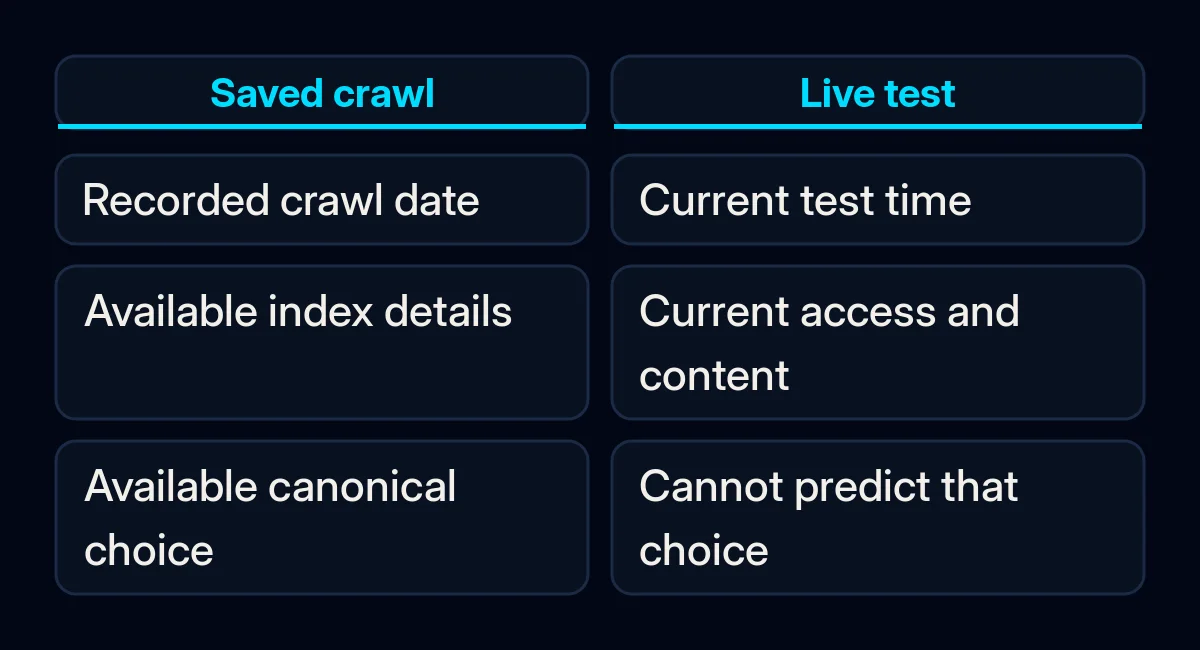
Open Search Console and select the property, the website record that contains the URL. Inspect the complete URL. Google’s URL Inspection help separates saved index data from a test of the current page. Save the initial result before running that test, so you can compare the observations afterwards. You need access to the relevant property; ask its administrator if you cannot open it.
- Write down the page’s purpose. Name the service, product or question this address should help someone find. Keep the exact URL, including its language and any parameters, in your record.
- Capture the initial indexing details. Expand the indexing section and note the status, last crawl date, fetch result and whether indexing was allowed, where those fields are available. Save a screenshot or copy the values into a private note.
- Compare dates. Add the date of the last meaningful page change. If you do not know it, write “unknown”. An older crawl cannot show whether a later edit has been seen.
- Keep canonical fields in separate rows. Note your declared address and Google’s selected address if shown. Missing information stays missing. The documentation says the live test cannot predict Google’s canonical choice.
- Run Test Live URL and note the time. When View tested page is available, look at the page shown by the test: can you find the service description, product details or answer that should be on this page? Record any missing material or specific access failure.
The live result answers a narrower question than inclusion in search. The same help page explains that a live test cannot confirm all quality and security requirements are met. Keep the indexing result and the live result in different rows of your note.
Choose the next action from what you found
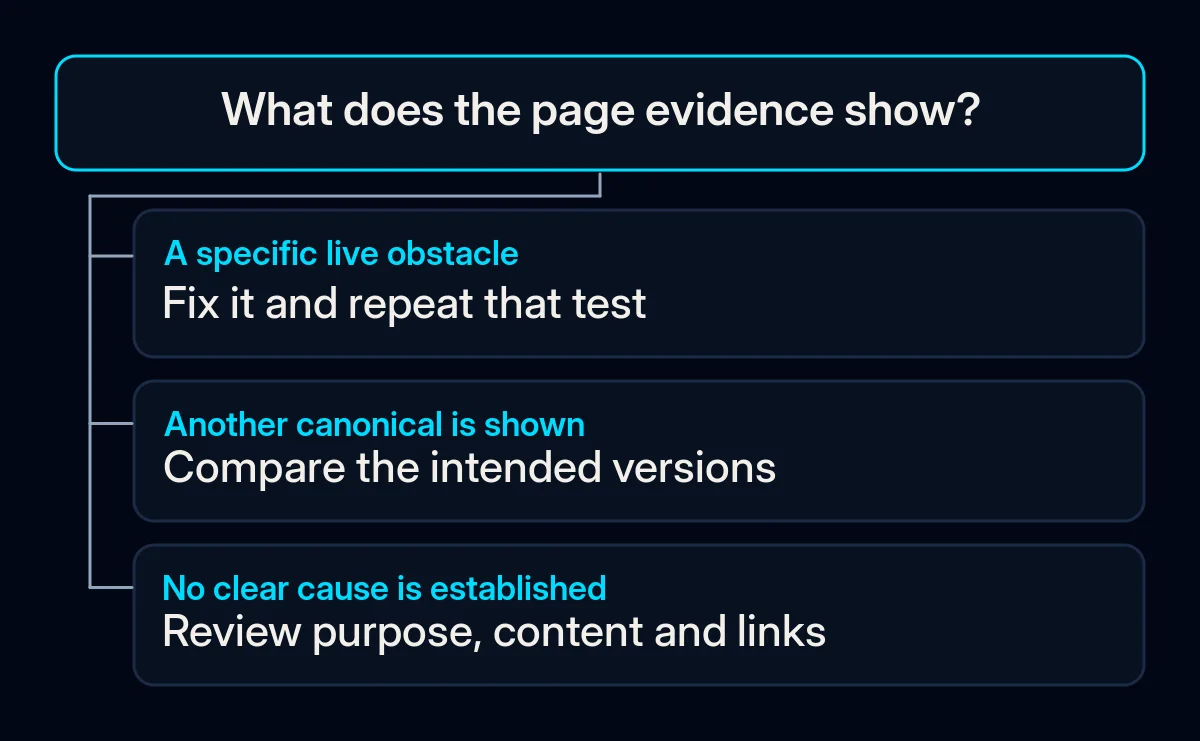
Use the observations to decide what needs attention. If the current test reports a specific failure, investigate that failure on the intended page. If it succeeds, compare the intended version, visible content and internal links. Record the evidence behind the action you choose, including any cause you have yet to establish.
| What you found | Next action | What remains unconfirmed |
|---|---|---|
| The address is deliberately excluded or duplicates the intended page | Confirm that the intended version serves the reader’s task | Whether Google has indexed that intended version |
| The live test reports a specific access or indexing obstacle | Ask the person responsible for the site to correct that obstacle for the intended page | Whether the corrected page will enter the index |
| Google shows a different canonical address | Open that address and decide whether the selection makes sense | Why Google made the choice and whether it will change |
| Live access succeeds, with no clear cause identified | Compare the page’s purpose, substance and links with its closest alternatives | The cause of the missing index entry |
For example, a service page may repeat another service page almost word for word. Ask what separate question the page answers and which address a customer should visit. This comparison can justify changing the page; the cause of exclusion remains unconfirmed.
Make a targeted change and check that change
Choose a change you can explain from the record, and name who will make it. Save the previous setting or content before editing. Avoid a site-wide change to exclusions, redirects or canonical tags just to clear a report count. If the same conflict comes from a shared template, review its scope with the person maintaining the site.
- Correct a demonstrated obstacle. If an important page has an unintended block, fix that block and repeat the test that exposed it. For changes to the way a page loads or its shared template, include a check of the published page in the website development work.
- Align the intended version. Google’s canonical guidance recommends consistent internal links to the preferred address. Check that a relevant page on your site leads to the version you intend visitors to use. Review canonical settings that point to different addresses with the site maintainer before changing them.
- Improve a page when the comparison supports it. Google’s people-first content guidance asks whether a page adds useful, original information. Supply missing service details, relevant product information or an answer the reader cannot obtain from the neighbouring page. Adding length alone gives you no evidence of improvement. Use this page-by-page comparison to decide the next task in an SEO audit and optimisation plan.
- Consider a crawl request after checking the edit. Google’s recrawl guide allows owners and full users to use URL Inspection for individual URLs. Repeated requests do not speed up crawling. Save the request date as an action taken; a request sets no deadline and does not confirm inclusion in search.
If your main concern is that the entire website cannot be found, continue with the broader checks for a website not showing up on Google. Keep this record for the individual page instead of expanding it into an unfocused list of changes.
What would count as progress?
Track the same address after the change. First check whether the edited page now behaves as intended. Then revisit URL Inspection and record any new crawl date, indexing result and available canonical information. If the recorded crawl still predates the edit, label the effect on Google as unobserved.
Your note should now contain the URL, intended purpose, saved crawl details, live result, change and its verification. If a new crawl is visible but the important page remains excluded without a clear explanation, give that note to the site maintainer or SEO specialist. For a problem affecting many pages, include representative affected URLs and the shared pattern, without assuming they all have the same cause.
Pass the findings to the person who will make the edit
Before asking someone else to investigate, copy this handoff form into a private note or task. Fill it from your checks and label anything you cannot establish as unknown.
- Address and purpose: [exact URL], [what a visitor should find here], [why this version should appear separately].
- Saved evidence: [inspection date], [last crawl], [status and any canonical value actually shown].
- Current check: [test time], [outcome], [missing material or specific failure, if any].
- Requested edit: [item to change], [evidence behind the decision], [what the repeat check must show].
- Responsibility: [person making the edit], [where they will leave the verification note], [who will review the later crawl].
The recipient should be able to repeat the investigation without asking you to reconstruct the conversation. Keep passwords, access tokens and account exports out of the note. Share it with the people responsible for the website, alongside the specific observation you need them to check.
Where we come in
If you ask us to investigate an unresolved finding, include the completed record and highlight the line you cannot explain.